





Confidential Computing: Google Cloud Security, Project Zero and AMD Come Together to Secure Sensitive Workloads

4552
Of your peers have already read this article.
3:00 Minutes
The most insightful time you'll spend today!
At Google Cloud, we believe that the protection of our customers’ sensitive data is paramount, and encryption is a powerful mechanism to help achieve this goal. For years, we have supported encryption in transit when our customers ingest their data to bring it to the cloud. We’ve also long supported encryption at rest, for all customer content stored in Google Cloud.
To complete the full data protection lifecycle, we can protect customer data when it’s processed through our Confidential Computing portfolio. Confidential Computing products from Google Cloud protect data in use by performing computation in a hardware isolated environment that is encrypted with keys managed by the processor and unavailable to the operator. These isolated environments help prevent unauthorized access or modification of applications and data while in use, thereby increasing the security assurances for organizations that manage sensitive and regulated data in public cloud infrastructure.
Secure isolation has always been a critical component of our cloud infrastructure; with Confidential Computing, this isolation is cryptographically reinforced. Google Cloud’s Confidential Computing products leverage security components in AMD EPYC™ processors including AMD Secure Encrypted Virtualization (SEV) technology.
Building trust in Confidential Computing through industry collaboration
Part of our mission to bring Confidential Computing technology to more cloud workloads and services is to make sure that the hardware and software used to build these technologies is continuously reviewed and tested. We evaluate different attack vectors to help ensure Google Cloud Confidential Computing environments are protected against a broad range of attacks. As part of this evaluation, we recognize that the secure use of our services and the Internet ecosystem as a whole depends on interactions with applications, hardware, software, and services that Google doesn’t own or operate.
The Google Cloud Security team, Google Project Zero, and the AMD firmware and product security teams collaborated for several months to conduct a detailed review of the technology and firmware that powers AMD Confidential Computing technology. This review covered both Secure Encrypted Virtualization (SEV) capable CPUs, and the next generation of Secure Nested Paging (SEV-SNP) capable CPUs which protect confidential VMs against the hypervisor itself. The goal of this review was to work together and analyze the firmware and technologies AMD uses to help build Google Cloud’s Confidential Computing services to further build trust in these technologies.
This in-depth review focused on the implementation of the AMD secure processor in the third generation AMD EPYC processor family delivering SEV-SNP. SNP further improves the posture of confidential computing using technology that removes the hypervisor from the trust boundary of the guest, allowing customers to treat the Cloud Service Provider as another untrusted party. The review covered several AMD secure processor components and evaluated multiple different attack vectors. The collective group reviewed the design and source code implementation of SEV, wrote custom test code, and ran hardware security tests, attempting to identify any potential vulnerabilities that could affect this environment.
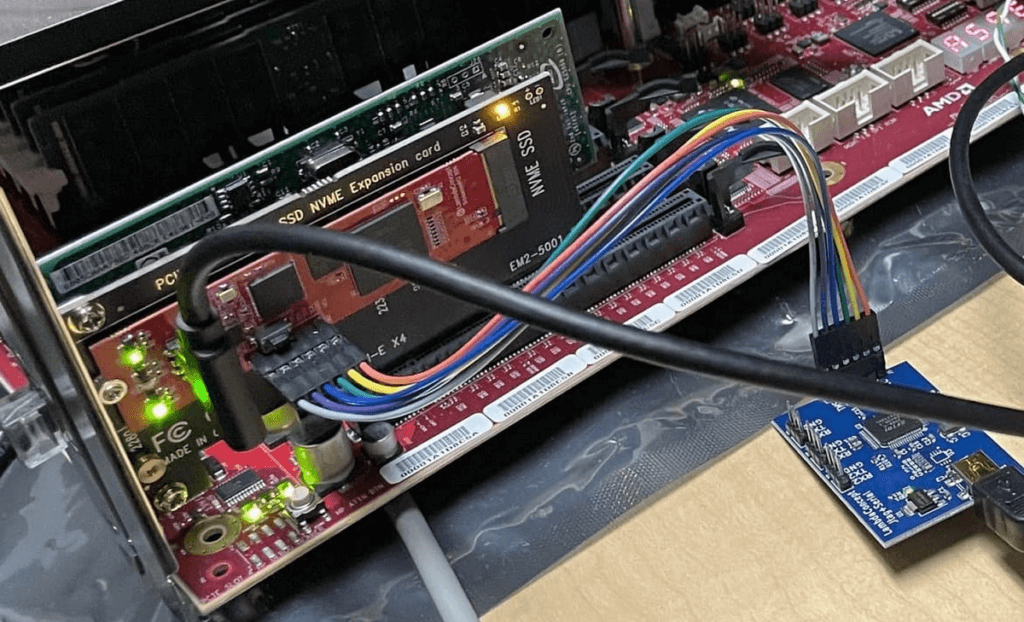
Working on this review, the security teams identified and confirmed potential issues of varying severity. AMD was diligent in fixing all applicable issues and now offers updated firmware through its OEM channels. Google Cloud’s AMD-based Confidential Computing solutions now include all the mitigations implemented during the security review.
“At Google, we believe that investing in security research outside of our own platforms is a critical step in keeping organizations across the broader ecosystem safe,” said Royal Hansen, vice president of Security Engineering at Google. “At the end of the day, we all benefit from a secure ecosystem that organizations rely on for their technology needs and that is why we’re incredibly appreciative of our strong collaboration with AMD on these efforts.”
“Together, AMD and Google Cloud are continuing to advance Confidential Computing, helping enterprises to move sensitive workloads to the cloud with high levels of privacy and security, without compromising performance,” said Mark Papermaster, AMD’s executive vice president and chief technology officer. ”Continuously investing in the security of these technologies through collaboration with the industry is critical to providing customer transformation through Confidential Computing. We’re thankful to have partnered with Google Cloud and the Google Security teams to advance our security technology and help shape future Confidential Computing innovations to come.”
Reviewing trusted execution environments for security is difficult given the closed-source firmware and proprietary hardware components. This is why research and collaborations such as this are critical to improve the security of foundational components that support the broader Internet ecosystem. AMD and Google believe that transparency helps provide further assurance to customers adopting Confidential Computing, and to that end AMD is working toward a model of open source security firmware.
With the analysis now complete and the vulnerabilities addressed, the AMD and Google security teams agree that the AMD firmware which enables Confidential Computing solutions meets an elevated security bar for customers, as the firmware design updates mitigate several bug classes and offer a way to recover from vulnerabilities. More importantly, the review also found that Confidential VMs are protected against a broad range of attacks described in the review.
Google Cloud’s Confidential Computing portfolio
The Google Cloud Confidential VMs, Dataproc Confidential Compute, and Confidential GKE Nodes have enabled high levels of security and privacy to address our customers’ data protection needs without compromising usability, performance, and scale. Our mission is to make this technology ubiquitous across the cloud. Confidential VMs run on hosts with AMD EPYC processors which feature AMD Secure Encrypted Virtualization (SEV). Incorporating SEV into Confidential VMs provide benefits and features including:
Isolation: Memory encryption keys are generated by the AMD Secure Processor during VM creation and reside solely within the AMD Secure Processor. Other VM encryption keys such as for disk encryption can be generated and managed by an external key manager or in Google Cloud HSM. Both sets of these keys are not accessible by Google Cloud, offering strong isolation.
Attestation: Confidential VMs use Virtual Trusted Platform Module (vTPM) attestation. Every time a Confidential VM boots, a launch attestation report event is generated and posted to customer cloud logging, which gives administrators the opportunity to act as necessary.
Performance: Confidential Computing offers high performance for demanding computational tasks. Enabling Confidential VM has little or no impact on most workloads.
The future of Confidential Computing and secure platforms
While there are no absolutes in computer security, collaborative research efforts help uncover security vulnerabilities that can emerge in complex environments and help to prevent Confidential Computing solutions from threats today and into the future. Ultimately, this helps us increase levels of trust for customers.
We believe Confidential Computing is an industry-wide effort that is critical for securing sensitive workloads in the cloud and are grateful to AMD for their continued collaboration on this journey.
To read the full security review, visit this page.
Acknowledgments
We thank the many Google security team members who contributed to this ongoing security collaboration and review, including James Forshaw, Jann Horn and Mark Brand.
We are grateful for the open collaboration with AMD engineers, and wish to thank David Kaplan, Richard Relph and Nathan Nadarajah for their commitment to product security. We would also like to thank AMD leadership: Ab Nacef, Prabhu Jayanna, Hugo Romero, Andrej Zdravkovic and Mark Papermaster for their support of this joint effort.
Hybrid Work with Google Workspace: What Customers can Expect

5843
Of your peers have already read this article.
4:00 Minutes
The most insightful time you'll spend today!
In June, we shared our vision for navigating the future of hybrid work with a single connected experience in Google Workspace. Now, as many of our customers begin to embark on their own hybrid journeys, I wanted to share how we’re helping them bridge the gaps in this new way of working.
A dedicated place for team collaboration: Spaces are now live
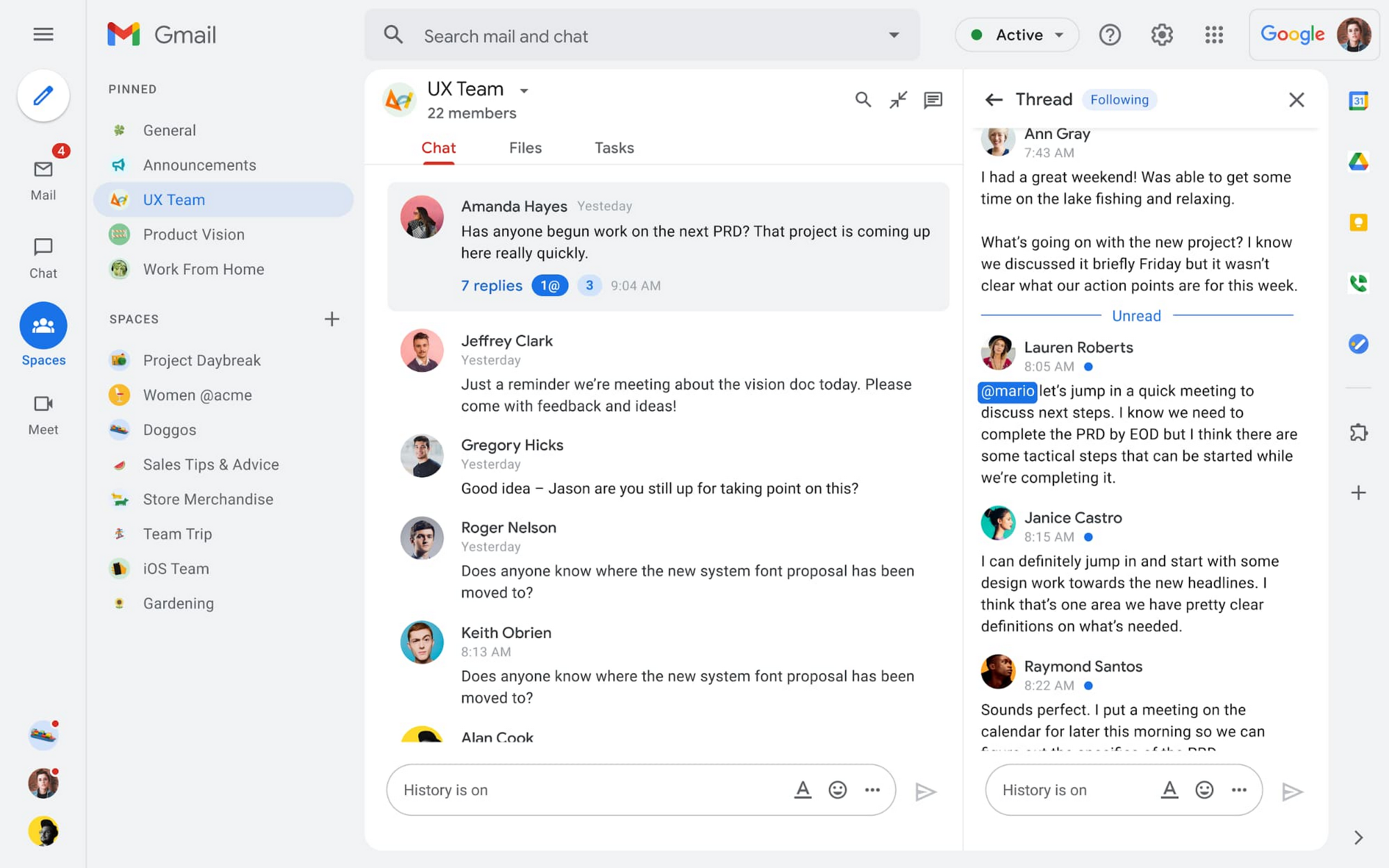
Spaces are the central place for team collaboration in Workspace and starting today, Spaces are live for all users. Spaces are unique in that they are tightly integrated with Google Workspace tools like Calendar, Drive, Docs, Sheets, Slides, Meet, and Tasks, providing a better way for people to engage in topic-based discussions, share knowledge and ideas, move projects forward and build communities and team culture.
We hear from our customers that they’re continuing to work across a broad range of locations and working hours, and that Spaces can be a central hub for collaboration, both in real time and asynchronously. Instead of starting an email chain or scheduling a video meeting, teams can come together directly in a Space to move projects and topics along, whether it’s a team of 10 for “2022 Roadmap Planning” or a team of 1,000 for the “Company-wide All-Hands.”
With Spaces, teams can share ideas, collaborate on documents, and manage tasks from a single place. Because all their work is preserved for future reference, team members can easily jump in and contribute at a time that works best for them, seeing a full history of the conversations, context, and content along the way. Using Spaces has already helped my own team, which is spread across time zones and varied in its working styles. It’s been helpful to rely on Spaces to retain and structure foundational knowledge, whether it’s for onboarding a new teammate or preserving context when someone moves to a new role.
We’re just getting started with Spaces and I’m excited to share a little more about where we’ll take it next.
In the coming months, our users will see:
- Streamlined navigation: A flexible user interface helps users easily access their inbox, chats, Spaces and meetings—all from a single location—so they can stay on top of everything that’s important.
- Discoverable Spaces: Spaces and their content can be made discoverable to all members of an organization, so other people can find and join the conversation. Administrators can also set discoverability as the default for their organization.
- Enhanced search: Allows users to easily find content from within and across Spaces, or even discover new Spaces to join. “Search everything” in Spaces opens up powerful new collaboration possibilities and makes it easier to access the team’s collective knowledge base.
- In-line topic threading: The ability to reply to any message within a Space fuels deeper discussions and collaboration across teams and organizations.
- Robust security & admin features: Tools for content moderation, managing Spaces, and establishing the right rules for healthy communication across domains and companies.
Making meetings more hybrid friendly
Spaces will play an important role in laying the groundwork for meetings and, in some cases, reduce the number of meetings a team needs to gain alignment. Having a dedicated space for asynchronous collaboration, with access to all the right content and context, will help teams be more deliberate about scheduling meetings. This is top of mind for us and many of our customers given the rise in meeting fatigue over the last 18 months. But when having a meeting genuinely feels worthwhile, the experience of transitioning into (and out of) it from different collaboration touchpoints should be seamless.
Over the past few months, in collaboration with many customers and across teams within Google, we developed a handbook for navigating hybrid work that includes best-practice blueprints for the five most common hybrid meeting types. Because meetings are a foundational piece of hybrid work, our goal is to make them as productive, immersive and inclusive as possible.
Scheduling meetings that work across the entire team
With hybrid work, many teams—my own included—have locations and working hours that can change daily. When many of us were together in the office, we might have tended to schedule meetings at a time that favored the “in-office majority,” but now it’s especially important to schedule meetings that scale across the entire distributed team.
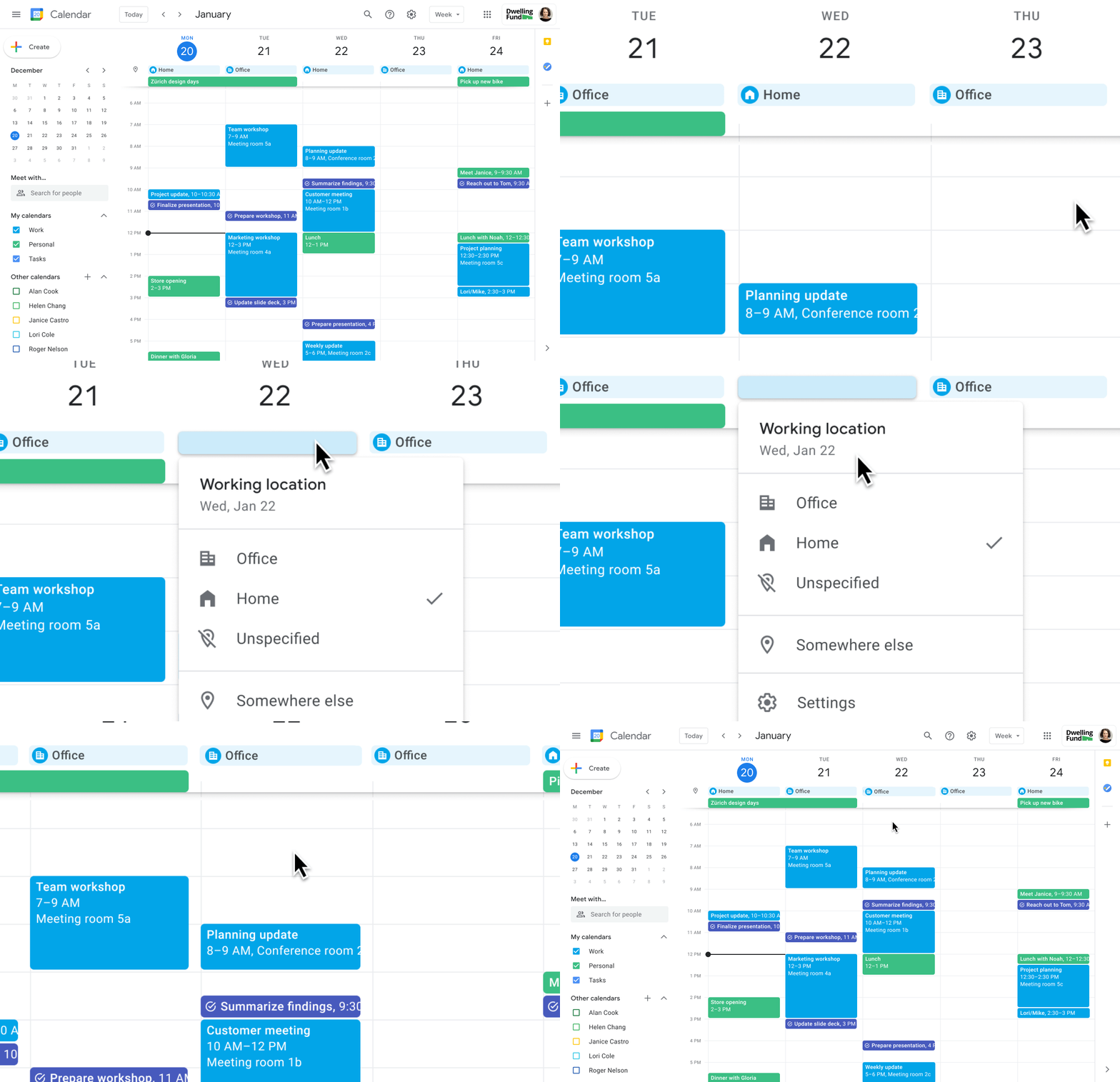
Now, beyond indicating their virtual or physical presence when accepting meeting invites, team members can set their location for each work day in Calendar. When combined, these capabilities allow meeting organizers and on-site support teams to plan for the right mix of in-person and virtual attendance. They can also provide greater visibility and help set expectations across hybrid teams.
Making meetings more spontaneous
Remember when you’d casually bump into a colleague in the office hallway or a break room and start a conversation that sparked new ideas? That’s perhaps the thing I’m looking forward to most as more of my team plan their part-time return to the office. These casual encounters were always a great way to build relationships and learn about topics that might not come up in structured meetings. To help enable these spontaneous connections when teammates aren’t in the office together, we’re bringing Google Meet calling to Workspace.
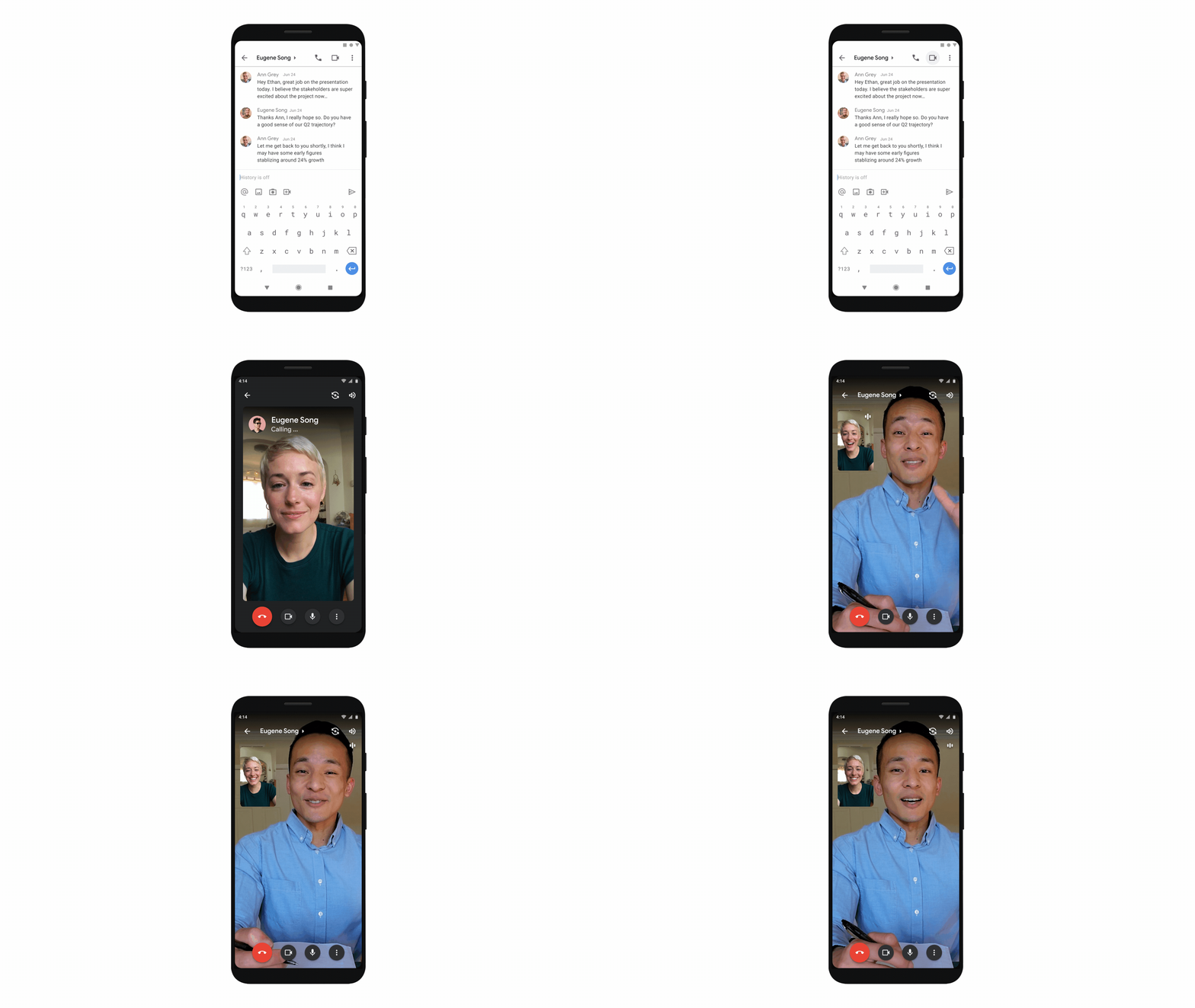
Google Meet calling is a seamless experience of initiating a video or audio call between one or more participants, complementing more structured, scheduled video meetings. Our intention is to bring Meet calling to all the natural endpoints in Workspace where you’d initiate an ad-hoc call including chats, people cards, and Spaces, but this will come first to one-to-one chats within the Gmail mobile app. Soon I’ll be able to call members of my team directly from a one-to-one chat. This will ring their device running the Gmail mobile app and send a call chip to our chat on their laptop, so they can easily answer from any device. It’s not quite the same as a spontaneous hallway conversation, but it might be the next best thing in a hybrid setting.
Ensuring collaboration equity in hybrid meetings
How do we ensure that hybrid meetings aren’t two meetings in one, divided between those in-person and those who are remote? Effective hybrid meetings need a unified experience so that the people sitting together in the same room can interact with their remote colleagues seamlessly, without it ever feeling like there are two parallel conversations.
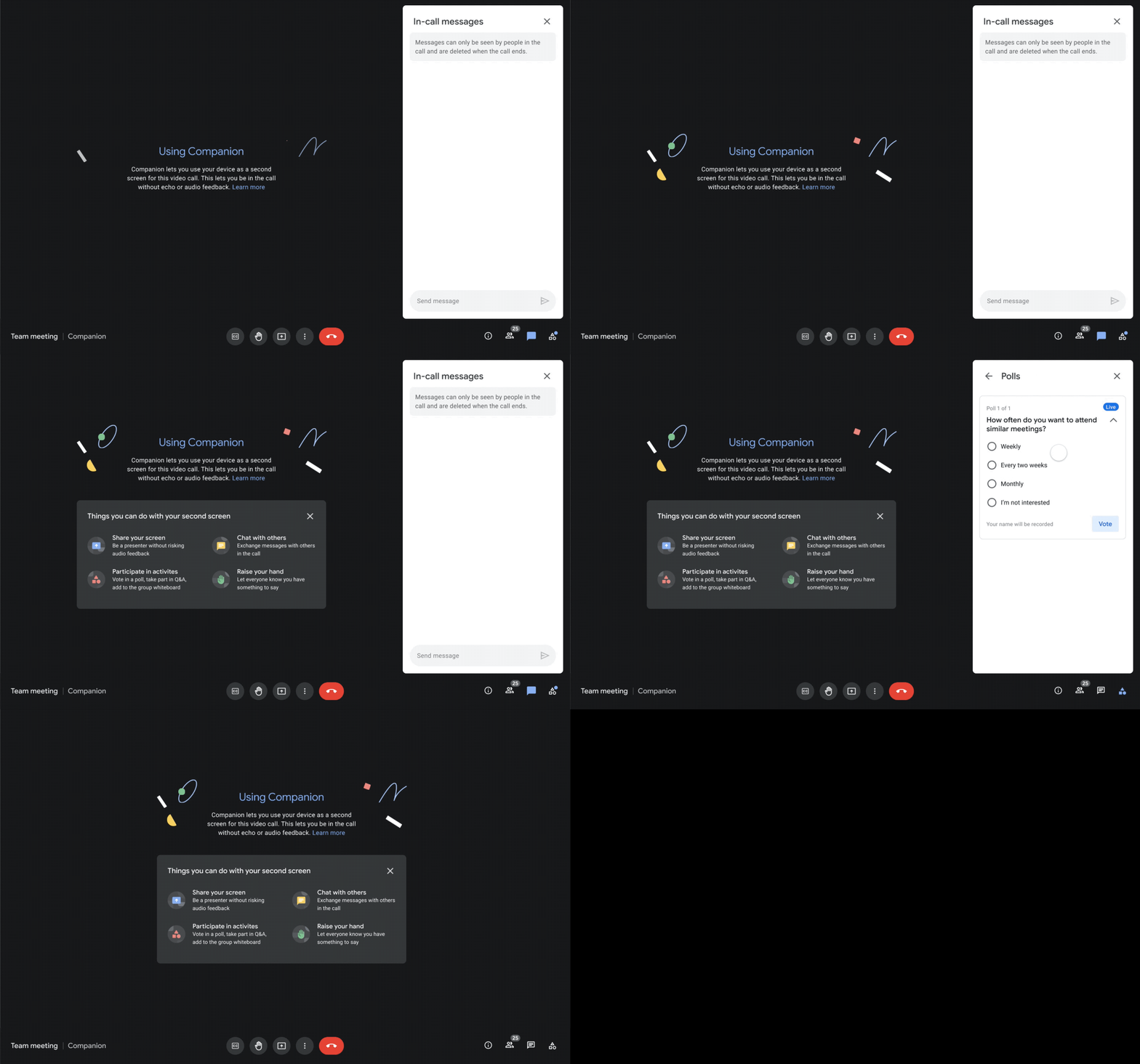
We designed Companion mode in Google Meet to specifically meet this challenge and we’ll start rolling it out to customers in November. With Companion mode I can host or join a meeting from within a conference room using my laptop while leveraging the in-room audio and video—and it all happens without any awkward audio feedback. This functionality lets me share content or see presentations up close on my own device, access the meeting chat and whiteboard, initiate and vote on polls, or post a question in Q&A, just as I would from home. And to ensure that users have greater choice over how they participate in meetings, live-translated captions will be available in Meet and through Companion mode by the end of the year. We’re currently working on translating meetings in English to French, German, Spanish and Portuguese, with many more languages coming in the future.
Expanding choice and flexibility for meeting hardware
While Companion mode keeps people in the room seamlessly connected to their remote colleagues, meeting hardware plays a crucial role in making hybrid meetings feel more immersive and human, with the ability for everyone to be clearly seen and heard. To provide more flexibility and choice on this foundation of how we come together in a hybrid work world, we’re announcing an expanded Google Meet hardware portfolio and interoperability with other conference room solutions.
First, we’re announcing two new all-in-one video conferencing devices to complement our Series One Room Kits. The Series One Desk 27 is an all-in-one 27” device that’s perfect for small shared spaces or your desktop, either in the office or at home. Series One Board 65 is an all-in-one 65” 4K device that can be paired with an optional stand for ultimate configuration flexibility—turning any room or space into a video collaboration hub in minutes.
Both devices feature collaboration capabilities with the Jamboard app built right in, and each can be used as an external display. While optimized for Google Meet, USB-C connection from your laptop gives you the flexibility to use the meeting app of your choice while leveraging the high-fidelity audio and high-definition video on Series One Desk 27 and Board 65. You can learn more about these devices developed in partnership with Avocor through our on-demand webinar starting at 9 AM PT today.
https://www.youtube.com/embed/BR81EAce5BQ?enablejsapi=1&
We’re also proud to announce new third-party devices coming to the Google Meet hardware ecosystem. Google has certified the Logitech Rally Bar Mini and Rally Bar for Google Meet, which provide complete room solutions for small and mid-sized rooms. You can learn more about these Google Meet-certified products in Logitech’s September 21 webinar. Additionally, the Rayz Rally Pro is a new mobile device speaker dock by Appcessori that will automatically launch Google Meet for video meetings and provide an improved audio experience from your mobile device.
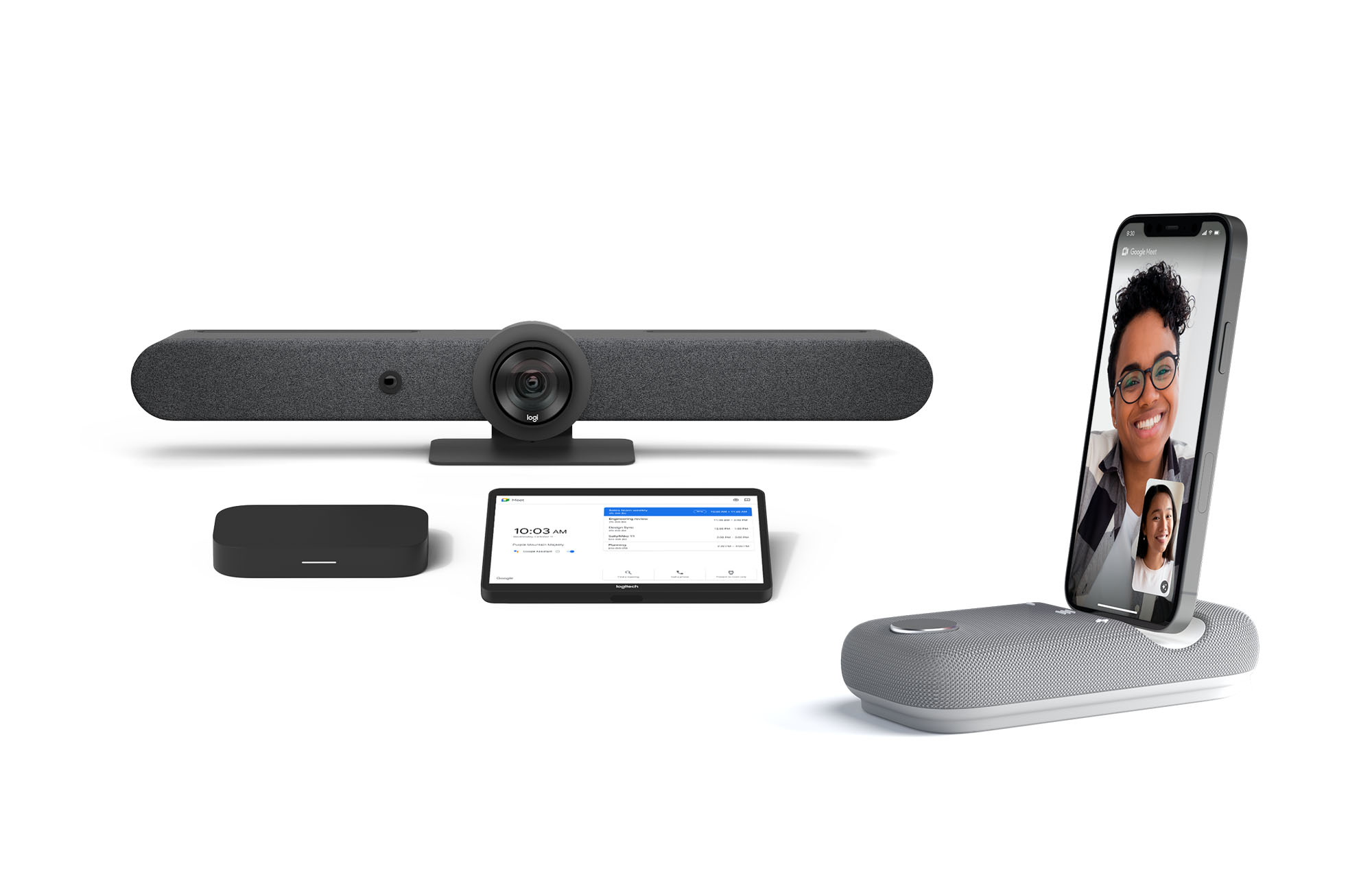
Certified Google Meet hardware ensures high-quality video and audio in meetings and is easy to deploy and manage. You can view our full Google Meet device portfolio and purchase directly from approved resellers by visiting the Google Meet Hardware website.
While Google Meet customers enjoy a full-featured experience on Meet hardware, we realize they sometimes need to connect with people outside of their video calling network. To enable this, organizations can use Pexip for Google Meet to seamlessly join Meet meetings from the widest range of third-party video conferencing solutions. Today, we’re also announcing support for bidirectional interoperability with devices from Webex by Cisco and Google Meet hardware. Soon you’ll be able to launch a Google Meet meeting on Webex hardware and a Webex meeting on Google Meet hardware. Calling interoperability between Meet and Webex is supported on Series One Board 65, Series One Desk 27, and the rest of the Google Meet hardware portfolio, as well as Webex Room Series, Room Kit Series, Desk Series and Board Series. We expect general availability later this year. You can find more details here. We plan to give Meet users even broader calling interoperability with support for other conferencing services in the near future.
Navigating hybrid work is a journey
We’re thrilled to bring these new Google Workspace experiences and devices to our customers, but we also realize that navigating hybrid work will be a journey of learning and adaptation for every organization. Two resources we recently developed can help along the way:
- Navigating hybrid work: A Google Workspace handbook
- The newly launched Future of Work site from Google Workspace, where you can keep up with all the ways work is changing.
Bridging the gaps in the emerging hybrid work world will necessarily be a combination of technology, workplace culture, and reimagining the use of physical spaces. But developing a “hybrid-first” mindset starts with the tools people use every day to connect, create, and collaborate, and Google Workspace will continue to play a crucial role in that evolution.
Building Unique Customer Experiences with Speed & Scale: Sprinklr & Google Cloud

8196
Of your peers have already read this article.
2:00 Minutes
The most insightful time you'll spend today!
Enterprises are increasingly seeking out technologies that help them create unique experiences for customers with speed and at scale. At the same time, customers want flexibility when deciding where to manage their enterprise data, particularly when it comes to business-critical applications.
That’s why I’m thrilled that Sprinklr, the unified customer experience management (Unified-CXM) platform for modern enterprises, has partnered with Google Cloud to accelerate its go-to-market strategy and grow awareness among our joint customers. Sprinklr will work closely with our global salesforce, benefitting from our deep relationships with enterprises that have chosen to build on Google Cloud.
Akin to Google Cloud’s mission to accelerate every organization’s ability to digitally transform their business through data-powered innovation, Sprinklr’s primary objective is to empower the world’s largest and most loved brands to make their customers happier by listening, learning, and taking action through insights. With this strategic partnership now in place, Sprinklr and Google Cloud will go-to-market together with the end-customer as our sole focus.
Traditionally, brands have adopted point solutions to manage segments of the customer journey. In isolation, these may work — but they rarely work collaboratively, even when vendors build “Frankenstacks” of disconnected products. These solutions can’t deliver a 360° view of the customer, and often reinforce departmental silos. All of which creates point-solution chaos.
Sprinklr’s approach is fundamentally different and is the way out of the aforementioned point-solution chaos. As the first platform purpose-built for unified customer experience management (Unified-CXM) and trusted by the enterprise, Sprinklr’s industry-leading AI and powerful Care, Marketing, Research, and Engagement solutions enable the world’s top brands to learn about their customers, understand the marketplace, and reach, engage, and serve customers on all channels to drive business growth.
Sprinklr was built from the ground up as a platform-first solution, designed to evolve and grow with the rapid expansion of digital channels and applications. The results? Faster innovation. Stronger performance. And a future-proof strategy for customer engagement on an enterprise scale.
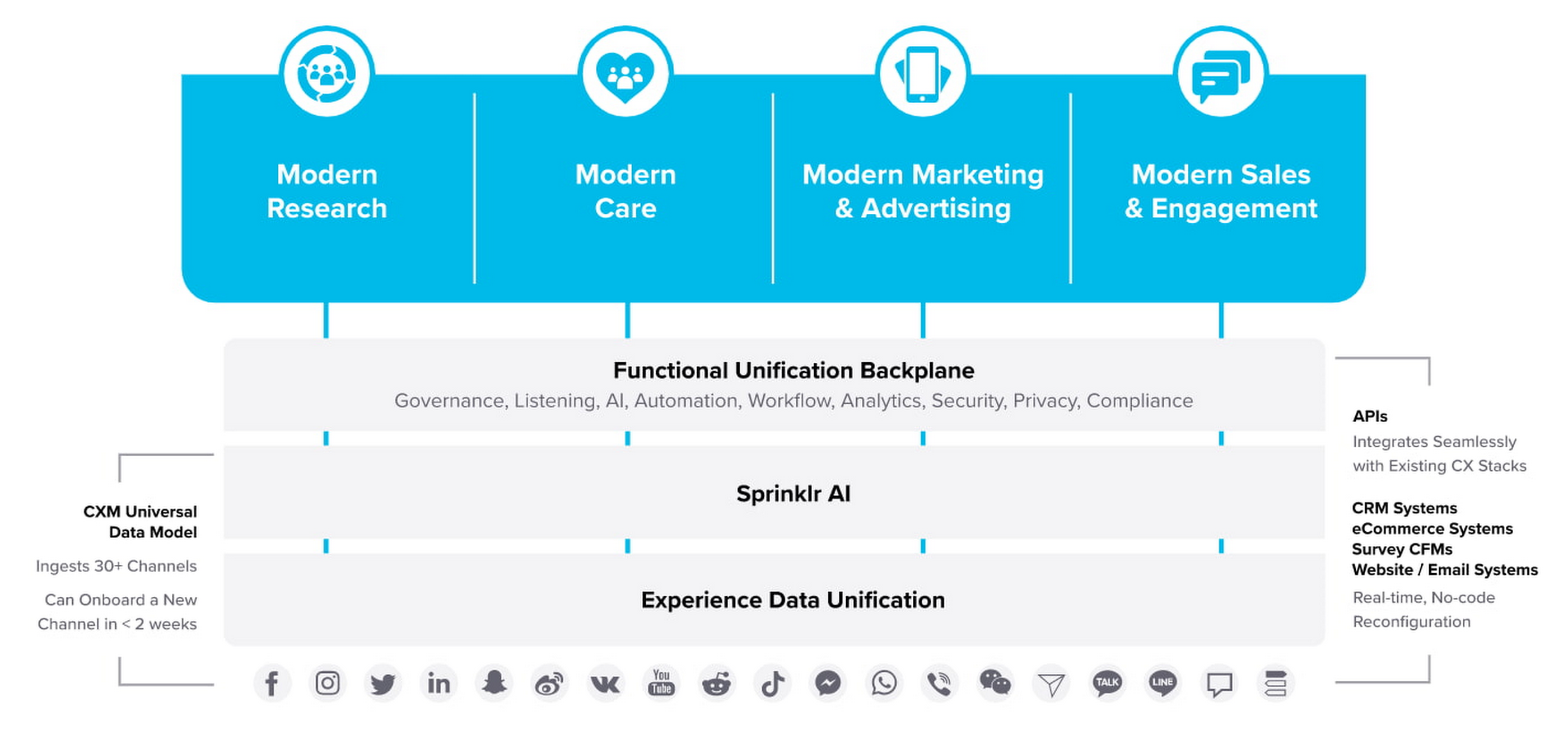
“Sprinklr works with large, global companies that want flexibility when deciding where to manage their enterprise data and consider our platform a business-critical application,” said Doug Balut, Senior Vice President of Global Alliances, Sprinklr. “Giving our customers the opportunity to manage Sprinklr on Google Cloud empowers them to create engaging customer experiences while maintaining the high security, scalability, and performance they need to run their business.”
To learn more about this exciting partnership and the challenges we jointly solve for customers, check out the recent conversation between Google Cloud’s VP of Marketing, Sarah Kennedy, and Sprinklr’s Chief Experience Officer, Grad Conn. Or read the press release on the partnership.
Learn to Access Process Metrics for Full-visibility into Software and Infrastructure behind Your Apps

3387
Of your peers have already read this article.
2:00 Minutes
The most insightful time you'll spend today!
When you are experiencing an issue with your application or service, having deep visibility into both the infrastructure and the software powering your apps and services is critical. Most monitoring services provide insights at the Virtual Machine (VM) level, but few go further. To get a full picture of the state of your application or service, you need to know what processes are running on your infrastructure. That visibility into the processes running on your VMs is provided out of the box by the new Ops Agent and made available by default in Cloud Monitoring. Today we will cover how to access process metrics and why you should start monitoring them.
Better visibility with process metrics
The data gathered by process metrics include CPU, memory, I/O, number of threads, and more, for any running processes and services on your VMs. When the Ops Agent or the Cloud Monitoring agent is installed, these metrics are captured at 60-second intervals and sent to Cloud Monitoring so you can visualize, analyze, track, and alert on them. A single VM may run tens or hundreds of processes, while you may have tens of thousands running across your fleet of VMs.
As a developer, you may only care about seeing inside a single VM to troubleshoot and identify memory leaks or the source of performance issues.
As an operator or IT Admin, you may be interested in aggregate resource consumption, building baseline views of compute, storage, and networking usage across your VM fleet. Then, when those baseline consumption levels break normal behaviors, you will know when to investigate your systems.
Built for scale and ease of use
Cloud Monitoring is built on the same advanced backend that powers metrics across Google. This proven scalability means your metrics ingestion will be supported despite the extremely high cardinality. Additionally, our agents do not require any config file changes to turn on process metric monitoring.
Lastly, our goal is to provide you the observability and telemetry data where, and when, you need it. So, like the rest of the operations suite, we deliver process metrics in the context of your infrastructure, directly in the VM admin console.
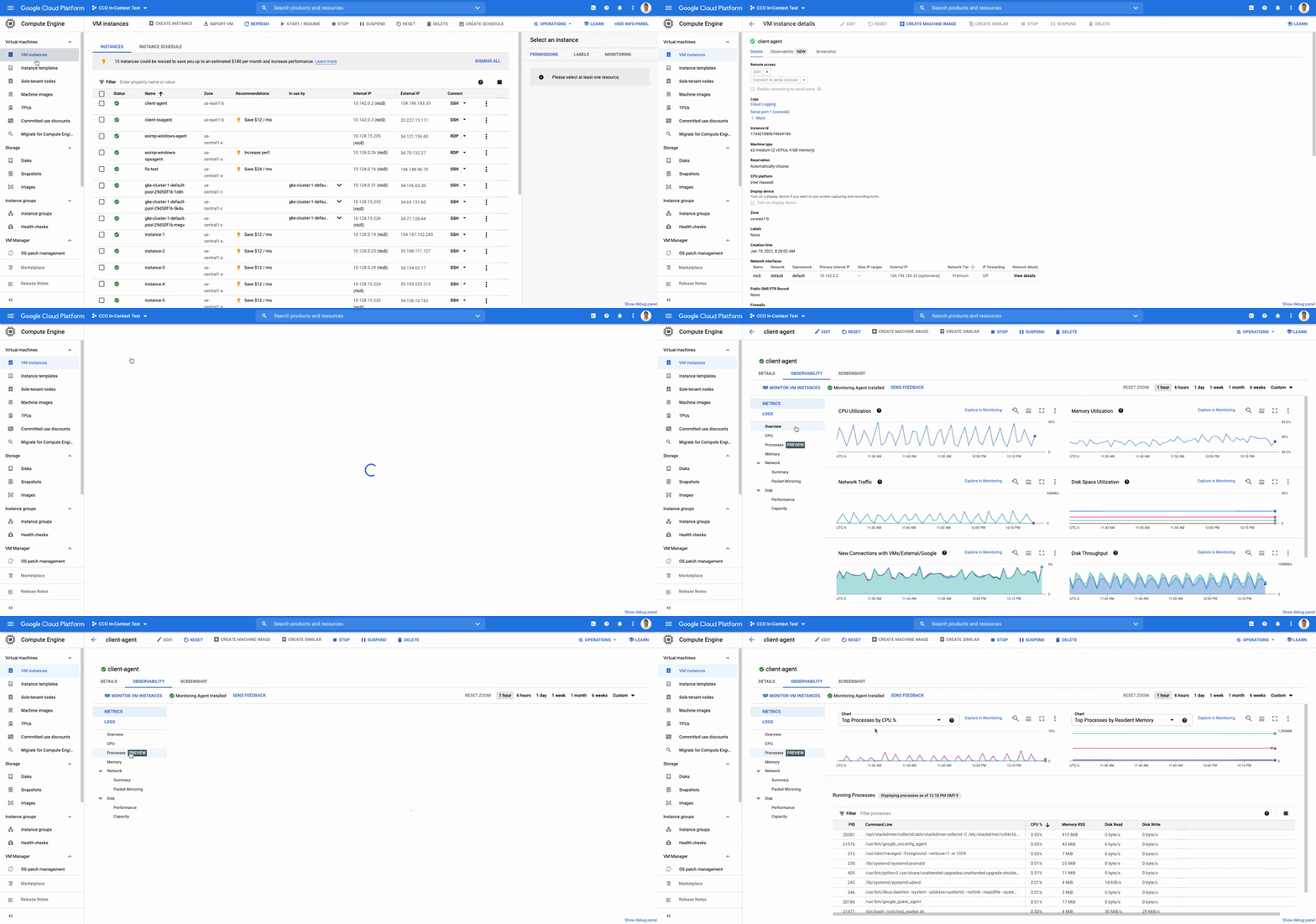
The navigation is simple. Once you have the Ops Agent or the Cloud Monitoring agent installed in your VMs:
- Go to the Compute Engine console page and click on VM Instances
- Select the VM that you want to investigate
- In the navigation menu on the top, click Observability
- Click on Metrics
- Lastly, click on Processes
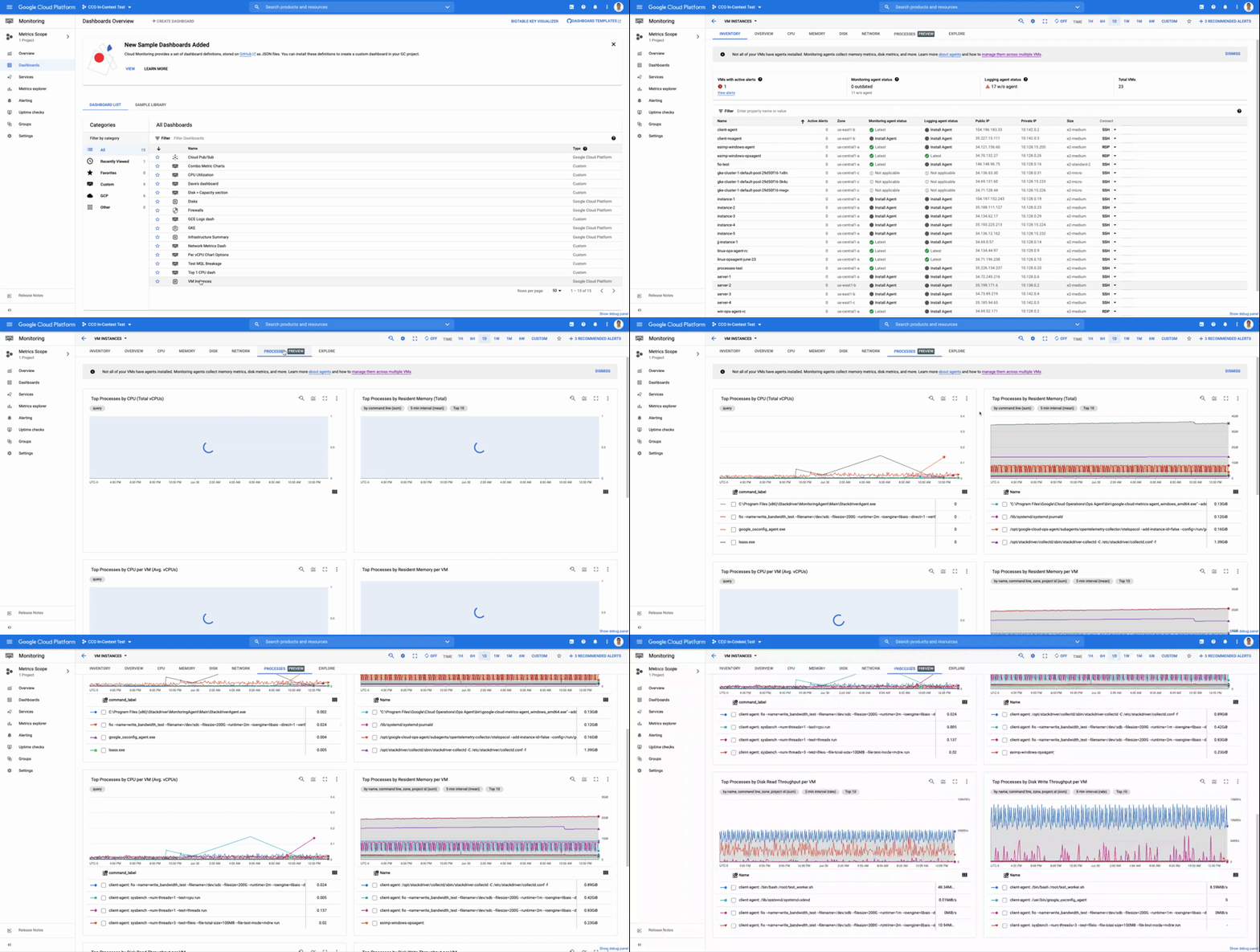
In the window on the right you will see a chart and a table with all of the processes in your VM. You can also filter by time frame and sort by name or value. You do not need to do anything, other than have the agent installed, for the process to be detected and displayed.
Fleet-wide metrics monitoring
Cloud Monitoring gives you a look across your fleet of VMs so you can identify the aggregated usage of resources by processes. This level of broad, yet granular, insight can drive your decisions around which software to run or how many VMs you need to optimally power your apps and services. Admins can perform a cost-savings analysis if they determine that certain processes are slowing down the work of a large number of VMs. The larger numbers of less powerful VMs can be replaced by fewer, more capable VMs.
To get this fleet-wide view:
- Navigate to Cloud Monitoring
- Click Dashboards in the left menu
- In the All Dashboards list, click on VM Instances
- Towards the top of the window, click on Processes
This provides many charts detailing the processes running across your fleet of VMs.
Get started today
To start identifying and monitoring your process metrics, you must first install the Ops Agent, or have installed the legacy Cloud Monitoring agent. Once that is complete, the process metrics data will automatically be ingested into Cloud Monitoring and the VM admin console.
If you have any questions, or to join the conversation with other developers, operators, DevOps, and SREs, visit the Cloud Operations page in the Google Cloud Community.

Forrester Surveyed Indian Retailers About Digital Transformation. Here’s What They Found
DOWNLOAD WHITEPAPER3985
Of your peers have already downloaded this article
12:30 Minutes
The most insightful time you'll spend today!
As today’s empowered consumers demand more of the retail experience than ever before, leading retailers and brands in India are investing to rethink and reinvent in their customers’ cross-touchpoint experiences.
Our survey results demonstrate that retail decision makers understand that better customer experience can yield financial benefits, including faster revenue growth, and elevate the reach of influence and brand in the market.
Forty percent or more of retail executives are prioritizing revenue growth, improvement of customer experience (CX), and simplification of operations as the top priorities in their business agendas over the next year.
The survey also covers:
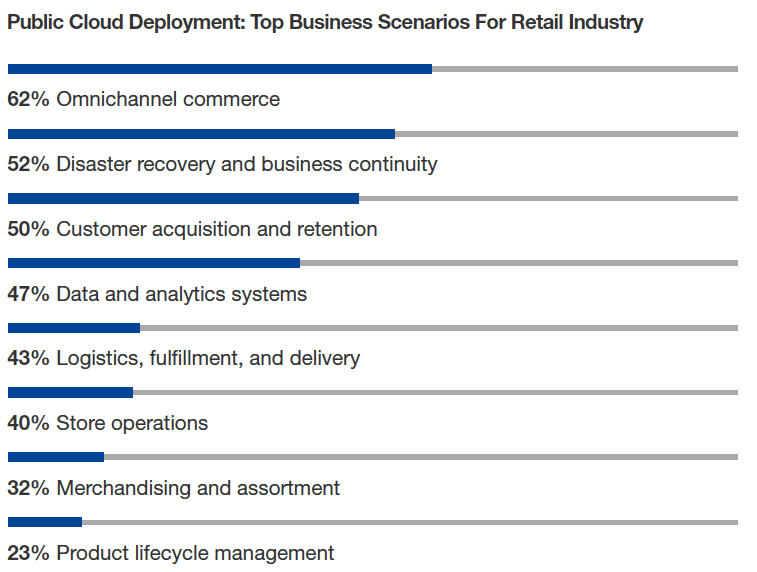
- Key Drivers For Retail Organizations To Migrate Application To Public Cloud
- Cloud Investments In The Retail Industry
- The Three Dimensions That The Industry’s Cloud Challenges Are Taking
- The Top Agendas Retailers Want to Accomplish with the Public Cloud
Download Forrester’s Retail Report Now.
Grofers Turns to Google Cloud for Building Delivery System

4785
Of your peers have already read this article.
2:00 Minutes
The most insightful time you'll spend today!
About Grofers
Grofers is an India-based local mobile e-commerce platform that delivers groceries, fruits and vegetables, cosmetics and electronics. Customers use Grofers’ mobile app to shop for products from local stores in 17 cities in India.

Google Cloud Results
- Scaled from 10,000 orders to more than 70,000 orders a day
- Increased the average number of deliveries per driver from five to nearly 15
- Maintains 100 percent uptime
India-based Grofers is a hyperlocal mobile platform that delivers groceries, fruits and vegetables, cosmetics and electronics. Customers use Grofers’ mobile app to shop for products from local stores in 17 cities in India.
In 2015, the number of deliveries Grofers fulfilled was growing at the rate of 10 times a month, and its delivery system struggled under the stress. When traffic spiked on weekends, its database frequently crashed. Fulfilling and delivering orders depended on manual processes such as telephone calls. Grofers needed a solution that would allow it to quickly scale and improve its delivery process.
Building an entire backend in two weeks
When Grofers launched in 2013, the logistics system was entirely manual. Staff at the headquarters called delivery drivers with order details and delivery addresses. Drivers then decided what order to pick up goods from local merchants. With a small number of customers and orders, that wasn’t a problem. But the manual system couldn’t handle growth. Grofers recognized it had to automate the system.
To do that, it turned to Google Cloud Platform. Grofers built a new backend for its delivery system using Google App Engine. When an order arrives, the new system looks at the status of all drivers — including their current location, the order he’s completing, and the pickup and delivery locations on the route. Based on that information, the system calculates the optimal driver for each order and sends the driver the order via a mobile app.
The system also takes advantage of Google Cloud Endpoints, which generates libraries for Javascript, iOS and Android. Grofers used Google Cloud Endpoints to create mobile apps to communicate with its delivery staff.
Scaling fast, dramatically improving delivery metrics
With the new backend and mobile apps, Grofers can scale quickly to keep up with its rapid growth. Grofers now delivers 70,000 orders per day, up from 10,000 before the GCP deployment, and has had 100 percent uptime. Each driver handles an average of 15 orders per day, compared to only five previously, letting Grofers handle more work with less staff. All this has been accomplished at very low cost: Prakash says that GCP costs account for only two percent of the company’s infrastructure spending. Without GCP, Prakash says the backend would be far more expensive and account for up to 50 percent of the company’s infrastructure expenses.
More Relevant Stories for Your Company

Google Cloud’s High-performance Compute Speeds Up the Chip Design Process
Cloud offers a proven way to accelerate end-to-end chip design flows. In a previous blog, we demonstrated the inherent elasticity of the cloud, showcasing how front-end simulation workloads can scale with access to more compute resources. Another benefit of the cloud is access to a powerful, modern and global infrastructure. On-prem




Skincare Firm Scales 4X in Minutes with SAP on Google Cloud
As the number one skincare brand in the United States, Rodan + Fields must support its team of over 300,000 of independent contractors as well as work to ensure a really personalized experience for customers. To keep pace with the company’s growth, Rodan + Fields realized it needed a more
Wipro selects Google Cloud to advance its digital transformation strategy
Wipro has partnered with Google for migration of its enterprise-wide SAP footprint to the Cloud platform. The engagement will bring SAP applications and workloads to the cloud to support the country’s fourth-largest software services firm’s 180,000-plus employees. Bhanumurthy B.M, President and Chief Operating Officer, Wipro said that as a provider

2022 is a Big Year for the Gaming Industry!
Editor’s note: This post was originally published in TechPulse Belgium, where Jack Buser, Google Cloud’s Director of Game Industry Solutions, shared his trends for the industry this year. The year 2022 will hold many surprises (with a few already dropping!), but there's one near certainty: By this time next year there will
