





3128
Of your peers have already watched this video.
12:00 Minutes
The most insightful time you'll spend today!
How Google Cloud Helps Banks and FinTech Create Cutting-edge, Digital Banking Products
Today’s customers demand sophisticated and secure banking platforms to keep up with the digital era. Banking and financial institutions spend time and investments either modernizing traditional banking products and solutions or building new cutting-edge products from the scratch. Money transfer solutions, bill payments and rewards, credit cards facilities, retail payments, loans services and more, banking products have a huge potential for leveraging Banking-as-a-service model which is a modular, cloud-native digital banking architecture that offers financial products and services via APIs and micro services. So, what typically goes under the sheets of a modern banking app that can easily build and adapt features in a matter of days and not months to keep up with the demand?
Watch the video to understand the role played by Google Cloud and its secure and scalable architecture for building digital banking products and services for today’s customers!
Google Cloud Offering a Natural Migration Path for Developers Accustomed to Heroku

2789
Of your peers have already read this article.
1:30 Minutes
The most insightful time you'll spend today!
Modern developers worldwide have grown accustomed to the comfort of writing code, pushing to a remote Git repository and having that code be deployed at an accessible URL without having to worry about how it is deployed. This was a workflow popularized by Heroku years ago which brought joy and productivity to developers even if it did impose some loss of flexibility for operation teams.
To address that loss of flexibility when meeting security and integration requirements, Heroku introduced Private Spaces. Private Spaces provide network isolation from the internet since any application or datastore provisioned by Heroku is accessible to the internet by default.
Cloud Run is quickly becoming the “swiss army knife” of serverless here at Google Cloud and it’s a natural migration path for developers accustomed to Heroku. The fundamentals are all there:
- Continuously Deploy via Git push using open source Buildpacks or Dockerfiles
- Set CPU and Memory requirements for each instance
- Horizontally scalable apps that scale from zero to thousands of instances to meet traffic demands automatically
So while devs are kept happy, can Cloud Run do something for the Ops folks? Yes. Here are some things available right in the Cloud Run UI:
- Proper Secret Management with IAM based access control. No more setting secrets as environment variables.
- Traffic management between different revisions for blue-green or canary deployments.
- Define SLIs and SLOs with ease. Eg: 90% of requests have to be served under 200ms in a calendar month.
- Secure your service with tools such as Software Delivery Shield, Binary Authorization, and Cloud Armor. Definitely deserves its own blog post.
Recreating Private Spaces on Cloud Run
Let’s focus on network isolation now, let’s say you have an internet-facing app and a private backend API that talks to a private database. Simplest architecture ever, it conceptually looks a bit like this:
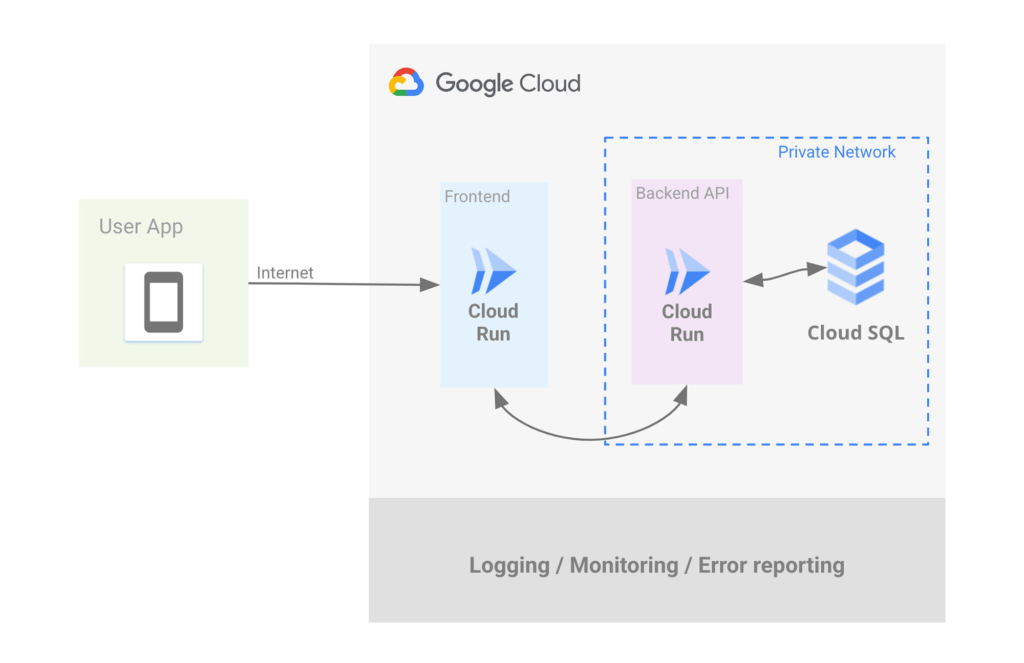
Let’s address the database first. If you want to use Postgres then Cloud SQL is most likely what you want, but do keep in mind that we have other datastores that speak Postgres such as AlloyDB and Spanner.
Cloud SQL allows you to create a Postgres instance that’s isolated from the internet by simply unchecking the Public IP checkbox and checking the Private IP checkbox. This will assign an IP address to your Postgres instance on your project’s network.
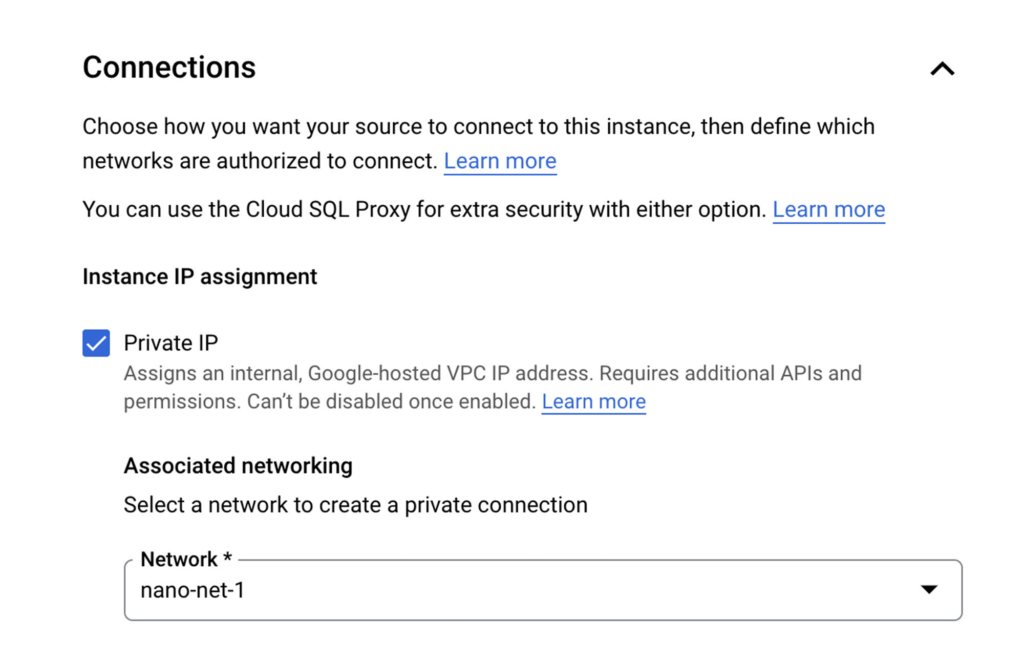
Once the DB is provisioned you’ll see the IP clearly listed, such as:
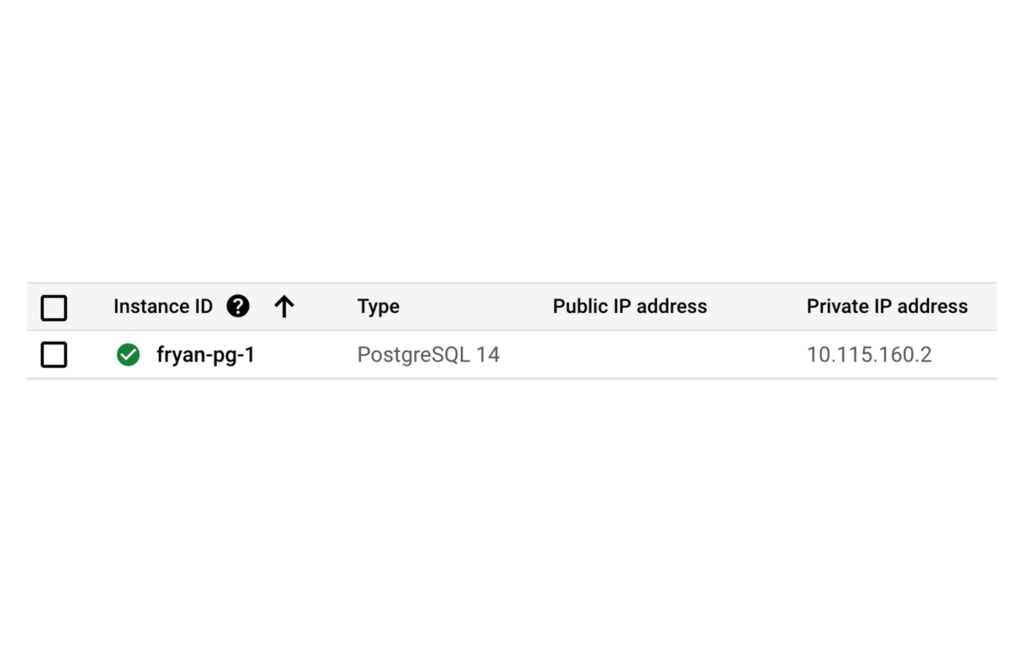
Of course there’s so much more to say about CloudSQL, to learn more please take a look at our documentation.
Ok now that you’ve dealt with Postgres, let’s address the private backend API on Cloud Run.
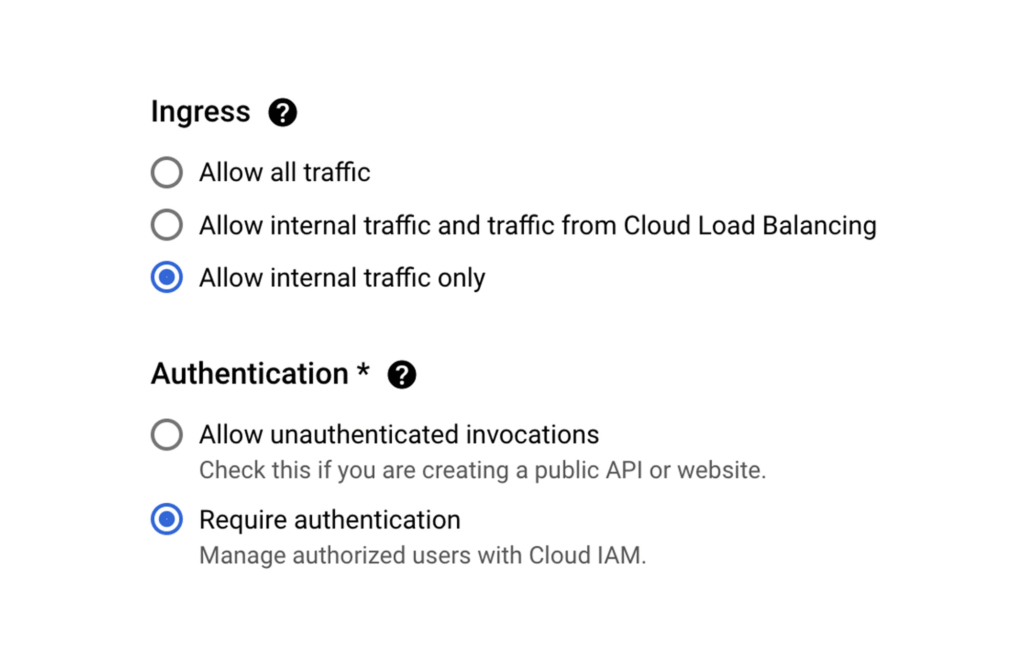
When creating a new Cloud Run service via the Google Cloud Console, Ingress can be limited to “Internal traffic only” so only traffic from internal sources, including your VPC, can access the service. In other words, the internet can not touch it.
As an additional level of security, it’s also possible to enforce that only requests from authorized users be served, In this case a “user” is most likely another service using its associated service account which will need the “roles/run.invoker” in order to call this service.
Now let’s make sure that our Backend API Service can reach the Postgres instance by configuring a VPC Connector. This will allow Cloud Run services to reach into the VPC and therefore, the internal IP for the Postgres instance.
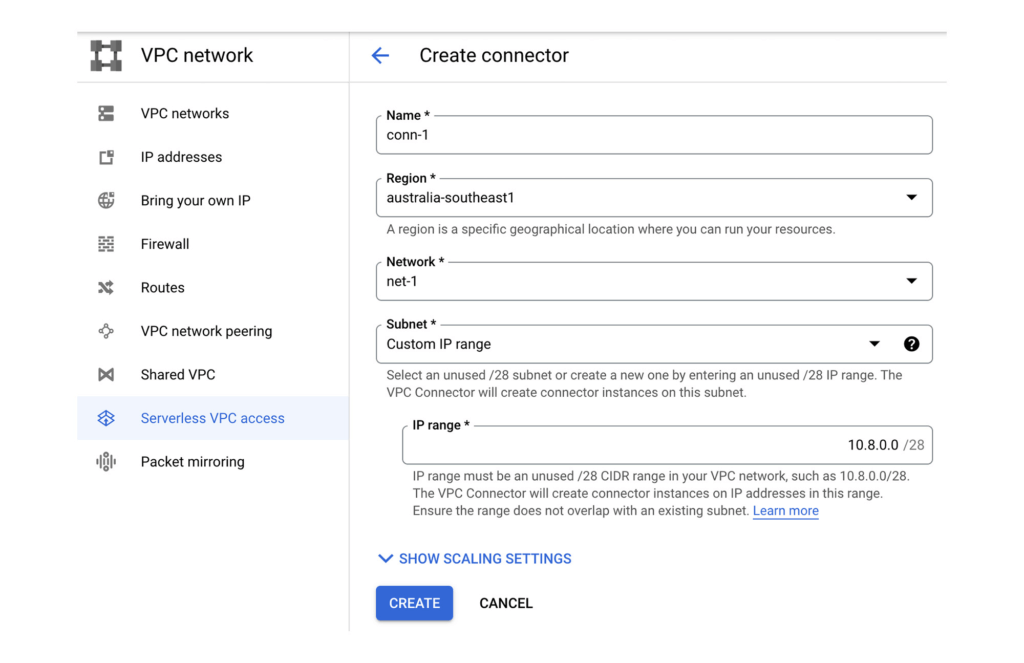
Once the VPC Connector is created, you can associate it with a Cloud Run service.
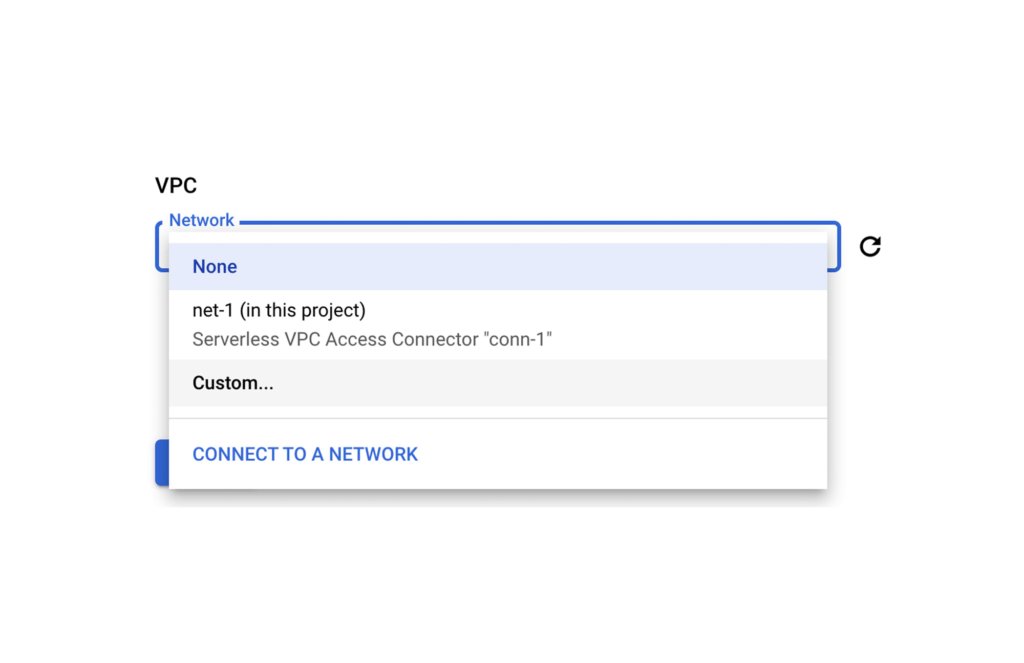
Then it’s just a matter of configuring your code to use the Postgres instance’s private IP address. A good 12-Factor app friendly spot to do that is with a connection string in an environment variable as part of the Cloud Run service configuration. Better yet, as this may contain a DB password, you can use Secret Manager to mount this environment variable from an encrypted and protected secret.
Finally, let’s now set up that Front End Cloud Run service which will respond to requests from the internet, and securely communicate with the backend API service.
For the frontend service choose to “Allow all traffic” and also “Allow unauthenticated invocations” so anyone on the web can access our URL. We could of course choose the middle option and use Cloud Load Balancing in conjunction with Cloud Armor which provides defenses against DDoS and application attacks, and offers a rich set of WAF rules. However, let’s keep it simple for now.
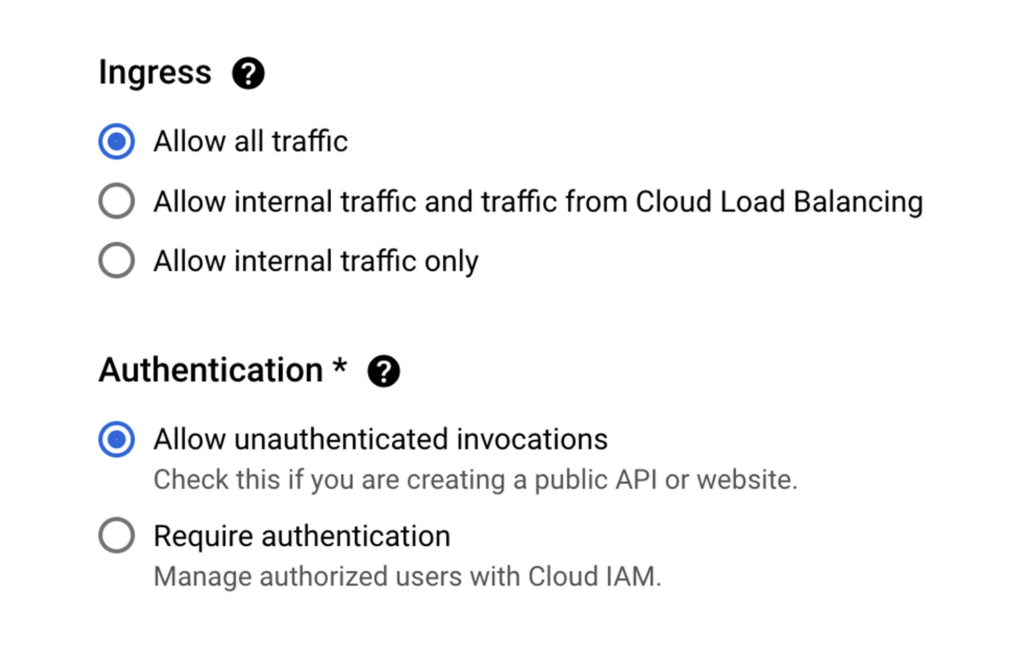
Keep in mind that our Backend service will only accept requests from within our VPC network, and that we don’t have a private IP address for Cloud Run.
So let’s ensure that all egresses from our Frontend actually get routed to the VPC Connector, this way when our Frontend calls a Backend API via it’s URL endpoint, the Backend will receive the request from within the VPC and allow it in.
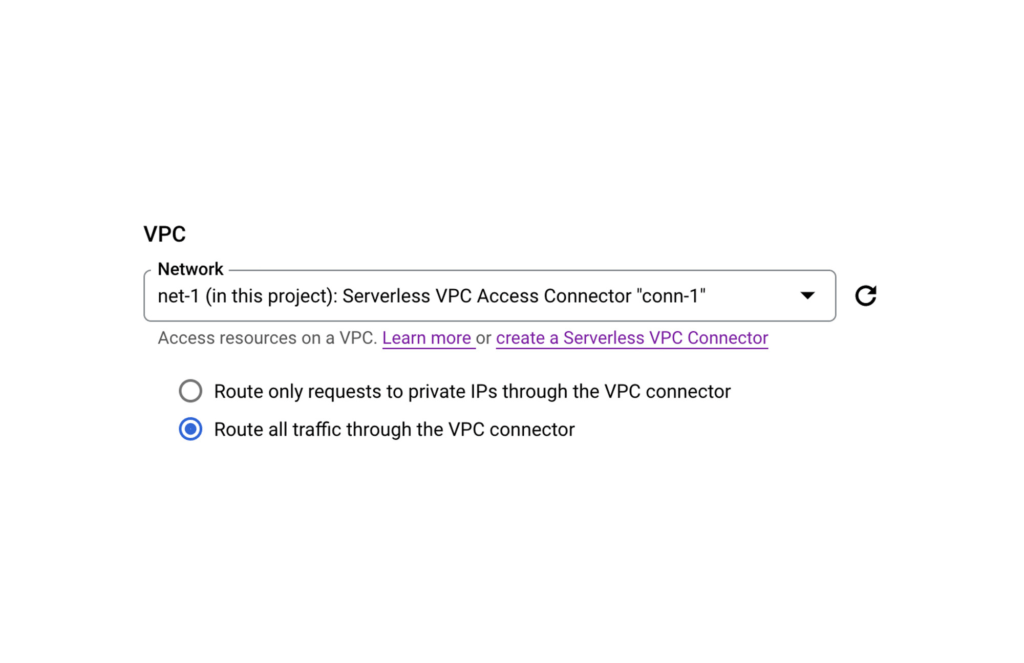
PS: If your Backend requires authentication don’t forget to create a Service Account for your Frontend Service and then give it the necessary role following a service-to-service auth pattern.
And that’s it. You now have an operationally acceptable private space like environment with an app composed of two Cloud Run services where the Backend service and Postgres instance are network isolated from the Internet. If after reading this blog you would like to get hands-on experience with the technologies mentioned above, then take a look at Google Cloud Skills Boost. There you will find learning paths, quests, and labs curated to boost your cloud skills in a particular area.
For example here’s a great lab that takes you through developing a REST API on Cloud Run using Go.
Secret Manager: Keeping Your Organization’s Secrets Safer!

3288
Of your peers have already read this article.
2:00 Minutes
The most insightful time you'll spend today!
Secret Manager is a Google Cloud service that provides a secure and convenient way to store API keys, passwords, certificates, and other sensitive data. It is the central place and single source of truth to manage, access, and audit secrets across Google Cloud. Since its launch, Secret Manager has helped secure millions of workloads and continues to provide industry-first features like replication policies and support for VPC perimeters. This blog post explores new Secret Manager capabilities and integrations that will help keep your secrets safer.
New tier, free of charge
No, you’re not dreaming – Secret Manager now has a tier that is free of charge! With this tier, each month per billing account you can have up to:
- 6 secret versions
- 3 rotation events
- 10,000 API calls
This enables you to experience the value of Secret Manager with minimal financial risk and pairs nicely with existing services that offer a free tier like Cloud Run and Cloud Functions. For existing Secret Manager customers, this change will go into effect next billing cycle. Learn more about the Secret Manager free tier in the documentation.
Increased SLA
To meet the growing availability and reliability requirements of our customers, the Secret Manager SLA is now 99.95%! With this update, Secret Manager guarantees that all valid requests will succeed 99.95% of the time. This means you can depend on Secret Manager for even your most critical workloads. Additional details are available in the updated Secret Manager SLA.
Geo-expansion
In addition to the free tier and increased SLA, Secret Manager is now available in all public Google Cloud regions! With Secret Manager’s replication policies, you can choose the specific regions in which to replicate your secret, which means you can store secret payloads in geographical proximity to your workloads or users to reduce latency. This is also very useful if you have legal or regulatory requirements to store data in a particular locality. For more information, check out the list of Secret Manager locations in the documentation.
Compliance certifications
For customers wishing to use Secret Manager to store and process regulated data, Secret Manager is validated for compliance use cases including ISO 27001, ISO 27017, ISO 27018, SOC 1, SOC 2, SOC 3, PCI DSS, and HIPAA. Combined with the increased SLA and geographical availability, this makes Secret Manager suitable for use with regulated workloads.
Customer-Managed Encryption Keys (CMEK)
Secret Manager has always encrypted payloads in transit with TLS and at rest with AES-256. For customers that want additional control over the keys used to encrypt their secret payloads, Secret Manager now supports Customer-Managed Encryption Keys (CMEK). Secret Manager CMEK supports software-backed keys via Cloud KMS, hardware-backed keys via Cloud HSM, and even externally-managed keys via Cloud EKM. Learn how to enable CMEK support for Secret Manager in our tutorial.
Expiration and TTLs
While it was previously possible to expire access to a secret using IAM conditions, the underlying secret would continue to exist. Secret Manager now supports auto-expiring secrets which permanently deletes a secret at a specified timestamp or TTL. Since it is also possible to update a secret’s TTL, services can “lease” a secret and renew their lease on a periodic basis. If the service does not extend the lease by updating the TTL, the secret is automatically deleted.
Expiring secrets can be used in combination with IAM conditions to more safely expire secrets. For more information on expiring secrets and safety measures, see the guide on creating and managing expiring secrets.
Etags and server-side filtering
For customers that create or manage Secret Manager secrets via the API or an SDK, concurrency controls and performance are extremely important. This is why Secret Manager now supports Etags and server-side filtering! Etags help prevent concurrent modifications to the same secret by providing optimistic concurrency controls, while server-side filtering can dramatically reduce payload size and client-side computational overhead. Together, these enable stronger consistency guarantees and performance improvements to your applications. Learn more about Secret Manager Etags and Secret Manager server-side filtering in the documentation.
Code, build, run, deploy, monitor, and orchestrate
Secrets – like API keys, passwords, and certificates – are an integral part of most modern software applications. It is crucial that developers, operators, and security teams are empowered to build, operate, and observe software securely. That is why Secret Manager is now integrated with popular tools and technologies used throughout the application development lifecycle:
- Code – Software engineers can create and access secrets directly from their preferred IDEs with Cloud Code. In VS Code, IntelliJ, or the Cloud Shell Editor, developers can browse secrets and insert code snippets for access secrets, all from the comfort of their local IDE.
- Build – Release engineers can access secrets as part of CI builds using the Cloud Build Secret Manager integration. This could be used, for example, to authenticate to a Docker registry or communicate with the GitHub API. For customers that use other CI systems, there is also a GitHub Action for accessing Secret Manager secrets.
- Run (on serverless) – Developers can mount secrets to be available as environment variables or via the filesystem through the native Cloud Run Secret Manager integration. Since the secrets are resolved in Cloud Run’s control plane, developers can use this integration to avoid a tight coupling between their applications and Secret Manager to enable hybrid cloud deployments or better local development experiences.
- Run (on Kubernetes) – Developers can mount secrets from GKE, Anthos, or any Kubernetes cluster using the Secret Manager CSI driver. This vendor-agnostic driver exposes secrets via environment variables or the filesystem and enables hybrid cloud deployments using the same interface as other public cloud providers and HashiCorp Vault.
- Deploy – To complement the existing Secret Manager Terraform integration, operators can now manage Secret Manager via Kubernetes Config Connector (KCC). KCC allows operators to manage Google Cloud resources through Kubernetes and the familiar Kubernetes APIs.
- Monitor – With the Secret Manager Cloud Asset Inventory (CAIS) integration, security teams can understand secret usage across specific projects, folders, or the entire organization.
- Orchestrate – Secret Manager Event Notifications enable DevOps and security teams to subscribe to Pub/Sub topics for when secrets or secret versions are changed. This enables customers to create deeply-integrated workflows, such as creating a ServiceNow ticket when a new secret version is added. Additionally, Secret Manager Rotation Scheduling enables DevOps teams to build automatic rotation flows like the ones described in the rotation guide.
Best practices
The Secret Manager best practices guide ensures customers get the maximum security benefits from Secret Manager. Security is non-binary, and this guide covers nuanced topics like access controls, coding practices, and secret administration. While not an exhaustive list, the Secret Manager best practices guide answers some of the most common questions and concerns around using Secret Manager in production deployments.
Towards seamless security
Secrets management is an important part of every organization’s security toolkit. With Secret Manager, you can easily manage, audit, and access secrets like API keys and credentials across Google Cloud, Anthos, and on-premises. These new features and integrations make it easy to adopt Secret Manager whether you are a hobbyist working on a side project or a large enterprise with thousands of employees.
To get started, check out the Secret Manager documentation.

3709
Of your peers have already downloaded this article
6:00 Minutes
The most insightful time you'll spend today!
Recently, consumer interactions and relationships among suppliers, partners and customers have turned digital and dynamic, requiring a certain degree of technological reimagining for businesses. To stay relevant with times and build resilience with digital transformation, businesses can explore application programming interfaces or APIs to leverage to make existing data value accessible and reusable, hiding underlying technical complexity and enabling businesses to recompose individual digital assets in new ways. Developers use APIs to connect software systems, including connecting existing technologies to new technologies, and to build modern applications. APIs drive operational efficiency by increasing developer productivity, and serve as a catalyst of innovation. With APIs, a business can securely share its data and services with developers, both inside and outside the enterprise, to foster new operational efficiencies, unlock new business models, and enable business transformation.
Download the e-book to learn about expert insights on building resilience with APIs and how Apigee API management is geared towards the helping businesses navigate digital challenges.
New Visual Interface for Google Cloud’s Speech-to-Text API Makes API Easy to Use !

4671
Of your peers have already read this article.
2:00 Minutes
The most insightful time you'll spend today!
At Google Cloud, we’re committed to making artificial intelligence (AI) accessible to everyone and easier to harness for new use cases. That’s why we’re excited to announce the general availability of our intuitive, new visual user interface for Google Cloud’s Speech-to-Text (STT) API, right in Google Cloud Console, which makes the API much simpler and easier for developers to use.
The STT API lets developers convert speech into text by leveraging Google’s years of research in automatic speech recognition and transcription technology. As advancements in AI continue to bring speech to new interfaces and devices, the STT API helps developers add speech functionality to their applications in order to better meet consumer demands.
The STT API covers a wide variety of use cases, from dictation and short commands, to captioning and subtitles. Getting the most of STT, however, can be a complicated process. To achieve the highest accuracy on any AI use case requires careful testing and tuning.
Previously, developers building on the STT API had to do this work manually by carefully experimenting with our API. Just to get started, developers needed familiarity with GCP integration concepts and had to either build their own tools or manage various scripts and API calls to fully understand the API documentation. These actions required cumbersome and time-consuming effort and made measuring, customizing, and improving models even more difficult.
Today’s announcement significantly simplifies the process, facilitating iteration and integration of models into developers’ applications by letting developers perform every API function from within the Google Cloud Console. These tools will make it easier for developers to integrate the STT API with their products or services. This update also gives developers the ability to manage and quickly iterate on their STT model customizations with Model Adaptation.
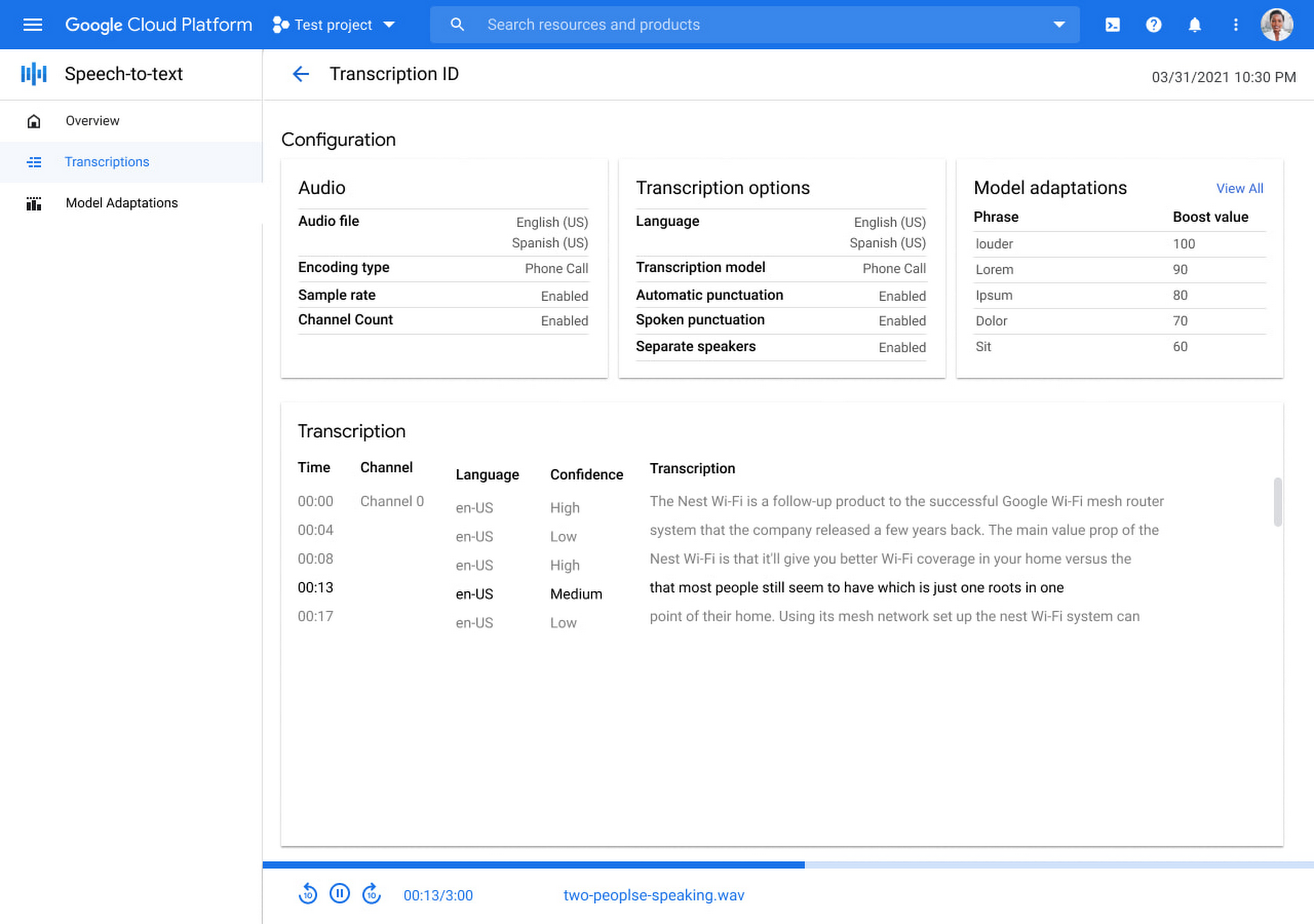
Model Adaptation allows developers to customize STT specifically for their domains or use cases. Developers can maintain lists of words and weights that will be applied to either every request or just single requests, depending on their needs. Model adaptations are reusable and composable, so once developers have seen good results in the STT Cloud Console, they can deploy to their entire solution.
The Speech-to-Text Cloud Console and Model Adaptation API is available now in all Google Cloud regions and languages and is accessible to all GCP users with no additional cost to that of the underlying API usage. The STT API supports over 70 languages in 120 different local variants. If you’re a developer looking for an easy to use, easy to integrate, and high-quality STT experience, sign up for our free trial and try our new interface on your own datasets today!
Google Cloud Helps LiveRamp Capture, Manage, Process and Visualize Data at Scale

4925
Of your peers have already read this article.
2:30 Minutes
The most insightful time you'll spend today!
Editor’s note: Today we’re hearing from Sagar Batchu, Director of Engineering at LiveRamp. He shares how Google Cloud helped LiveRamp modernize its data analytics infrastructure to simplify its operations, lower support and infrastructure costs and enable its customers to connect, control, and activate customer data safely and securely.
LiveRamp is a data connectivity platform that provides best in class identity resolution, activation and measurement for customer data so businesses can create a true customer 360 degree view. We run data engineering workloads at scale, often processing petabytes of customer data every day via LiveRamp Connect platform APIs.
As we integrated more internal and external APIs and the sophistication of our product offering grew, the complexity of our data pipelines increased. The status quo for building data pipelines very quickly became painful and cumbersome as these processes take time and knowledge of an increasingly complex data engineering stack. Pipelines became harder to maintain as the dependencies grew and the codebase became increasingly unruly.
Beginning last year, we set out to improve these processes and re-envision how we reduce time to value for data teams by thinking of our canonical ETL/LT analytics pipelines as a set of reusable components. We wanted teams to spend their time adding new features which encapsulate business value rather than spending time figuring out how to run workloads at scale on cloud infrastructure. This was even more pertinent with data science, data analyst and services teams whose daily wheelhouse was not the nitty gritty of deploying pipelines.
With all this in mind, we decided to start a data operations initiative, a concept popularised in the last few years, which aims to accelerate the time to value for data-oriented teams by allowing different personas in the data engineering lifecycle to focus on the “what” rather than the “how.”
We chose Google Cloud to execute on this initiative to speed up our transformation. Our architectural optimizations, coupled with Google Cloud’s platform capabilities simplified our operational model, reduced time to value, and greatly improved the portability of our data ecosystem for easy collaboration. Today, we have ten teams across LiveRamp running hundreds of workloads a day, and in the next quarter, we plan to scale to thousands.
Why LiveRamp Chose Google Cloud
Google Cloud provides all the necessary services in a serverless fashion to build complex data applications and run massive infrastructure. Google Cloud offers data analytics capabilities that help organizations like LiveRamp to easily capture, manage, process and visualize data at scale. Many of the Google Cloud data processing platforms also have open source roots making them extremely collaborative. One such platform is CDAP (Cask Data Application Platform), which Cloud Data Fusion is built on. We were drawn to this for the following reasons:
- CDAP is inherently multicloud. Pipeline building blocks known as Plugins define individual units of work. They can be run through different provisioners which implement managed cloud runtimes.
- The control plane is a set of microservices hosted on Kubernetes, whereas the data plane leverages the best of breed big data cloud products such as Dataproc.
- It is built as a framework and is inherently extensible, and decoupled from the underlying architecture. We can extend it both at the system and user-level through “extensions” and “plugins” respectively. For example, we were able to add a system extension for LiveRamp specific authorisation and build a plugin that encompasses common LiveRamp identity operations.
- It is open sourced, and there is a dedicated team at Google Cloud building and maintaining the core codebase as well as a growing suite of source, transform and sink connectors.
- It aligns with our remote execution and non-data movement strategy. CDAP executes pipelines remotely and manages through a stream of metadata via public cloud APIs.
- CDAP supports an SRE mindset by providing out of the box monitoring and observability tooling.
- It has a rich set of APIs backed by scalable microservices to provide ETL as a Service to other teams.
- Cloud Data Fusion, Google Cloud’s fully managed, native data integration platform is based on CDAP. We benefit from the managed security features of Data Fusion like IAM integration, customer manager encryption keys, role based access controls and data residency to ensure stricter governance requirements around data isolation.
How are teams using the Data Operations Platform?
Through this initiative, we have encouraged data science and engineering teams to focus on business logic and leave data integrations and infrastructure as separate concerns. A centralised team runs CDAP as a service, and custom plugins are hosted in a democratized plugin marketplace where any team can contribute their canonical operations.
Adoption of the platform was driven by one of our most common patterns of data pipelining: The need to resolve customer data using our Identity APIs. LiveRamp Identity APIs connect fragmented and inaccurate customer identity by providing a way to resolve PII to pseudonymous identifiers. This enables client brands to connect, control, and activate customer data safely and securely.
The reality of customer data is that it lives in a variety of formats, storage locations, and often needs bespoke cleanup. Before, technical services teams at LiveRamp had to develop expensive processes to manage these hygiene and validation processes even before the data was resolved to an identity. Over time, a combination of bash and python scripts and custom ETL pipelines became untenable.

By implementing our most used Identity APIs, a series of CDAP plugins, our customers were able to operationalise their processes by logging into a Low Code user interface, select a source of data, run standard validation and hygiene steps, visually inspect using CDAP’s Wrangler interface for especially noisy cases, and channel data into our Identity API. As these workflows became validated, they have been established as standard CDAP pipelines that can now be parameterized and distributed on the internal marketplace. These technical services teams have not only reduced their time to value but have also enabled future teams to leverage their customer pipelines without worrying about the portability to other team’s infrastructures.
What’s Next ?
With critical customer use cases now powered by CDAP, we plan on scaling out usage of the platform to the next batch of teams. We plan on taking on more complex pipelines, cross-team workloads, and adding support for the ever growing LiveRamp platform API suite.
In addition to the Google Cloud community and the external community, we have a growing base of LiveRamp developers building out plugins on CDAP to support routine transforms and APIs. These are used by other teams who push the limits and provide feedback — spinning a flywheel of collaboration between those who build and those who operate. Furthermore, teams internally can continue to use their other favorite data tools like BigQuery and Airflow as we continue to deeply integrate CDAP into our internal data engineering ecosystem.
Our data operations platform powered by CDAP is quickly becoming a center point for data teams – a place to ingest, hygiene, transform, and sink their data consistently.
We are excited by Google Cloud’s roadmap for CDAP and Data Fusion. Support for new execution engines, data sources and sinks, and new features like Datastream and Replication will mean LiveRamp teams can continue to trust that their applications will be able to interoperate with the ever evolving cloud data engineering ecosystem.
More Relevant Stories for Your Company

Guide to API Management: How to Become User-Centric
Customer and developer expectations are increasingly driving enterprise IT to employ new approaches to serving the needs of a diverse mix of users and experiences. That’s where application programming interfaces (APIs) come into play. They are the foundation which digital business is built, allowing app developers to create apps that

Rapido: Finding the Quickest Route to Success with Google Maps Platform
Founded in 2015, Rapido operates a mobile app-based two-wheeler taxi service across more than 40 cities in India. More than 100,000 drivers provide Rapido two-wheeler taxi services, while more than 400,000 current or prospective drivers have downloaded the company's app. Consumers have downloaded the app more than 5 million times,

How Experian Transformed its Business by Using APIs
Chances are, when you think of Experian you think of a traditional credit bureau that provides credit reports. But Experian has transformed into a true technology and software provider. We gather, analyze, and process data in ways that other companies just can’t. Businesses use this data to make smarter decisions about credit

A Human Centered Design to Chart a Superior Customer Journey!
Banking, insurance and fintech companies strive to deliver superior customer experience. By adopting a human centered design for the digital customer journey, platform providers can drive monetization by focusing on interactions, behaviors and events!
