





How Japan’s Vaccine Locator Platform Became A One-stop Shop for COVID-19 and Vaccination-related Information

3906
Of your peers have already read this article.
4:00 Minutes
The most insightful time you'll spend today!
Editor’s Note: David Moore, Founder and CEO of Navagis, shares his story of teaming up with the Google Maps Platform team to help people across Japan get vaccinated amid COVID-19 pandemic.
The roots of Navagis go back to Hurricane Katrina, when I led an Army Corps of Engineers team that deployed 3D mapping technologies with Google Earth to respond to critical needs on the U.S. Gulf Coast. As a Google Cloud Premier Partner we work across various industries and organizational types to solve location intelligence challenges with our software solutions.
The experience taught me how powerful mapping insights can be in protecting lives when disaster strikes. The COVID-19 crisis brought a brand new human challenge to the world and like other countries, Japan found itself struggling to vaccinate its 125 million people, while trying to communicate about where (and under what circumstances) people could get their vaccines.
Our end goal was to build a reliable, enriched, real-time dataset on Japan’s vaccination centers. Living in Japan, seeing some confusion and anxiety, I felt great urgency when I accepted the mission on behalf of our team.
From the very beginning we faced many challenges. Japan was experiencing unique difficulties in building an accurate real-time vaccine locator. First, we noticed the fragmentation of address information across thousands of local governments, from Hokkaido in the north to subtropical Okinawa in the south. Second, Japan’s Ministry of Health, Labor and Welfare had launched a website of nationwide vaccination sites, which they were constantly updating data sources. We noticed the location information was prone to inconsistencies due to its dispersion at the local level, and different conventions among prefectures on writing addresses. In order to ensure the integrity of a massive amount of decentralized data, mostly in Japanese, we required on-the-ground presence and experience.
In addition, we needed to go beyond simply mapping the location of vaccination centers. Each one needed to be a one-stop shop for all information regarding vaccination, including opening hours, safety precautions, and qualifications for getting the COVID-19 vaccine.
Round-the-clock teamwork builds a helpful, informative mapping solution
People might think of mapping as all about AI, advanced satellites, and cloud computing power. Of course, these are essential. What is less known is the massive amount of human toil and dedication that goes into making vaccine location information available especially for an urgent health mission for a country as large and complex as Japan.
Realizing our task was urgent, we worked with the Google Maps Platform team across time zones and over weekends to make this happen fast. In some cases a vaccine center was at a place where one would not normally expect to get a vaccine—like a pop-up location at a convention center. So we matched vaccine center addresses from the government website against Google Maps Platform’s Places data.
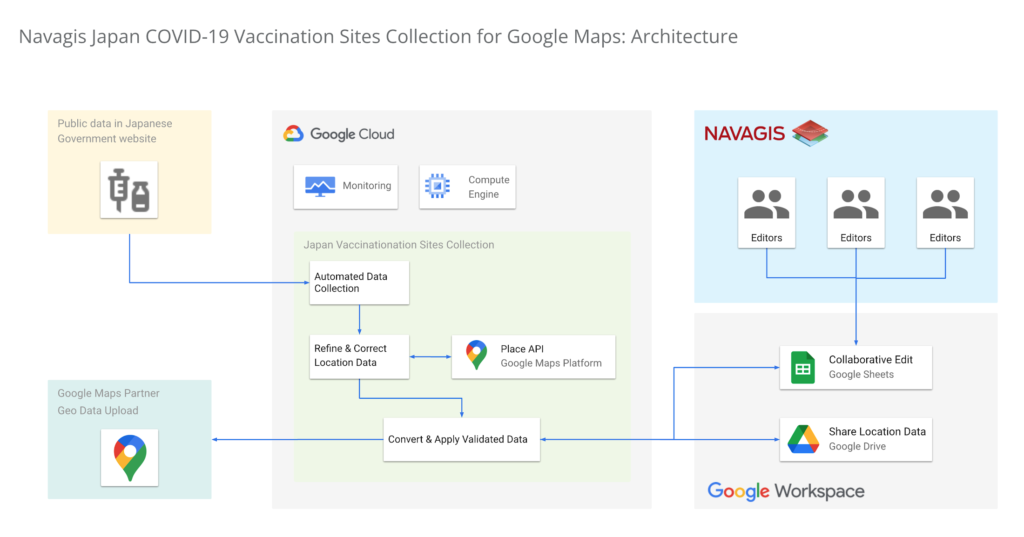
In under two weeks, we had identified, matched and marked tens of thousands of locations as vaccination centers around the country. Moreover, the power of the Geolocation API and Places API enabled us to provide richer details for many of the centers.

One of the unique aspects of this project was being able to surface our work across multiple channels to accomplish a single goal. We were able to work with Google to ensure the vaccine centers appeared on the consumer user-facing Google Maps apps and website, with information to help citizens learn where and how to get their vaccine. Our team was in hourly contact with requests such as “this center is mission-critical, can we get it mapped?” They were able to quickly get the site listed and visible on the map for end-users. This was a big human mobilization.
Powerful mapping APIs for pinpointed vaccine location information
We couldn’t have accomplished the massive task of validating 35,000 vaccination sites in such a short period of time without Google’s mapping APIs. The Maps Geocoding API and Places API enabled us to take location data from the government website, and quickly verify whether the location existed, or not, with up-to-date places intelligence.

The Places API served a critical role in two ways: breadth of information (covering Japan’s entire territory), and depth of information (complex insight into each place, such as landmarks and phone numbers).
The ability to take the addresses provided by the government of vaccination sites, run them through the Places API, and assess the address quality helped enormously. Google Street View, meanwhile, provided a further level of validation, enabling us to visually identify the specific locations where errors remained, and manually identifying clinics and hospitals before identifying their precise latitude and longitude within cities in Japan.
Looking beyond COVID-19
Japan went from being a laggard in global vaccination rates before the summer of 2021 to one of the leaders, with nearly 80% of the population fully vaccinated. And, daily confirmed cases had been as low as 100 nationwide prior to Omicron emerging globally.
The prospect of putting to bed our adventure with the Japan Vaccine Locator couldn’t bring us more joy.
Except perhaps, the prospect of helping people rediscover the joy of a return to normalcy—in partnership with Google Maps Platform.
For more information on Google Maps Platform, visit our website.
Migrating MySQL to Spanner? Here’s What You Need to Know

5619
Of your peers have already read this article.
2:00 Minutes
The most insightful time you'll spend today!
Since its initial release in 1995, MySQL has not only been the de-facto database for many data storage needs, but has gathered much attention over the years as one of the most well-recognized databases around when it comes to Relational Database Management Systems and transactional data processing.
Any application in retail, e-commerce, or banking has likely had its fair share of business depending on a relational database for its transactional needs. Many of these applications are built on MySQL due to its flexibility, open source nature, and strong community support.
Whether in the context of a migration from a relational database (like MySQL or PostgreSQL) , migration from a NoSQL database (like Cassandra), or a green grass workload, many companies turn to Cloud Spanner seeking a high availability SLA (99.99% for regional instances and 99.999% for multi region instances), unlimited scale, and low operational overhead – no patching required, no maintenance or other planned downtimes, just to name a few benefits.
The tooling and open source ecosystem around Spanner has evolved and grown ever since the service was introduced. HarbourBridge is a part of this ecosystem, and it’s meant to help customers port their existing MySQL or PostgreSQL schema to a Cloud Spanner schema.
Application Migration Tips
Despite helpful tools like HarbourBridge, database migrations are never trivial. Here are a few things to pay attention to when migrating from MySQL to Spanner, and how to update your application logic to address them.
Note – The following snippets use the PHP client for Cloud Spanner. A couple of the snippets reference a partial Magento port that our friends over at Searce have been working on. Once you understand the operations, you should be able to implement the same in any of the other languages that Cloud Spanner supports.
Cloud spanner enforces strict data types
In a MySQL query, the value of an attribute can be referenced as either a string or an integer. Example:
- select * from catalog_eav_attribute where attribute_id = 46;
- select * from catalog_eav_attribute where attribute_id = “46”;
Both are valid and equivalent.
In Cloud Spanner, the query will return an error if you try to reference an integer type by using a string representation.
Here is an example of a working query from Cloud Spanner:
- select * from catalog_eav_attribute where attribute_id = 46; — this will work
- Select * from catalog_eav_attribute where attribute_id = “46” — will fail, since we are supplying a string with “46”
You may use a function like the following to assist you with such transformations.
/*** Formats the SQL for Cloud Spanner* Example* Input SQL : <select statement> WHERE* (`product_id` = '340') ORDER BY position ASC* Output SQL : <select statement> WHERE* (`product_id` = 340) ORDER BY position ASC* In the above example integer*`340` is sanitized by removing single quotes.* Sanitization is required since Cloud Spanner* has strict typing* @param string $sql* @return string $sql*/public function sanitizeSql(string $sql){if (preg_match_all("/('[^']*')/", $sql, $m)) {$matches = array_shift($m);for($i = 0; $i < count($matches); $i++) {$curr = $matches[$i];$curr = filter_var($curr,FILTER_SANITIZE_NUMBER_INT);if (is_numeric($curr)) {$sql = str_replace($matches[$i],$curr, $sql);}}}return $sql;}
Using sequences in primary keys is not a Spanner best practice
Cloud Spanner does not implement a sequence generator, and it is not a Spanner best practice to use sequential IDs because doing so can cause hotspotting.
An alternative mechanism of generating a unique primary key is to use a UUID or any other similar mechanisms that result in non-sequential values. For more information, please refer to this article.
In order to convert all existing primary keys to a UUID pattern, you can change the schema using the snippet here
You may use this code snippet to modify the application code to generate the UUID for the auto increment. There are other ways to do this as well, such as using PHP built-in uniqid function.
/*** Generate UUID.* @return string*/public function getAutoIncrement(){if (function_exists('com_create_guid') === true) {return trim(com_create_guid(), '{}');}return sprintf('%04X%04X-%04X-%04X-%04X-%04X%04X%04X',mt_rand(0, 65535), mt_rand(0, 65535),mt_rand(0, 65535), mt_rand(16384, 20479),mt_rand(32768, 49151), mt_rand(0, 65535),mt_rand(0, 65535), mt_rand(0, 65535));}
Implicit casting and the need for explicit casting of field data types
Both MySQL and Cloud Spanner follow the SQL standard, hence much of the query syntax is the same. One notable difference is that the Cloud Spanner field types are implicitly cast to an appropriate data type out of the ones mentioned here. When implicit casting of the field type fails, Spanner returns a read error, so it would be safer to perform the casting to the appropriate type when issuing the SELECT statement.
Modify application code to cast to respective data type before execution of query.
$con = $this->getSpannerConnection();/*** Cloud Spanner follows strict type so cast the columns appropriately*/$select = $con->addCast($select, "`t_d`.`value`", 'string');$select = $con->addCast($select, "`t_s`.`value`", 'string');$select = $con->addCast($select, "IF(t_s.value_id IS NULL,t_d.value, t_s.value)", 'string');$values = $con->fetchAll($select);
Modify the application code to cast the column to its respective type
/*** Cast the column with type* @param string $sql* @param string $col* @param string $type* @return string*/public function addCast(string $sql,string $col, string $type){$cast = "cast(".$col." as ".$type.")";return str_replace($col, $cast, $sql);}
Using interleaved tables to improve read performance
Cloud Spanner’s table interleaving is a great choice for many parent-child relationships where the child table’s primary key includes the parent table’s primary key columns. Interleaving ensures that child rows are collocated with their parent rows, which can significantly improve query performance.
Refer to the statements here for a few samples of creating interleaved tables. To learn more about table interleaving, visit the documentation.
Conclusion
Database migrations are complicated. Hopefully, using HarbourBridge and the list of tips in this article can make that task easier. For additional tips, please take a look at this migration guide and read more about HarbourBridge.
4474
Of your peers have already watched this video.
9:49 Minutes
The most insightful time you'll spend today!
Quick Tips: How to Set Up a Business Without Investing Too Much
Running a business is everybody’s dream but only a few get to realize it. Among the many hurdles that entrepreneurs face, setting up the business with everyday tools like business emails, calendars, and finding cost-effective ways to collaborate are imperatives.
But it isn’t a struggle in the age of the cloud. Cloud computing takes care of infrastructure costs, breaks geographical boundaries, and makes collaboration across continents a walk in the park.
Google’s G Suite—a cloud-based collaboration and productivity platform—helps organizations achieve exactly that. G Suite is an affordable option to keeping your business organized. It’s the one stop shop for collaborating, creating consistency, and developing the professionalism your business needs.
What does that essentially mean?
Your marketing teams can create pitch presentations on Slides by collaborating in real time. All of them can work on the same version of the presentation all at once, ensuring everybody is on the same page.
Your finance teams can move over complex spreadsheet formulas and analyse costs just by asking—in words—Google Sheets to throw up answers to questions like: “What was our average spend last month?”
Your executive boards can meet on Hangouts from wherever they are, leading to faster decision-making.
Amber Hurdle, author of The Bombshell Business Woman, expands on the Tech Tools chapter of her book, by walking through how she uses G Suite to streamline her business.
5088
Of your peers have already watched this video.
1:30 Minutes
The most insightful time you'll spend today!
Ramco Cements: Enhancing Intelligence with Data Visualization
Ramco Cements chose Google Maps to integrate with its Ramco ERP system. By layering its data onto Google Maps, the result was a rich data visualization tool that facilitated idea generation and improved productivity. Over 1,000 employees across India access reports and transactions on a daily basis from the Ramco ERP system and integrated Google Maps.
Management at Ramco Cements uses Google Maps for visual analysis – for monitoring benchmarks, identifying discrepancies and deviation. Google Maps serves as a tool to help them develop appropriate strategies for business growth.
Also, the field sales team now has the capability to easily view information on their mobile devices – information ranging from competitor distribution networks in their area, to the best and worst performing dealers.
Accelerate Developer Productivity with Google Workspace

5767
Of your peers have already read this article.
3:30 Minutes
The most insightful time you'll spend today!
The software development process requires complex, cross-functional collaboration while continuously improving products and services. Our customers who build software say that they value Google Workspace for its ability to drive innovation and collaboration throughout the entire software development life cycle. Developers can hold standups and scrums in Google Chat, Meet, and Spaces, create and collaborate on requirements documentation in Google Docs and Sheets, build team presentations in Google Slides, and manage their focus time and availability with Google Calendar.
Development teams also use many other tools to get work done, like tracking issues and tasks in Atlassian’s Jira, managing workloads with Asana, and incident management in PagerDuty. One of the benefits of Google Workspace is that it’s an open platform tailored to improve the performance of your tools by seamlessly integrating them together. We’re constantly expanding our ecosystem and improving Google Workspace, giving you the power to push your software development even further.
Make software development more agile
Google Workspace gives you real-time visibility into project progress and decisions to help you ship quality code fast and stay connected with your stakeholders, all without switching tools and tabs. By leveraging applications from our partners, you can pull valuable information out of silos, making collaborating on requirements, code reviews, bug triage, deployment updates, and monitoring operations easy for the whole team. This allows your teams to stay focused on their priorities while keeping everyone aligned, ensuring collaborators are always in the loop.
Plan and execute together
When combined with integrations, Google Workspace makes the software development planning process more collaborative and efficient. For example, many organizations use Asana—a leading work management platform—to coordinate and manage everything from daily tasks to cross-functional strategic initiatives. To make the experience more seamless, Asana built integrations so users can always have access to their tasks and projects with Google Drive, Gmail, and Chat. With these integrations for Google Workspace, you can turn your conversations into action and create new tasks in Asana—all without leaving Google Workspace.
“We’ve seen exceptional, heavy adoption of tasks being created from within the Gmail add-on. Our customers and community have also shown very strong interest in future development work, which is something we’ll continue to prioritize.” Strand Sylvester, Product Manager, Asana
To date, users have installed the Asana for Gmail add-on over 2.5 million times, as well as over 3.8 million installs of the Asana for Google Workspace add-on for Google Drive.

Start coding quickly
Google Workspace makes it easy for product managers, UX designers, and engineers to agree on what they’re building and why. By bringing all stakeholders, decisions, and requirements into one place—whether it’s a Gmail or Google Chat conversation, or a document in Google Docs, Sheets, or Slides—Google Workspace removes friction, helping your teams finalize product specifications and get started right away.
Integrations like GitHub for Google Chat make the entire development process fit easily into a developer’s workflow. With this integration, teams can quickly push new commits, make pull requests, do code reviews, and provide real-time feedback that improves the quality of their code—all from Google Chat.

Speed up testing
Integrations like Jira for Google Chat accelerate the entire QA process in the development workflow. The app acts as a team member in the conversation, sending new issues and contextual updates as they are reported to improve the quality of your code and keep everyone informed on your Jira projects.

Ship code faster
Developers use Jenkins—a popular open-source continuous integration and continuous delivery tool—to build and test products continuously. Along with other cloud-native tools, Jenkins supports strong DevOps practices by letting you continuously integrate changes into the software build.
With Jenkins for Google Chat, development and operations teams can connect into their Jenkins pipeline and stay up to date by receiving software build notifications directly in Google Chat.

Proactively monitor your services
Improving the customer experience requires capturing and monitoring data sources to improve application and infrastructure observability. Google Workspace supports DevOps teams and organizations by helping stakeholders collaborate and troubleshoot more effectively. When you integrate Datadog with Google Chat, monitoring data becomes part of your team’s discussion, and you can efficiently collaborate to resolve issues as soon as they arise.
The integration makes it easy to start a discussion with all the relevant teams by sharing a snapshot of a graph in any of your Chat spaces. When an alert notification is triggered, it allows you to notify each Chat space independently, precisely targeting your communication to the right teams.

Improve service reliability
Orchestrating business-wide responses to interruptions is a cross-functional effort. When revenue and brand reputation depends on customer satisfaction, it’s important to proactively manage service-impacting events. Google Workspace supports response teams by ensuring that urgent alerts reach the right people by providing teams with a central space to discover incidents, find the root cause, and resolve them quickly.
PagerDuty for Google Chat empowers developers, DevOps, IT operations, and business leaders to prevent and resolve business-impacting incidents for an exceptional customer experience—all from Google Chat. See and share details with link previews, and perform actions by creating or updating incidents. By keeping all conversations in a central space, new responders can get up to speed and solve issues faster without interrupting others.

Accelerate developer productivity
Integrating your DevOps tools with Google Workspace allows your development teams to centralize their work, stay focused on what’s important—like managing their work—build code quickly, ship quality products, and communicate better during service impacting incidents. For more apps and solutions that help centralize your work so you and your teams can connect, create, and get things done, check out Google Workspace Marketplace, where you’ll find more than 5,300 public applications that integrate directly into Google Workspace.
Discovery’s Massive Workspace Migration Fuels Innovation and Collaboration

3829
Of your peers have already read this article.
1:30 Minutes
The most insightful time you'll spend today!
In the past two decades, Discovery has moved from a purely cable business based in the U.S. to a global media and entertainment powerhouse. Like many other businesses in the industry, we’ve had to adjust to the unique shifts in people’s behaviors and preferences, almost all of which result from the rise in streaming.
We have always been consumer-obsessed at Discovery, with a corporate culture built on the desire to entertain and inspire people of all ages and backgrounds with exceptional content. As we’ve grown, we have also learned just how important it is to be staff-obsessed, giving our employees the best possible experiences so they can continue to innovate and deliver the world-class content our customers expect.
In 2019, we decided one way to fuel innovation and collaboration among employees was to bring in Google Workspace. Selected for its intuitive, easy-to-use, and constantly evolving tools, Google Workspace enables teams to seamlessly create, connect, and collaborate anywhere, anytime.
Given the scope of our ambitions, and recognizing the challenges of migrating 16,500 global employees to a new collaboration solution, we worked with Google Cloud premier partner SADA to get the job done.
Change management amid a massive migration
We began the move to Google Workspace by migrating our document storage system from a legacy cloud provider to Google Drive. This included 86 million items amounting to about two petabytes of data migrated with minimal disruptions. A few months later we completed our move to Google Workspace by migrating 1.2 million calendar invites and 20,800 mail accounts, including thousands of collaborative inboxes and delegated accounts.
In addition to the technical support and Google Workspace expertise that SADA provided, they also partnered with our project team on the change management strategy. Despite challenges presented by the COVID-19 pandemic, our training team and SADA were able to offer outstanding educational opportunities to assist our workforce in the transition and to get the most out of Google Workspace. This included collaborating on over 240 global webinars in seven languages.
Discovering the power of transformative tools
Discovery has many types of end users, from finance professionals and marketing teams to producers and content developers. The fact that Google Workspace has been well-received across the company is a testament to the power of the solution.
Many of our teams have taken advantage of collaborative Gmail accounts and shared drives, providing them with a centralized location to seamlessly communicate and work together on team-focused projects. Our internal communications team is especially happy with the real-time collaborative editing experience within Docs as they work on company-wide emails, announcements, and other projects.
These collaboration tools have allowed us to stay agile amid global lockdowns and will continue to do so as we adapt to a more flexible working environment.
The value of partnership
While we were comfortable with our legacy collaboration suite, one of the biggest benefits of switching to Google Workspace has been Google Cloud’s and SADA’s partnership. They provide us with regular updates on product roadmaps, upcoming features, and more.
This is just the beginning as we plan to grow, deliver new content, and lead the media and entertainment industry with the help of these two great partners and their solutions.
To learn more about Discovery’s journey with Google Workspace, read the full case study.
More Relevant Stories for Your Company

Latest Features and Updates to Globally Bolster Translation Services
Let’s face it: in the globalized world, which is now more than ever a digital demand world, you need to scale and reach your customers right where they’re at. Translation is a critical piece of that, whether you’re translating a website in multiple languages or releasing a document, a piece

Google Cloud’s Virtual Appointment Scheduling Tool (VAST) Helps State of Arizona Recover from Unemployment Situation
When the world was forced to go primarily online, state governments also faced the reality of needing to provide community services without the health risk of meeting in person. Old systems that relied on interpersonal contact could not keep up. An unprecedented number of displaced workers swamped every unemployment system.
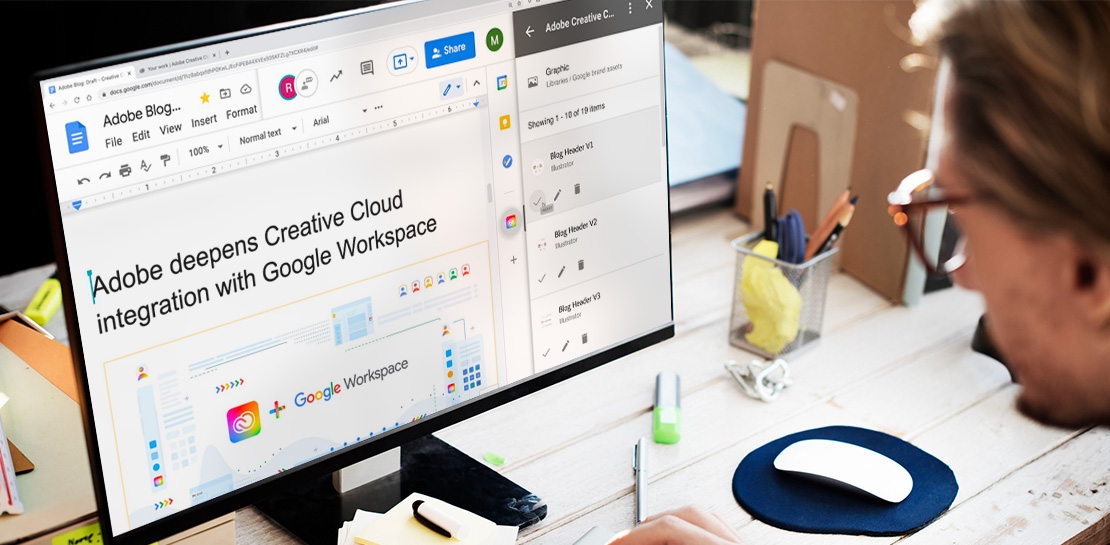
Google Workspace Now has Adobe Add-on!
Every day, individual people and creative teams combine Google Workspace with Adobe Creative Cloud to bring their best ideas to life and delight their customers or friends, across photography, design, video, 3D design, and more. In fact, Adobe’s add-on for Google Workspace has had over a million installs and counting. By partnering

Why I Moved to the G Suite: Rentokil CIO
Whether it's getting rid of pests, cleaning up a crime scene or tending to office plants, Rentokil Initial is a service business whose primary aim is to offer customers the best possible standard. This can only be achieved if teams work closely together, sharing expertise and ideas and communicating constantly.
