





Notebook Executor Feature of Vertex AI Workbench to Schedule Notebooks Ad Hoc or on Recurring Basis

4446
Of your peers have already read this article.
3:00 Minutes
The most insightful time you'll spend today!
When solving a new ML problem, it’s common to start by experimenting with a subset of your data in a notebook environment. But if you want to execute a long-running job, add accelerators, or run multiple training trials with different input parameters, you’ll likely find yourself copying code over to a Python file to do the actual computation. That’s why we’re excited to announce the launch of the notebook executor, a new feature of Vertex AI Workbench that allows you to schedule notebooks ad hoc, or on a recurring basis. With the executor, your notebook is run cell by cell on Vertex AI Training. You can seamlessly scale your notebook workflows by configuring different hardware options, passing in parameters you’d like to experiment with, and setting an execution schedule, all via the Console UI or the notebooks API.
Built to Scale
Imagine you’re tasked with building a new image classifier. You start by loading a portion of the dataset into your notebook environment and running some analysis and experiments on a small machine. After a few trials, your model looks promising, so you want to train on the full image dataset. With the notebook executor, you can easily scale up model training by configuring a cluster with machine types and accelerators, such as NVIDIA GPUs, that are much more powerful than the current instance where your notebook is running.
Your model training gets a huge performance boost from adding a GPU, and you now want to run a few extra experiments with different model architectures from TensorFlow Hub. For example, you can train a new model using feature vectors from various architectures, such as Inception, ResNet, or MobileNet, all pretrained on the ImageNet dataset. Using these feature vectors with the Keras Sequential API is simple; all you need to do is pass the TF Hub URL for the particular model to hub.KerasLayer.

Instead of running these trials one by one in the notebook, or making multiples copies of your notebook (inceptionv3.ipynb, resnet50.ipynb, etc) for each of the different TF Hub URLs, you can experiment with different architectures by using a parameter tag. To use this feature, first select the cell you want to parameterize. Then click on the gear icon in the top right corner of your notebook.

Type “parameters” in the Add Tag box and hit Enter. Later when configuring your execution, you’ll pass in the different values you want to test.
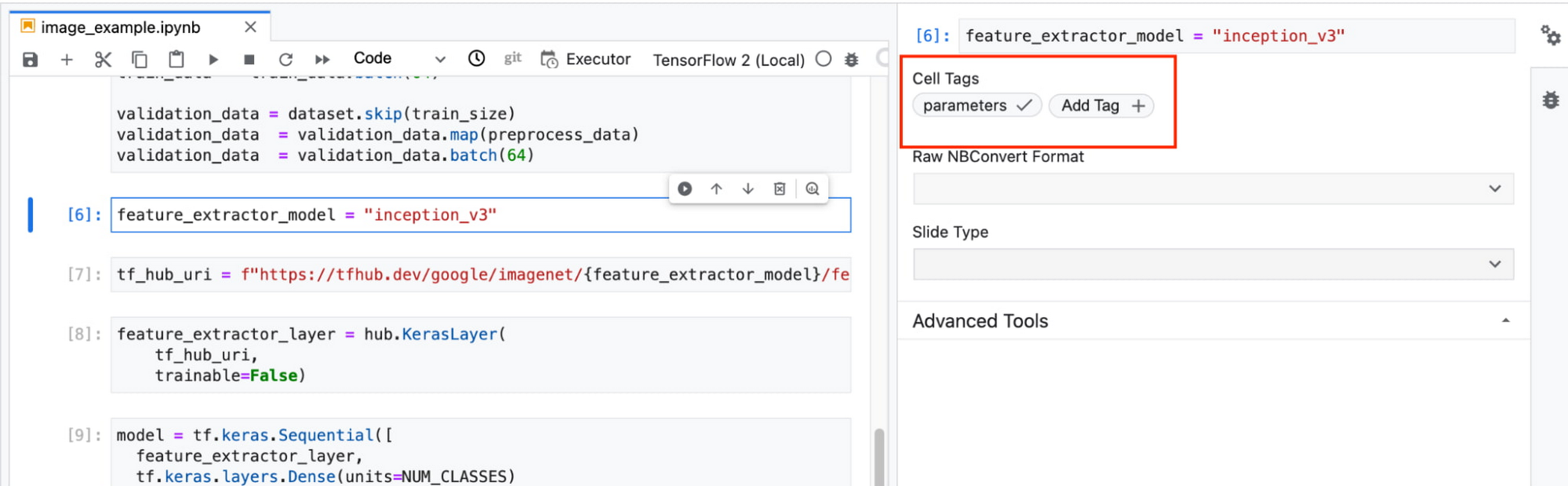
In this example, we create a parameter called feature_extractor_model, and we’ll pass in the name of the TF hub model we want to use when launching the execution. That model name will be substituted into the tf_hub_uri variable, which is then passed to the hub.KerasLayer, as shown in the screenshot above.
After you’ve discovered the optimal model architecture for your use case, you’ll want to track the performance of your model in production. You can create a notebook that pulls the most recent batch of serving data that you have labels for, gets predictions, and computes the relevant metrics. By scheduling these jobs to execute on a recurring basis, you’ve created a lightweight monitoring system that tracks the quality of your model predictions over time. The executor supports your end-to-end ML workflow, making it easy to scale up or scale out notebook experiments written with Vertex AI Workbench.
Configuring Executions
Executions can be configured through the Cloud Console UI or the Notebooks API.
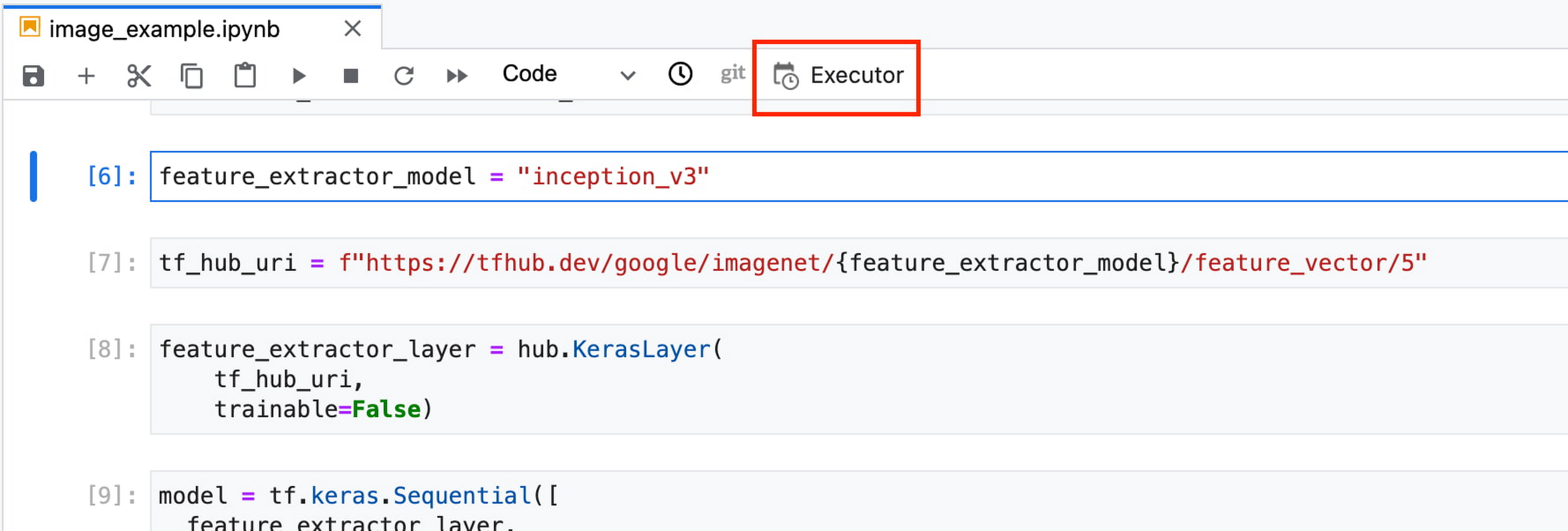
In your notebook, click on the Executor icon.
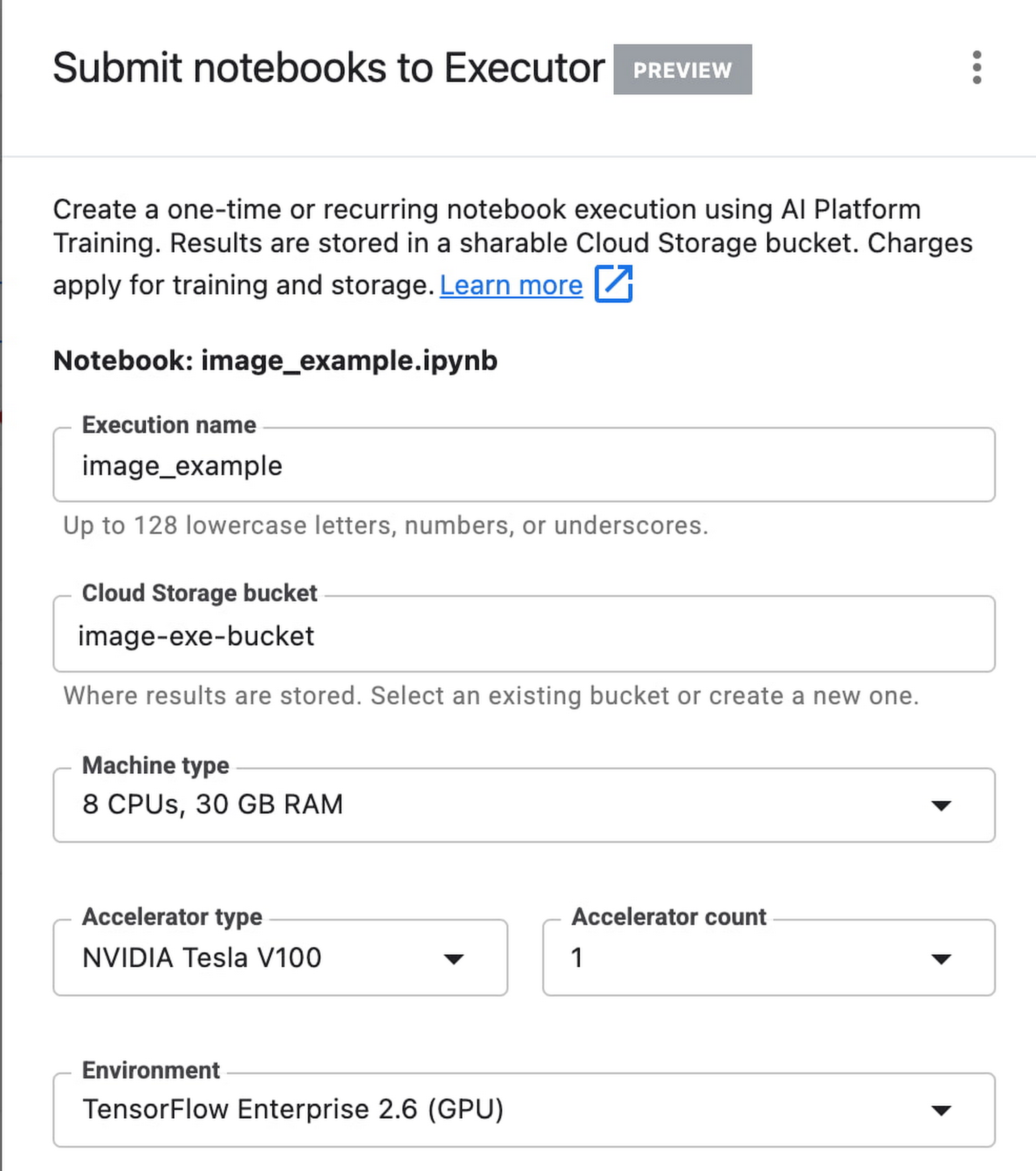
In the side panel on the right specify the configuration for your job, such as the machine type and the environment. You can select an existing image, or provide your own custom docker container image.
If you’ve added parameter tags to any of your notebook cells, you can pass in your parameter values to the executor.

Finally, you can choose to run your notebook as a one time execution, or schedule recurring executions.
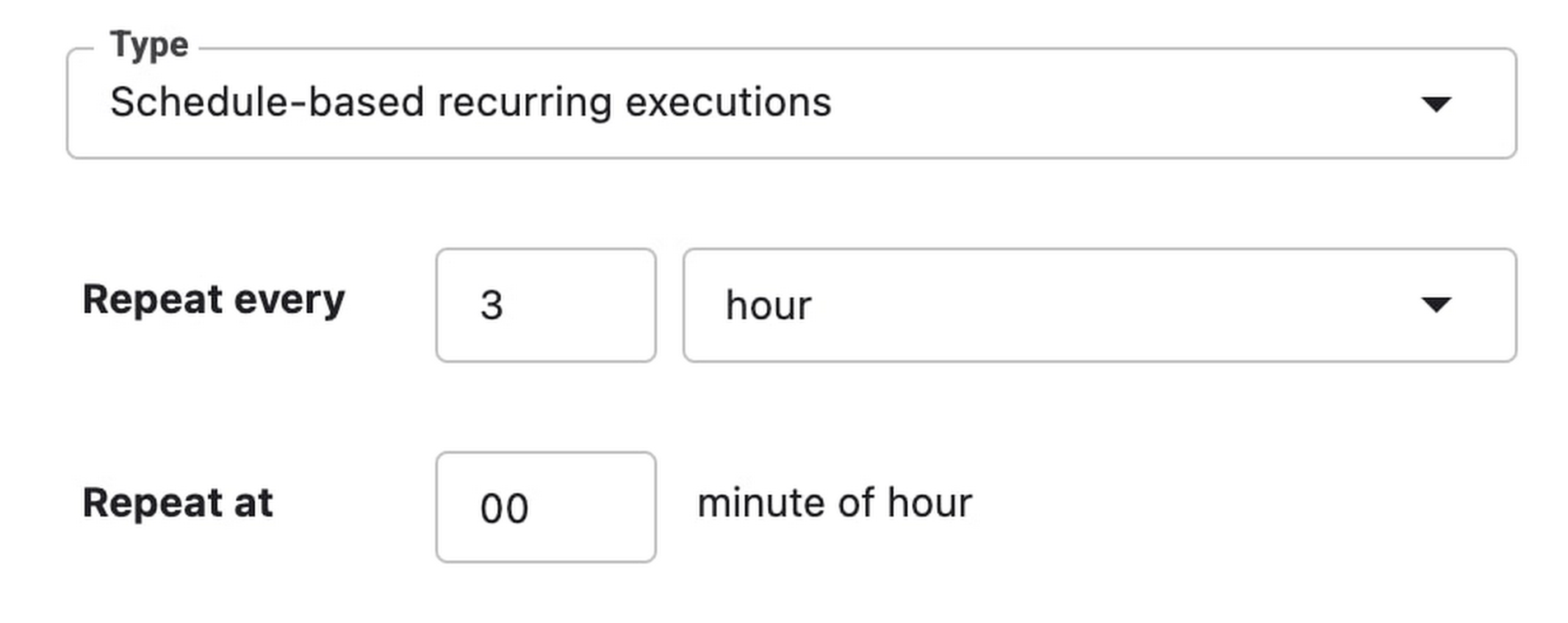
Then click SUBMIT to launch your job.
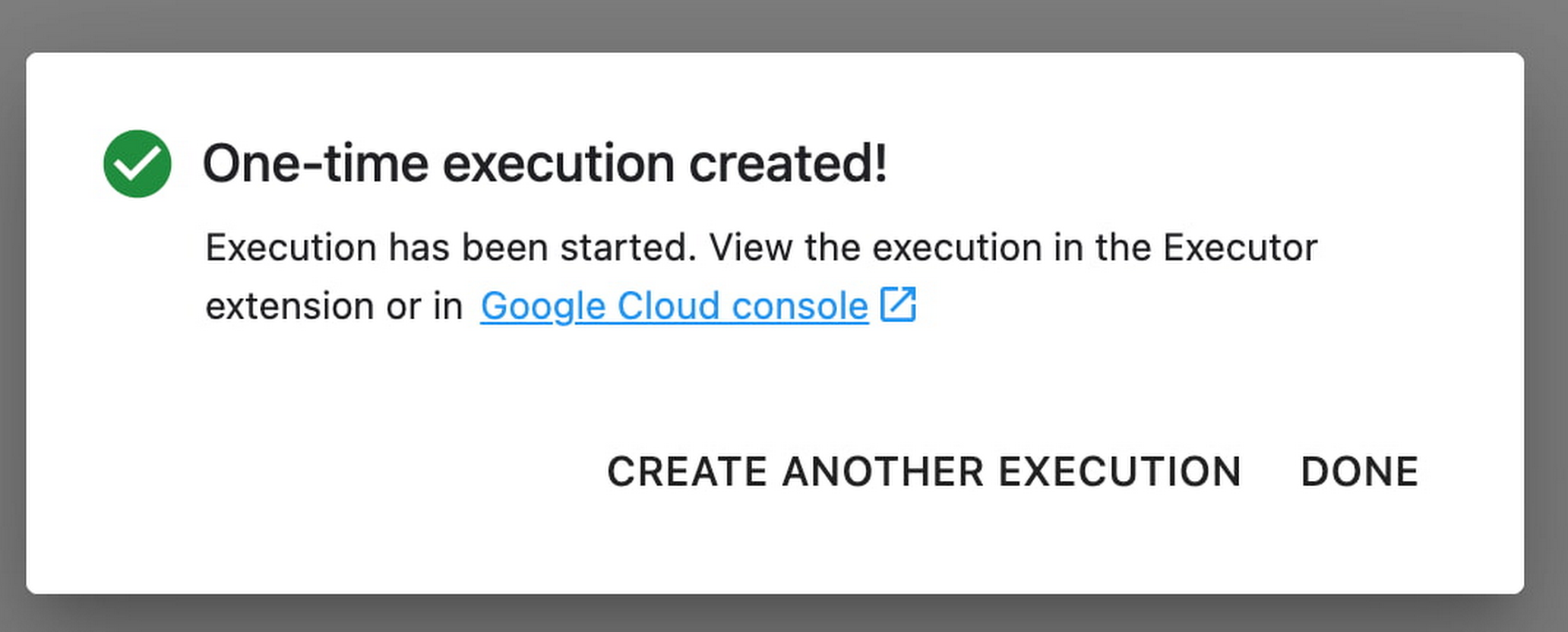
In the EXECUTIONS tab, you’ll be able to track the status of your notebook execution.

When your execution completes, you’ll be able to see the output of your notebook by clicking VIEW RESULT.

You can see that an additional cell was added with the comment # Parameters, that overrides the default value for feature_extractor_model, with the value we passed in at execution time. As a result, the feature vectors used for this execution came from a ResNet50 model instead of an Inception model.
What’s Next?
You now know the basics of how to use the notebook executor to train with a more performant hardware profile, test out different parameters, and track model performance over time. If you’d like to try out an end-to-end example, check out this tutorial. It’s time to run some experiments of your own!
Combining IoT and Analytics to Warn Manufacturers of Line Break Downs and Increase Profitability

7601
Of your peers have already read this article.
2:45 Minutes
The most insightful time you'll spend today!
Oden Technologies is using the Internet of Things (IoT) to improve the factories of today. The giant network of “things” (including people) connected to each other via the Internet has the potential to reduce waste, increase efficiency, and improve safety across all walks of life. Oden is leading IoT innovation in manufacturing by combining wireless connectivity, big data, and cloud computing.
The use of data to improve manufacturing is practically as old as manufacturing itself. But the computerization of manufacturing has resulted in broad and rapid changes to the way data is collected and processed, as well as the sheer volume of data available.
Oden’s goal is to help manufacturers tap into this data to quickly identify process trends and even warning signs of machine breakdown. Such visibility can reveal opportunities to improve manufacturing and maintenance processes that reduce waste and increase profit margins.
Oden designs and develops data collection devices that can plug into almost any kind of machine and can wirelessly transmit data with minimal complexity and setup time.
Once devices are installed, the Oden technology platform processes data to give manufacturers cutting-edge analytics that are easy to comprehend. Analysis produced by the platform provides factory engineers with data points such as detailed root-cause analysis down to the second, factory-wide performance in real-time, and trend analysis.
Improving cloud delivery
Oden’s previous cloud platform performed satisfactorily, but the company evaluated alternatives in search of potential reductions in cost and complexity and increases in performance.
When evaluating Google Cloud Platform, Oden discovered it would require fewer virtual machine (VM) instances for equivalent performance, which would cut costs. Furthermore, Oden could gain more sophisticated data analytics and machine learning capabilities compared with its existing cloud provider.
Today, Oden runs its entire platform on Google Cloud Platform including Google Compute Engine, Google Cloud Pub/Sub, Google Cloud Bigtable, Google Stackdriver, and Google Kubernetes Engine.
“In order to serve our customers, we need a cloud platform that can scale reliably while keeping costs low, perform under heavy loads, and consistently deliver sophisticated features such as machine learning,” says Willem Sundblad, CEO and Founder at Oden Technologies. “Google Cloud Platform is way ahead in all of these areas compared to our previous cloud provider.”
Capturing tens of millions of metrics a day
Using Google Cloud Platform, Oden can help an average factory capture and store approximately 10 million metrics on a single manufacturing line every day.
Metrics can include extremely granular detail, such as the amount of electricity going to machines, the amount of raw material consumed, and the volume of material produced. Sensors can also capture and transmit environmental information such as temperature, humidity, and dew point so that manufacturers can identify weather-related and seasonal impacts on production.
The updated Oden Cloud Platform uses Kubernetes Engine—powered by the open source Kubernetes system—to run application program interfaces (APIs) that capture data from Oden’s wireless devices on the factory floor.
Google Cloud Pub/Sub then sends the data in real time to Google Cloud Bigtable, where data is processed using Oden’s proprietary analytics tools. Google Stackdriver supports Google Cloud Platform monitoring, logging, and diagnostics, which help Oden deliver its cloud platform with confidence.
Oden Technologies builds dashboards powered by Kubernetes Engine, which pull analyzed data from Google Cloud Bigtable. The dashboards provide customers with real-time visibility into their manufacturing lines. Oden Factory Cloud dashboards allow customers to delve deeper into their data to fine-tune production processes or discover the root causes of production issues.
With the previous cloud provider, Oden required 80 VM instances to run the dashboards. With Google Cloud Platform that number has been cut to 45, which dramatically reduces costs and complexity.
“We migrated from our previous cloud provider to Google Cloud Platform in just one month,” says Willem. “Further, our storage and data analytics costs have decreased by 30%. Cost savings like these allow us to protect customers from rising expenses, keeping us focused on bringing the best products possible to market.”
Faster data access; more efficient factories
With Google Cloud Platform, Oden can now deliver a complete factory analytics picture to manufacturers. In environments where thousands of variables affect the bottom line, businesses can now automatically and perpetually record machine and performance measurement. Oden Factory Cloud gives customers access to comprehensive data insights and can eliminate reliance on onsite infrastructure investments to run their own analytics.
Because manufacturers have access to live data and can analyze production data quickly, they can troubleshoot and resolve problems in minutes rather than months. Such information helps improve product quality, minimize unplanned downtime, cut costs, and improve profitability.
“With the help of Google Cloud Platform, we are helping our customers to be data-driven, which wasn’t possible before,” adds Willem. “They now understand that data is their most important asset. That allows them to be more innovative and continually improve their production processes.”

3487
Of your peers have already downloaded this article
15:15 Minutes
The most insightful time you'll spend today!
Today’s business leaders face more challenges than ever, in a world that is evolving rapidly, that is hyper-connected, and that is data-driven.
As the pace of change intensifies, marketers have come under immense pressure to demonstrate value and to lead their organizations through this new landscape.
This is particularly pronounced in Asia, home to many of the world’s fastest-growing economies. Innovations in e-commerce, online payments, and communications are driving new business models and shifts in consumer behavior both here and around the globe.
Now, more than ever, strong consumer insights are essential in order to succeed. We are surrounded by signals that can help decode how behavior will change in the coming years.
Marketers who invest in detecting and developing these signals will stay ahead of the curve. In today’s world, opportunity and growth lie at the intersection of data and foresight.
This thought-leadership study showcases newly-breaking trends, examples of what companies are doing now, stories of how emergent leaders are pushing the boundaries, and what the future could hold.
The study covers:
- Cutting-edge trends including Shoppingmas, Retailarity, Leisuressence, Part-time Preneurs, and Mindful Impact
- The implications for CMOs and businesses
- How to use data and machine learning to prepare
Download Now: A Peek Into Your Consumer’s Future
Cohere uses Google Cloud’s new TPU v4 Pods on its quest to create larger and more powerful language models

2819
Of your peers have already read this article.
3:30 Minutes
The most insightful time you'll spend today!
Over the past few years, advances in training large language models (LLMs) have moved natural language processing (NLP) from a bleeding-edge technology that few companies could access, to a powerful component of many common applications. From chatbots to content moderation to categorization, a general rule for NLP is that the larger the model, the greater the accuracy it’s able to achieve in understanding and generating language.
But in the quest to create larger and more powerful language models, scale has become a major challenge. Once a model becomes too large to fit on a single device, it requires distributed training strategies, which in turn require extensive compute resources with vast memory capacity and fast interconnects. You also need specialized algorithms to optimize the hardware and time resources.
Cohere engineers are working on solutions to this scaling challenge that have already yielded results. Cohere provides developers a platform for working with powerful LLMs without the infrastructure or deep ML expertise that such projects typically require. In a new technical paper, Scalable Training of Language Models using JAX pjit and TPUv4, engineers at Cohere demonstrate how their new FAX framework deployed on Google Cloud’s recently announced Cloud TPU v4 Pods addresses the challenges of scaling LLMs to hundreds of billions of parameters. Specifically, the report reveals breakthroughs in training efficiency that Cohere was able to achieve through tensor and data parallelism.
This framework aims to accelerate the research, development, and production of large language models with two significant improvements: scalability and rapid prototyping. Cohere will be able to improve its models by training larger ones more quickly, delivering better models to its customers faster. The framework also supports rapid prototyping of models that address specific objectives — for example, creating a generative model that powers customer-service chatbot — by experimenting and testing new ideas. The ability to switch back and forth among model types and optimize for different objectives will ultimately allow Cohere to offer models optimized for particular use cases.
The FAX framework relies heavily on the partitioned just-in-time compilation (pjit) feature of JAX, which abstracts the relationship between device and workload. This allows Cohere engineers to optimize efficiency, and performance by aligning devices and processes in the ideal configuration for the task at hand. Pjit works by compiling an arbitrary function into a single program (an XLA computation), that runs on multiple devices — even those residing on different hosts.
Cohere’s new solution also takes advantage of Google Cloud’s new TPU v4 Pods to perform tensor parallelism. which is more efficient than the earlier pipeline parallelism implementation. As the name suggests, the pipeline parallel approach uses accelerators in a linear fashion to scale a workload, like a single long assembly line. Accelerators must process each micro-batch of data before passing it along to the next one, and then run the backward pass in reverse order.
Tensor parallelism eliminates the accelerator idle time of pipeline parallelism, also known as the pipeline bubble. Tensor parallelism involves partitioning large tensors (mathematical arrays that define the relationship among multiple objects such as the words in a paragraph) across accelerators to perform computations at the same time on multiple devices. If pipeline parallelism is an ever-lengthening assembly line, tensor parallelism is a series of parallel assembly lines — one making the engine, the other the body, etc. — that simultaneously come together to form a complete car in a fraction of the time.
These computations are then collated, a process made practical thanks to Google Cloud TPU v4 VMs, which more than double the computational power. The superior performance of v4 chips has enabled Cohere to iterate on ideas and validate them 1.7X faster in computation than before.
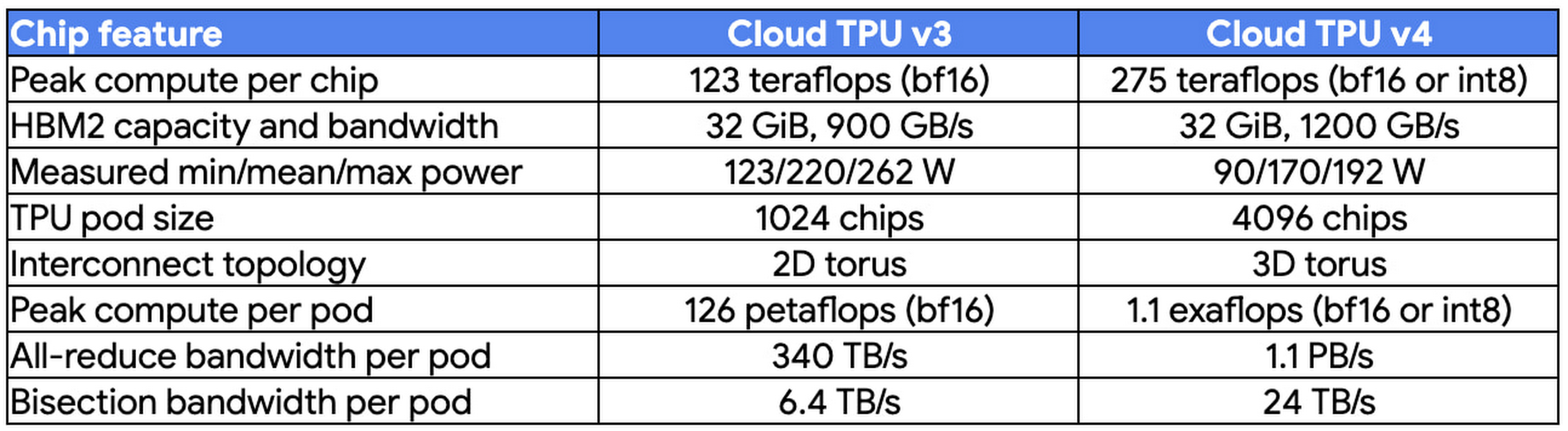
At Cohere, we build cutting-edge natural language processing (NLP) services, including APIs for language generation, classification, and search. These tools are built on top of a set of language models that Cohere trains from scratch on Cloud TPUs using JAX. We saw a 70% improvement in training time for our largest model when moving from Cloud TPU v3 Pods to Cloud TPU v4 Pods, allowing faster iterations for our researchers and higher quality results for our customers. The exceptionally low carbon footprint of Cloud TPU v4 Pods was another key factor for us.
Aidan Gomez
CEO and co-founder, Cohere
Why Google Cloud for LLM training?
As part of a multiyear technology partnership, Cohere leverages Google Cloud’s advanced AI and ML infrastructure to power its platform. Cohere develops and deploys its products on Cloud TPUs, Google Cloud’s custom-designed machine learning chips that are optimized for large-scale ML. Cohere’s recently announced their new model improvements and scalability by training an LLM using FAX on Google Cloud TPUs, and this model has demonstrated that transitioning from TPU v3 to TPU v4 has so far enabled them to achieve a total speedup of 1.7x. In addition to a significant performance boost, TPUs provide an excellent user experience with the new TPU VM architecture. Importantly, Google Cloud ensures that Cohere’s state-of-the-art ML training is achieved with the highest standards of sustainability, powered by 90% carbon-free energy in the world’s largest publicly available ML hub.
By adopting Cloud TPUs, Cohere is making LLM training faster, more economical, and more agile. This helps them provide larger and more accurate LLMs to developers, and put NLP technology in the hands of developers and businesses of all sizes.
To learn more about these LLM training advances, you can read the full paper, Scalable Training of Language Models using JAX pjit and TPUv4. To learn more about Cohere’s best practices and AI principles, you can check this article co-authored with Open AI and AI 21 Labs.
Everything a Marketer Needs to Know About Machine Learning
3572
Of your peers have already read this article.
8:30 Minutes
The most insightful time you'll spend today!
As consumer expectations grow for more personalized, relevant, and assistive experiences, machine learning is becoming an invaluable tool to help meet those demands.
It’s helping marketers create smarter customer segmentations, deliver more relevant creative campaigns, and measure performance more effectively. In fact, 85% of executives believe AI will allow their companies to obtain or sustain a competitive advantage.1
We created this guide to help you optimize your machine learning marketing efforts — whether you’re just starting out or you want to discover more benefits of machine learning.
Guide to Create and Manage Datasets with Vertex AI

3054
Of your peers have already read this article.
2:00 Minutes
The most insightful time you'll spend today!
At Google I/O this year, we introduced Vertex AI to bring together all our ML offerings into a single environment that lets you build and manage the lifecycle of ML projects. In a previous post, we gave you an overview of Vertex AI, sharing how it supports your entire ML workflow—from data management all the way to predictions. Today, we’ll talk a little about how to manage ML datasets with Vertex AI.
Many enterprises want to use data to make meaningful predictions that can bolster their business or help them venture into new markets. This often requires using custom machine learning models—something not every business knows how to create or use. This is where Vertex AI can help. Vertex AI provides tools for every step of the machine learning workflow—from managing data sets to different ways of training the model, evaluating, deploying, and making predictions. It also supports varying levels of ML expertise, so you don’t need to be an ML expert to use Vertex AI.https://www.youtube.com/embed/CN2X6oIlnmI?enablejsapi=1&
Types of data you can use in Vertex AI
Datasets are the first step of the machine learning lifecycle—to get started you need data, and lots of it. Vertex AI currently supports managed datasets for four data types—image, tabular, text, and videos.
Image
Image datasets let you do:
- Image classification—Identifying items within an image.
- Object detection—Identifying the location of an item in an image
- Image segmentation—Assigning labels to pixel level regions in an image.
To ensure your model performs well in production, use training images similar to what your users will send. For example, if users are likely to send low quality images, be sure to have blurry and low resolution images in your data set. Don’t forget to include different angles, backgrounds, and resolutions. We recommend you include at least 1,000 images per label (item you want to identify), but you can always get started with 10 per label. The more examples you provide, the better your model will be.
Tabular
Tabular datasets enable you to do:
- Regression—Predicting a numerical value.
- Classification—Predicting a category associated with a particular example.
- Forecasting—Predicting the likelihood of sudden events or demands.
Tabular data sets support hundreds of columns and millions of rows.
Text
With text datasets, you can do:
- Classification—Assigning one or more labels to an entire document.
- Entity extraction—Identifying custom text entities within a document, like “too expensive” or “great value”.
- Sentiment analysis—Identifying the overall sentiment expressed in a block of text, for example, if a customer was happy or upset or frustrated.
Video
Video datasets enable:
- Classification—Labeling entire videos, shots, or frames.
- Action recognition—Identifying clips video clips where specific actions occur.
- Object tracking—Tracking specific objects in a video.
Creating and managing datasets in Vertex AI
Now that we’ve covered the different types of data you can use, let’s shift to creating and managing those datasets. In the Cloud Console, go to Vertex AI dashboard page and click Datasets, then click Create Project.
Say you want to classify items within a set of photos. Create an image dataset and select image classification. You can import files directly from your computer, which will be stored in Cloud Storage. Then, you’ll need to add the corresponding labels (items you want to identify) for your images. If you already have labels, you can use the Import File option to import a CSV with your image URLs and their labels. If your data is not labeled and you would like human help to label it, you can use the Vertex AI data labeling service. Once the files are uploaded, you can create labels and assign them to the images. You can also analyze the images in the data set, the number of images per label, and a few other properties.
Depending on the type of data you use, your options might vary slightly. For example, if you want to use tabular data, you could upload a CSV file from your computer, use one from Cloud Storage, or select a table from BigQuery directly. Once you select the table, the data is available for analysis.
More to come
This concludes our overview of creating and managing datasets in Vertex AI. In a future installment, we’ll go over the next phase of the machine learning workflow: building and training ML models.
If you enjoyed this post, keep an eye out for more AI Simplified episodes on YouTube. In the meantime, here’s where you can learn more about Vertex AI.
More Relevant Stories for Your Company

Poor Product Discovery Causes Shoppers’ Abandonment, Time to Augment ‘Search Experience’ with Google’s Retail Search!
How many times has a shopper searched for a product on a store’s website only to get results that aren’t relevant—or worse, provided no search results at all? While most ecommerce sites have search capabilities, few accomplish their ultimate goal: making it easy for customers to discover the products they

Google and AI Researchers Work towards Building Data-centric AI
AI researchers and engineers need better data to enable better AI solutions. The quality of an AI solution is determined by both the learning algorithm (such as a deep-neural network model) and the datasets used to train and evaluate that algorithm. Historically, AI research has focused much more on algorithms

The Real Drivers of Efficiency, Growth, and Customer Experience
The increasing adoption of technologies like connected devices, augmented reality, and machine learning has changed the way we shop, and retailers are evolving how they do business to meet the needs of their customers. Retailers say it’s no longer enough to keep pace with shoppers’ growing expectations—they must get ahead




Google had Enough of Flooding in India. Here’s What It Did About It
Over the last century, floods have become the most common and deadly natural disaster on the planet. Many countries currently lack effective early warning systems and alerts. Today, 20 percent of flood fatalities occur in India. To help, Google sent a team to study the Ghaghara River, near Patna. “In
