





You Can Now ‘Listen’ to Over 50 Tech Blogs on Google Cloud Reader

4879
Of your peers have already read this article.
1:30 Minutes
The most insightful time you'll spend today!
🎧 Prefer to listen? Check out this episode on the Google Cloud Reader podcast
If you’re anything like me, you love reading, but also appreciate that sometimes your eyes need to be doing other things; whether it’s finding your exit off the highway, or keeping your puppy from destroying the couch.
And sometimes the thought of sitting down to read something just feels like it’s going to take valuable multi-tasking time away from my day. I know, I know, multitasking can be frowned upon, but it’s the way I live a good chunk of my life, and it’s working out so far. And while I’m not alone in my multitasking, I’m also not alone in my desire for a non-visual way to get this content, or any content.
*Google Cloud Reader enters the chat*
Google Cloud Reader is a podcast that lets you listen to the Google Cloud Blog posts that aren’t as dependent on visuals. This means they’re articles that are, or are adapted to be, less focused on graphs, or code samples, and instead describe the meaning behind those visual aids.
It’s an easy, audible way to absorb content around all things new in Cloud, while still being able to make sure Ruthie doesn’t eat my work from home equipment.

So by now you’re probably thinking “OK, so you started a podcast during the pandemic, even though you definitely seemed like the type to start making sourdough”—and you’re right. My 53 plants agree with you. But rest assured, one can listen to an episode of this podcast *while* creating a macramé plant hanger, or waiting for bread to rise—multitasking, am I right?
We’re a little over 50 episodes/macrame plant hangers in, so you should check it out (Ruth and I would appreciate it).
Some of my personal favorites
- Beginners Guide to Painless Machine Learning – Learn how to get started with Google Cloud AI tools
- Introducing GKE Autopilot: A Revolution in Managed Kubernetes – Learn more about GKE Autopilot, a revolutionary mode of operations for managed Kubernetes that lets you focus on your software, while GKE Autopilot manages the infrastructure.
- Cook up your own ML recipes with AI Platform – Learn about Mars Wrigley’s new ML-inspired recipe experiment on Google Cloud and how you can get started with your own.
- Recovering Global Wildlife Populations using ML – Review Google’s Wildlife Insight’s ML project and help users create an image classification model for motion-sensor cameras (called camera traps) used to help protect wildlife in an non-invasive way by collecting and tagging species via pictures.
Let me know your favorite episodes, and what other articles you’d like to hear on Twitter @jbrojbrojbro!
No matter why you prefer an audio format, we’ve got you covered; Google Cloud Reader, where we read the tech blog for you, and to you.
Get all the Google Cloud Reader on your favorite podcast platform, including Google Podcasts, Apple Podcasts, and Spotify.
An Expert’s Opinion on What Early-stage Startups Must Know

6455
Of your peers have already read this article.
3:00 Minutes
The most insightful time you'll spend today!
As lead for analytics and AI solutions at Google Cloud, my team works with startups building on Google Cloud. This puts us in the fortunate position to learn from founders and engineers about how early-stage startups’ investments can either constrain them or position them for success, even at the seed level. In this post, I want to share a few of the best practices to keep in mind as you’re building.
Understand your value proposition before diving into a technology stack
If you’re launching a startup in the cloud, you’re no doubt thinking about a technology stack, but it’s important to step back a bit and think carefully about the major value proposition that your startup offers to your customers. That value proposition is going to fundamentally drive the kind of technology that you should pick.
For example, does your system need processing in real time, or can it be done in a batch mode? Can you rely on once-a-day insights or do the insights have to come in as events happen?
Additionally, what kind of latency will your customers face? That latency makes your value proposition either usable or unusable. Early on in Google’s development, leaders realized that no one was going to wait more than a few hundred milliseconds for a web page to show them their results, and that realization drove the technology decisions that have allowed Google to scale from being a startup in a garage to being a trillion dollar company. Your startup needs to define its value to customers with this level of specificity before it can build a technology stack suited to its needs.
Focus on customer interactions
A few companies have gracefully pulled off big IT pivots that reshaped their value proposition. Netflix, for example, moved from mostly sending DVDs through the mail to becoming a streaming service and major content producer. That’s a huge shift in the user experience and the technology stack necessary to support it, even if the underlying value proposition (i.e., get content to customers) was broadly the same. But it’s also an outlier. If you’re planning for potential changes of this magnitude, rather than focused on getting your value proposition to users, you probably need to sharpen what that value proposition is.
Specifically, you need a clear vision of how customers will access and interact with your business. Typically, they’ll do so over a website or a mobile app, but there are still so many variables.
Are customers going to transmit documents? If so, in what format? Is handwriting supported or is input limited to typing? Can they use images for optical character recognition? Will it mostly be forms? Will the data be structured or unstructured? If all that sounds a little overwhelming, don’t worry, it’ll seem simpler by the end of this article—but also be aware: we’re just getting warmed up.
Imagine that most of your customers will access your business via voice, so you know you’ll want to prioritize conversational workflows. That’s a start—but dig deeper. Even if we suppose you’re usingDialogflow, a Google Cloud conversational AI platform that lets you build and deploy virtual agents, we’re still not really seeing the value proposition. How will all this work, from the beginning of a typical full customer interaction to the resolution? How many interactions will have to be facilitated over low-bandwidth connections, for example? When it comes to user interactions, make sure you can see an end-to-end use case.
Another example: you’re building a retail website, and one of your end-to-end use cases involves the customer asking if a certain amount of a given product is in stock, whether it’s one unit of the product, ten or hundreds. If the product is not sufficiently stocked, you want your app to offer similar items that are. Will your technology stack support this end-to-end use case?
These considerations are not an argument for premature optimization. There’s value in moving fast, getting minimum viable products to users, and then iterating. But in the early stages, you only get one chance to start on the right foot—and how you navigate that chance will influence a lot of dollars and effort down the road. You need to make sure you have business use cases, not just an idea, before you can start designing a technology stack.
Here’s how to get in the right frame of mind. Pick three use cases: two that are “bread and butter” and one that is technologically complex. Make sure your proposed technology stack can support all three, end to end.
Default toward higher levels of abstraction
Now that we’re in the right frame of mind, we’re ready to think about the technology stack more directly.
As a startup, you’ll need to conserve resources, and to do that, you’ll want to build at the highest level of abstraction possible for your value proposition. For example, you probably don’t want your people setting up clusters. You don’t want them configuring things if they can use a fully managed service. You want them focused on building your prototype, not managing infrastructure.
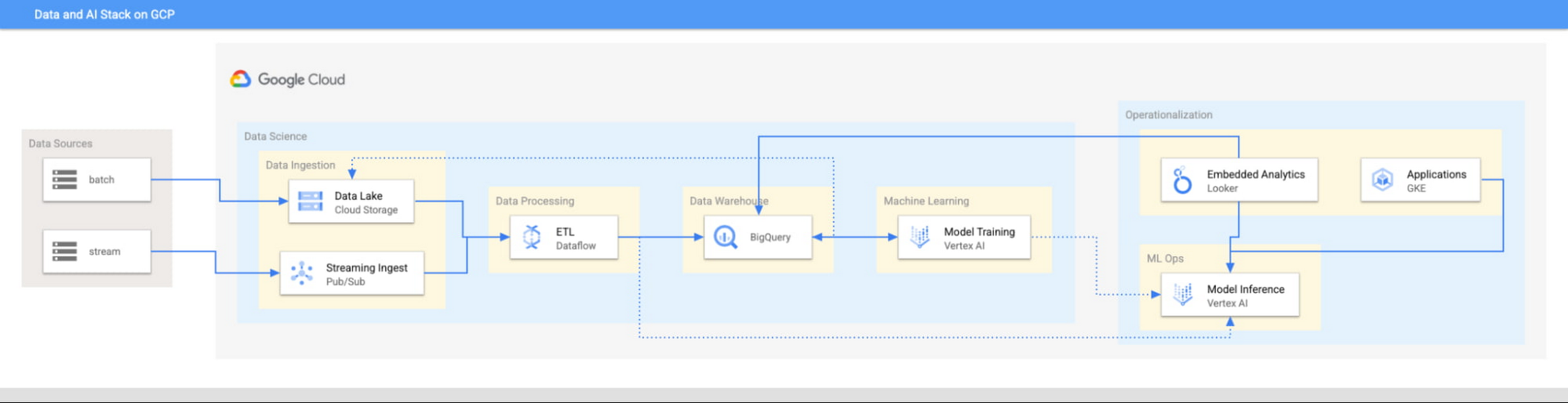
This focus has definitely informed how we create products at Google Cloud, as our canonical data stack—Pub/Sub, Dataflow, BigQuery, and Vertex AI—consists of auto-scaling and serverless products.
But management of infrastructure is not the only place where you should err toward a less-is-more philosophy.
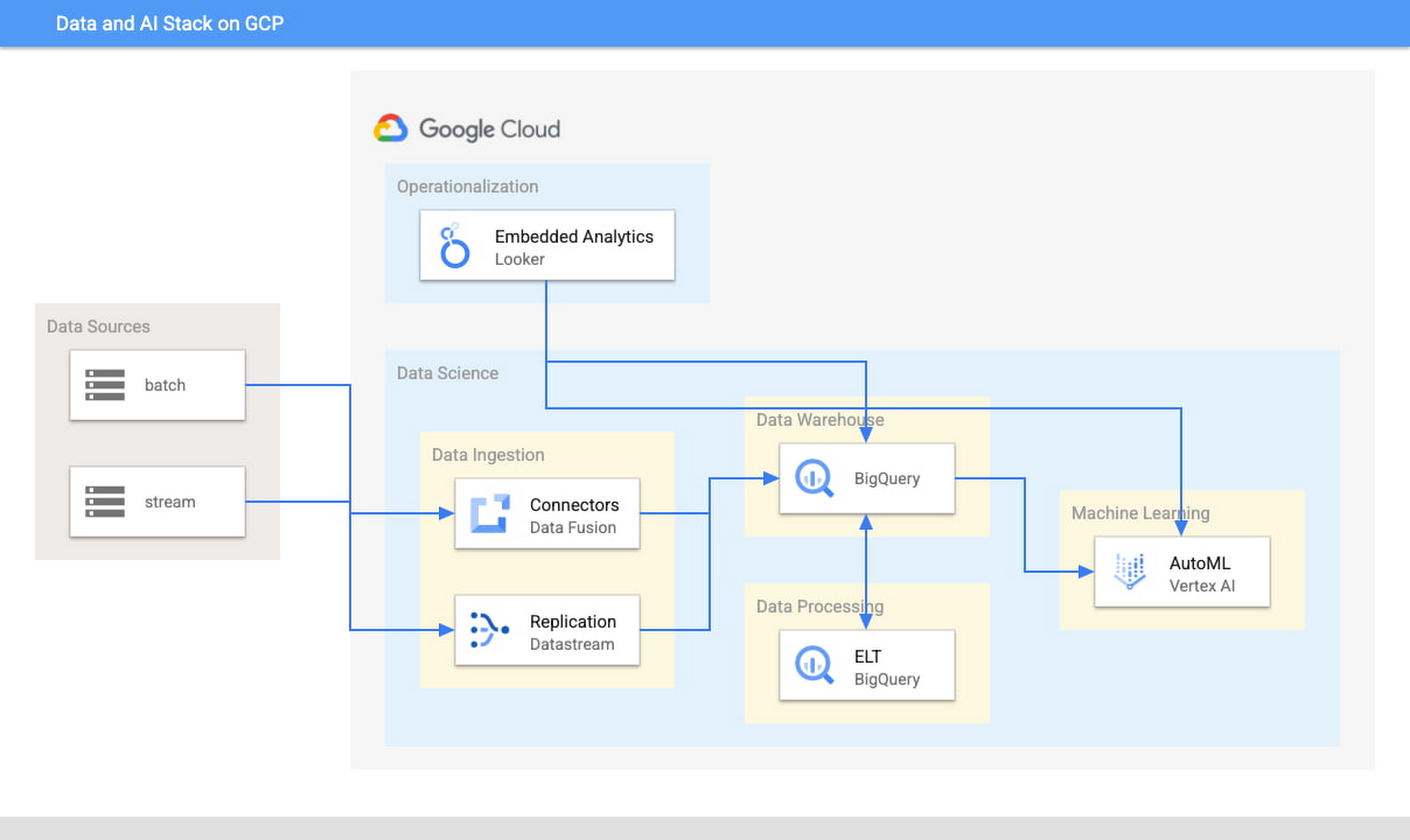
When it comes to architecture, choose no-code over low-code and low-code over writing custom code. For example, rather than writing ETL pipelines to transform the data you need before you land it into BigQuery, you could use pre-built connectors to directly land the raw data into BigQuery. That’s no code right there. Then, transform the data into the form you need using SQL views directly in the data warehouse. This is called ELT, and it is low code. You will be a lot more agile if you choose an ELT approach over an ETL approach.
Another place is when you choose your ML modeling framework. Don’t start with custom TensorFlow models. Start with AutoML. That’s no-code. You can invoke AutoML directly from BigQuery, avoiding the need to build complex data and ML pipelines. If necessary, move on to pre-built models from TensorFlow Hub, HuggingFace, etc. That’s low-code. Build your own custom ML models only as a last resort.
Focus on getting your vision to market, not chasing technology hype
The goal is to pick the right technology stack for bringing your vision to market, generating value for customers, conserving resources, and maintaining flexibility for growth. Early IT investments should usually gravitate toward things that preserve flexibility, such as managed services built on standard protocols or open APIs, but they needn’t always rush to the flashiest technologies. The answer isn’t always ML, for example. The answer might be heuristics to start, with a path to ML once you have collected enough data. You want to make sure that your intelligence layer has enough abstraction so you can mark it up with simple rules at first, but then replace it with a more robust system as you go along.
Launch and iterate fast with these principles
The preceding discussion is a reminder that your most expensive resource is your people—and that you really want them to be focused on building your prototype, minimum viable product or production app You want to launch fast and iterate fast, and the only way you can do that is by focusing on the things that differentiate you.
But regardless of the technologies you use, the bottom line is the same: follow these four principles.
- Figure out your major value proposition and design your tech stack around it.
- Be very careful about user interactions. User experience is super important; you need to make sure you deliver the kind of experience that your customers have grown to expect.
- When you’re building, pick the highest possible level of abstraction possible—the most fully managed tools and no-code/low-code frameworks that give you the functionality that you need.
- Instead of choosing new or flashy technologies, consider if you can build a “good enough” minimum viable product quickly and come back to a better implementation later.
To learn more about why startups are choosing Google Cloud, click here.
4457
Of your peers have already downloaded this article
1:30 Minutes
The most insightful time you'll spend today!
Increasingly, technology, data, and human interactions will follow a new model of real-time inputs, enabling change without interruption and positive iteration. Cloud computing powers an important shift for information technology, and it will usher in new and better ways to serve customers, make discoveries, and build great products and services.
As part of this transformation, technology models will become more flexible, interoperable, and open; office cultures will shift toward transparency, collaboration, and constant learning. That means innovation and team building – the best parts of work – can happen more frequently and efficiently. Customer focus can sharpen and become more responsive. Corporate knowledge gained over decades of competing and innovating can be brought to bear more easily and meaningfully.
To compete effectively in this changing landscape, business and technology leaders must find ways to embrace the potential of cloud computing – whether in the tools and systems they choose, the institutional cultures they create, or the business strategies they prioritize. Today’s enterprises can set the stage for future success by infusing their unique assets – such as customer relationships, excellent service capabilities, strong partnerships, market knowhow, and technology investment – with the power of innovative IT.
7 Common Myths About Cloud Computing That Must Be Banished

4271
Of your peers have already read this article.
3:15 Minutes
The most insightful time you'll spend today!
No discussion about the emerging technologies that are shaping our future is complete without a mention of cloud computing. Unfortunately, too many of these discussions are filled with misinformation and fear-mongering. And while it’s always advisable to approach new technologies with a degree of healthy skepticism, this should always be backed by facts.
Here are seven of the most common myths about cloud computing that you shouldn’t take at face value:
An On-Premises Data Centre is More Secure Than the Cloud
One of the first concerns cloud skeptics cite as the case against it is the possibility of a data breach or cyber attack. However, the overwhelming majority of professionals agree that cloud computing offers much more security than an on-premises data centre. Not only do cloud solutions come with the requisite infrastructure, but they’re also maintained by some of the finest security personnel in the world, who work for cloud service providers.
Cloud Computing is Too Expensive
The concerns surrounding the cost of cloud computing have been blown vastly out of proportion. While the cost of implementation varies from one business to another, cloud computing’s ‘pay-as-you-go’ model helps prevent unnecessary spending on infrastructure. In fact, some providers offer users their service without any up-front costs or termination fees. However, it is up to an enterprise to evaluate whether this model will be more cost-effective for their requirements, as opposed to building a data centre.
Migration to the Cloud Will Result in Extended Downtime
There’s a reason that the old adage ‘Time is money’ is as popular as it is. Irrespective of its industry, geography, size or nature, no organisation can afford more than the bare minimum downtime. However, cloud migration doesn’t have to be synonymous with lost time and money. In fact, most popular cloud service providers offer seamless, live migration, and may only result in negligible downtime where the existing servers are extremely outdated.
My Business is Too Small for Cloud Computing
Cloud computing was once thought of as the prerogative of big companies that have massive computing power and infrastructure needs. However, a quick glance through the pros and cons of the technology shows that this isn’t the case. In fact, small and medium organisations might just find it to be more useful. Not only does cloud adoption save the cost of building a data centre, but also the human resource expenditure that comes with having to maintain it. Moreover, offerings like Google Apps for Business consolidate a multitude of services into one platform, making them easier to implement and maintain.
Cloud Computing is Only Good for Storage and Analytics
Data storage and analytics are among the cloud’s most popular uses. However, this doesn’t mean that the technology is only of use to technology and data science departments. Figures from 2011 showed that the bulk of cloud spending in the Asia Pacific region is concentrated in the functions of customer service, marketing, sales, manufacturing and human resource management. Seamless flow of accurate and up-to-date information is department-agnostic, and if leveraged in the right way, can be a game-changer for every organisation.
I Won’t Have Enough Control on the Cloud
Cloud solutions aren’t as rigid as most people assume. Between the public, private and hybrid cloud, there are a host of options that businesses can choose from when it comes to cloud migration. Each of these offers a different degree of customisation and flexibility, which companies can pick from, on the basis of their requirements and skill level.
Cloud Computing is Digital Transformation
Deploying cloud solutions can put organisations on the fast track to success in the digital age. However, it is far from the only component that is needed to make the big transition. It’s not unheard of for vendors and IT professionals to make cloud computing seem like the be-all and end-all solution to all of a business’ digital woes. This is why, senior management should have a clearly defined purpose and realistic expectations in mind before migrating to the cloud.
Attract Investor Funding by Harnessing the Power of Cloud Operations, Billing, and Customer Care

1389
Of your peers have already read this article.
4:30 Minutes
The most insightful time you'll spend today!
More and more startups are choosing to build their business on Google Cloud, and if yours is one of them — welcome! And even though Google Cloud is easy to use, there’s still a lot to learn, starting with how to create and activate your account, and how to create projects, folders, and organizations as part of Google Cloud’s resource hierarchy. If you prefer, you can also watch our video on how to get started with Google Cloud.
Once you’ve mastered those concepts, you’re ready to learn how to get the most out of your investment in Google Cloud. In this blog, we’ll show you how to manage and monitor your cloud resources with Google Cloud’s operations suite, administer your billing with Cloud Billing, and improve the support you receive with Google Cloud Customer Care. Whether you’re new to Google Cloud or an experienced user, these services will help improve your experience.
Let’s get started!
Improve the performance and reliability of your applications with the operations suite
Sometimes you want to check how your deployment is behaving, or if there is something happening with your server, database, or application that is affecting your customers. With so many tools to check, finding and solving the issue can become overwhelming very quickly. This is where Google Cloud’s operations suite comes in.
This suite of products for integrated monitoring, logging, and tracing managed services for applications and systems running on Google Cloud and beyond. It can help you visualize and monitor incidents with dashboards and Metrics Explorer, manage and analyze log data in real-time all in one place with Cloud Logging, visualize metrics at scale with Cloud Monitoring, manage latency with Cloud Trace, and perform performance and cost management with Cloud Profiler.
Learn more about the operations suite in the video below:
Manage budgets and alerts with Cloud Billing
Google Cloud billing management is easier than you might think. Google Cloud charges for compute resources monthly on a consumption basis, which is different from the traditional upfront purchase model. With the right tools and resources, you can more easily manage your costs and optimize your use of Google Cloud resources.
One of the most important things to do is to set up billing and alerts. This will help you avoid unexpected charges and ensure that you are only paying for the resources you use. You can also use budgets and alerts to track your costs and help ensure that you are staying within your budget.
You can also view your costs through console billing reports, monthly invoices or build customized dashboards on BigQuery, Google Data Studio, or a BI tool of your preference. This allows you to see where your costs come from and identify areas where you can save money. You can also use cost management to optimize your use of Google Cloud resources and get the most out of your investment.
Finally, Google Cloud offers a variety of discounts and optimization options. These can help you save money on your overall costs. For example, you can get a discount if you commit to using Google Cloud for a certain period of time. You can also save money by using preemptible VMs, which are VMs that are available at a lower price but can be terminated at any time.
Google Cloud Customer Care
To meet customer needs and deliver a better experience, we’ve reenvisioned our Customer Care portfolio, a scalable set of offerings built with your needs at the center, so you can simplify and streamline your support experience.
Choose from the core offerings:
- Basic – the support tier you receive when you sign up on Google Cloud. You can use this at no cost but support is offered for billing issues only.
- Standard – simple, flexible way to ensure that your workloads run smoothly on Google Cloud. Standard enables you to receive technical help from Google experts with a four hour response time and 8 hours response time during 5 days a week availability.
- Enhanced – rapid response times and additional services to boost your productivity and help you run in Google Cloud efficiently. There is both case and phone support for technical issues, with a one-hour response time. There is 24/5 availability overall with 24/7 for critical issues. You can also have add-ons or value-add services like Technical Account Adviser Service and Event management.
- Premium – the highest value support offering, supplying incredibly fast response times, a named Technical Account Manager, Customer Aware support and additional services. There is case and phone support for technical issues and also third-party technology support, with a 15-minute response time and a 24/5 availability overall with 24/7 for critical issues.
Watch the video to find out how to purchase support, create support cases and learn more about support.
Supercharge your growth with the Google for Startups Cloud Program
Growing a startup requires technology that can keep up with and enhance your ideas. The Google for Startups Cloud Program provides the tech you need to help develop better software and deliver innovative experiences with confidence. At the same time, you’ll help boost your team’s capabilities with expert cloud guidance, Google Cloud credits, training opportunities, and more.
The program has two tiers:
- Start: for pre-seed startups that have not yet received equity funding. Get up to $2,000 USD in Google Cloud credit that’s valid for two years toward Google Cloud services and even toward a Cloud Customer Care plan with unlimited access to technical support, networking opportunities with the global Google Cloud Startup Community, and more.
- Scale: for seed to series A startups with verified equity funding. Get Google Cloud and Firebase costs covered up to $100,000 USD a year for your first two years, unlimited access to technical support when credits are applied to a Cloud Customer Care plan, partnerships with Google Cloud Startup Customer Engineers and a dedicated Startup Success Manager, networking opportunities with the global Google Cloud Startup Community, co-marketing for select startups, and more.
Once enrolled, Google startup experts will recommend Google products and services that can help your startup grow in the cloud. Learn more about the Google for Startups program, eligibility criteria, credit usage and migration incentives in the our Startup Programs video linked down below.
That’s a wrap!
Let’s recap: The operations suite includes tools to monitor incidents, analyze log data in real-time, manage latency, and more. Cloud Billing offers billing management tools and resources to help you save costs and make the most of your resources. If you need help, Cloud Customer Care services are available to streamline your support experience. Also, if you’re a startup, don’t forget to check the Google for Startups Cloud Program!
The Google Cloud Technical Guides for Startups series has many detailed videos and handbooks to support you on all steps of your startup growth journey. Check out our full playlist on the Google Cloud Tech channel and website. Don’t forget to subscribe to stay up to date.
See you in the cloud!
Titanium: A Robust Foundation for Workload-optimized Cloud Computing

941
Of your peers have already read this article.
3:30 Minutes
The most insightful time you'll spend today!
Google Cloud is built on world-class technical infrastructure that supports services that are loved and relied on by billions of people across the globe: Google Search, YouTube, Gmail, Google Maps and more. A core tenet at Google Cloud is to leverage Google’s experience building and operating highly available and highly reliable planetary-scale compute, storage and networking systems and data centers.
Google takes a workload-optimized approach to building its infrastructure, employing a combination of dedicated hardware and software components to meet its workloads’ ever-growing demands. Underpinning this infrastructure is Titanium, a system of purpose-built, custom silicon and multiple tiers of scale-out offloads that together power improvements in the performance, reliability, and security of our customers’ workloads (for example, 25% faster block storage IOPS/instance compared to the other two leading hyperscalers). Unveiled today at Google Cloud Next, you’ll find Titanium technology in many of Google Cloud’s recent infrastructure offerings.
10x demands of tomorrow
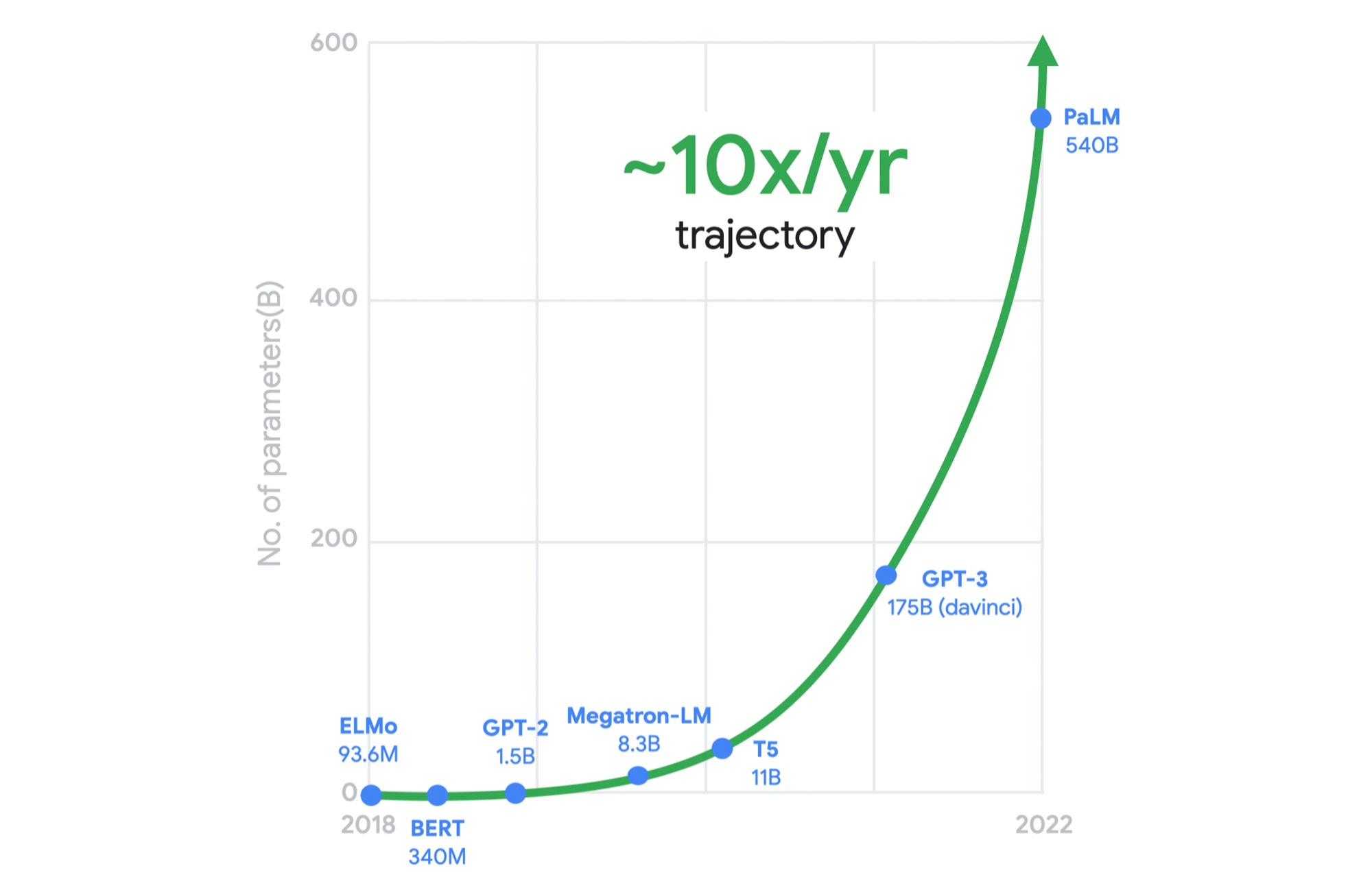
Meeting the growing performance, reliability, and security demands of both legacy and emerging workloads is a constant challenge for cloud infrastructure providers. And now, these demands are multiplying with the heightened adoption of generative AI across almost every industry. Meanwhile, the benefits of Moore’s law have been declining in recent years. We can’t rely on silicon advances alone to meet tomorrow’s needs.
As just one example, this chart shows the exponential computing demands of large language models.
It was clear to us a long time ago that we needed to rethink our infrastructure designs to meet these demands. This is why, for several years, we’ve adopted workload-optimization and intentional design as central principles for our infrastructure platform. We engineer golden paths from silicon to the customer workload, using a combination of purpose-built infrastructure, prescriptive architectures, and an open ecosystem to deliver workload-optimized infrastructure.
Offloads play a pivotal role
Central to this strategy are offload technologies. Traditionally, the CPU wears many hats: It runs the hypervisor, the virtualization stack to enable your workloads, and manages storage and networking I/O; it’s responsible for security isolation for virtual interfaces and physical hardware, etc. In this model, customer workloads running on the CPU contend for resources with these platform tasks.
Offloads on dedicated hardware perform behind-the-scenes security, networking, and storage functions that were previously performed by the host CPU, allowing the CPU to focus on maximizing performance for customer workloads.

A recent example of an on-host offload or accelerator is the Infrastructure Processing Unit (IPU), a system-on-chip that we co-designed with Intel to enable better security isolation and performance on our 3rd gen compute instances. The IPU enables:
- Predictable and efficient compute
- Programmable packet processing for low latency, 200 Gbps networking with 3x the packets per second compared to our previous-generation compute instances
- In-transit encryption with the PSP protocol
Another important example of Google’s on-host hardware is Titan, a secure, low-power microcontroller that helps ensure that every machine in Google Cloud boots from a trusted state.
But we did not stop there. To meet tomorrow’s demands, we knew we needed to go past the performance that could be achieved using the host’s dedicated offload hardware.
A tiered system of offloads
A key component of Titanium is its modern offload architecture, which combines capabilities whose scale and performance are well-established within Google, as well as new capabilities tailored for cloud use cases.
Just as modern workloads scale out horizontally in the cloud, with Titanium, we’ve extended the architecture to augment on-host offloads with an additional tier of scale-out offloads that run outside the host. This system of offloads is deployed fleet-wide and dynamically adjusts to changing workload needs to continually deliver the best performance.

Example 1: Block storage
Titanium scale-out offload enables Hyperdisk block storage to deliver stellar I/O performance. Hyperdisk’s Titanium offload on the host IPU works in tandem with the Titanium scale-out offload tier that distributes I/O across Google’s massive cluster-level filesystem, Colossus.

With traditional offload architectures, higher block storage IOPS requires purchasing larger compute instances. For example, you may need to deploy a data-intensive workload on a compute instance with many more vCPUs than the workload needs just to get sufficient storage performance. This tight coupling results in wasted resources and higher costs for customers. Further, even with large instances, storage performance in the cloud may be inadequate relative to what customers are used to with on-prem storage systems.
With our new block storage, Hyperdisk powered by Titanium, we have decoupled compute-instance size from storage performance. Hyperdisk uses a tier of offloads in our cloud fabric to offload storage I/O from the customer hosts to achieve higher storage performance even with a general-purpose VM.
In fact, today we are announcing that Titanium-powered C3 VMs with Hyperdisk Extreme now support 500K IOPS per compute instance in preview to meet the needs of the most demanding workloads. This is 25% faster IOPS/instance compared to the other two leading hyperscalers, courtesy of the Titanium system.
Example 2: Network routing
Virtual network routing is another example of using a second tier of scale-out offloads (“hoverboards”). With Titanium, Google’s Andromeda virtual networking stack on the IPU offload device sends all packets for which it does not have a route to Hoverboard gateways, which have forwarding information for all virtual networks. Hoverboards are standalone software switches that act as default routers for some flows.

Unlike the traditional gateway model, the control plane dynamically detects flows that exceed a specified usage threshold and programs them to be direct host-to-host flows, bypassing the hoverboards allowing hoverboards to focus on the long tail of less frequent flows. Typically, only a small subset of possible VM pairs in a network communicate with one another, so the VMs only have to store and process a small fraction of the usual network configuration on an individual VM host, improving per-server memory utilization and control-plane CPU scalability.
Titanium already powers your workloads
The Titanium journey began years ago with the component technologies described above. Many of our products already benefit from this architecture, and the newest elements of this architecture are now available with our 3rd gen Compute Engine instances such as C3 and the new Hyperdisk block storage.
Going forward, look for the Titanium architecture to underpin all future generations of our infrastructure offerings, in the process enabling new classes of infrastructure capabilities that move well beyond the confines of a single server.
More Relevant Stories for Your Company

Google Cloud: Craft Your Successful Migration Path
There is no one-size-fits-all solution to cloud migration. Every approach has unique considerations, so you need to understand the trade-offs of each to execute an effective migration plan. We’ve outlined the key things to consider when crafting your migration journey, including: The benefits of having your applications in the cloud.
Google Cloud Next ’22 to Commence in October: Block Your Calendar!
We’re excited to announce that Google Cloud Next returns on October 11–13, 2022. Join us for keynotes from industry luminaries and engage live with Google developers. Explore dynamic content across various learning levels, and dive deep into technologies and solutions spanning the Google Cloud and Google Workspace portfolios. Participate in breakout sessions,

How Lowe’s SRE Team Decreases Mean-time-to-recovery (MTTR)
Editor’s Note: In a previous blog, we discussed how home improvement retailer Lowe’s was able to increase the number of releases it supports by adopting Google’s Site Reliability Engineering (SRE) framework on Google Cloud. Lowe’s went from one release every two weeks to 20+ releases daily, helping meet its customer needs faster and

Making Mothers’ Day Special: How Google Cloud Migration for 1-800-FLOWERS.COM, Inc Impacts CX
Editor’s note: In honor of Mother’s Day, we look at how 1-800-FLOWERS.COM, Inc. migrated to Google Cloud as part of its digital transformation to quickly deploy seamless and convenient customer experiences across multiple brands on Mother’s Day and every day. As a leading provider of gifts designed to help customers
