





Google Cloud’s Metric Scope Makes Multi-project Monitoring Simple

4747
Of your peers have already read this article.
2:00 Minutes
The most insightful time you'll spend today!
Customers need scale and flexibility from their cloud and this extends into supporting services such as monitoring and logging. Google Cloud’s Monitoring and Logging observability services are built on the same platforms used by all of Google that handle over 16 million metrics queries per second, 2.5 exabytes of logs per month, and over 14 quadrillion metric points on disk, as of 2020. However, you let us know through consistent feedback that the previous construct of Workspaces for Cloud Monitoring was not providing the flexibility needed for your larger scale projects.
Cloud Operation’s New Approach to Multi-Project Monitoring
We’re happy to announce a new model for multi-project monitoring, which replaces the concept of Workspaces. This overhaul is geared toward maximizing the flexibility you have to manage your monitoring environments by introducing Metrics Scopes. Starting today you can associate your Google Cloud projects with multiple Metrics Scopes! Like Workspaces, Metrics Scopes will still be used to store all of the configuration content for dashboards, alerting policies, uptime checks, notification channels, and group definitions. However there is no limit to the number of Metrics Scopes to which you can associate a project. Prior to this change, a project could only be scoped with a single Workspace. Now, there are virtually unlimited possibilities for how you can set up multi-project monitoring. This unlocks a large variety of options, from more granular permissions to mission-focused configurations. At its most simple implementation though: operators/SREs can now create org-wide Metrics Scopes with monitoring configurations focused on infrastructure health. And developers can leverage Metrics Scopes built on a subset of their organization’s projects that allow them to focus on their application’s performance.
How it works
- When you have a collection of projects, Metrics Scopes enable you to view each project’s metrics in isolation as well as in combination with metrics stored by other projects.
- The Metrics Scope is hosted by a scoping project. This scoping project is the Cloud project that is selected in the Cloud Console project picker.
Example
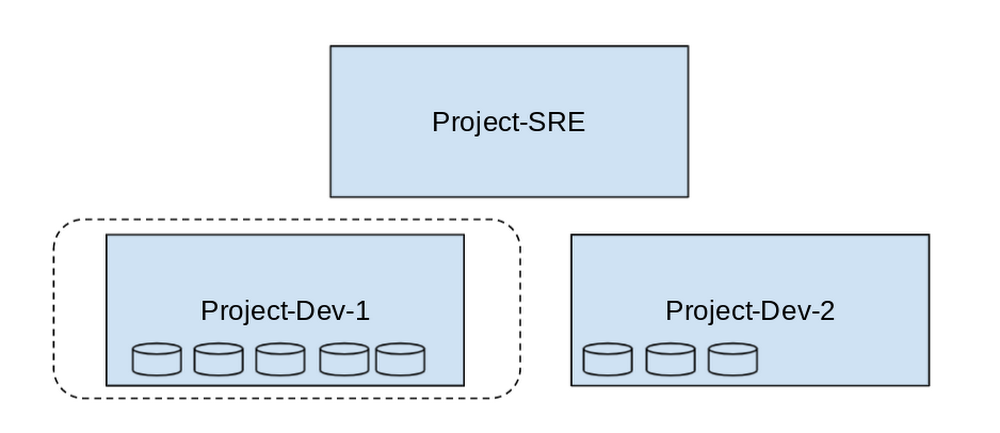
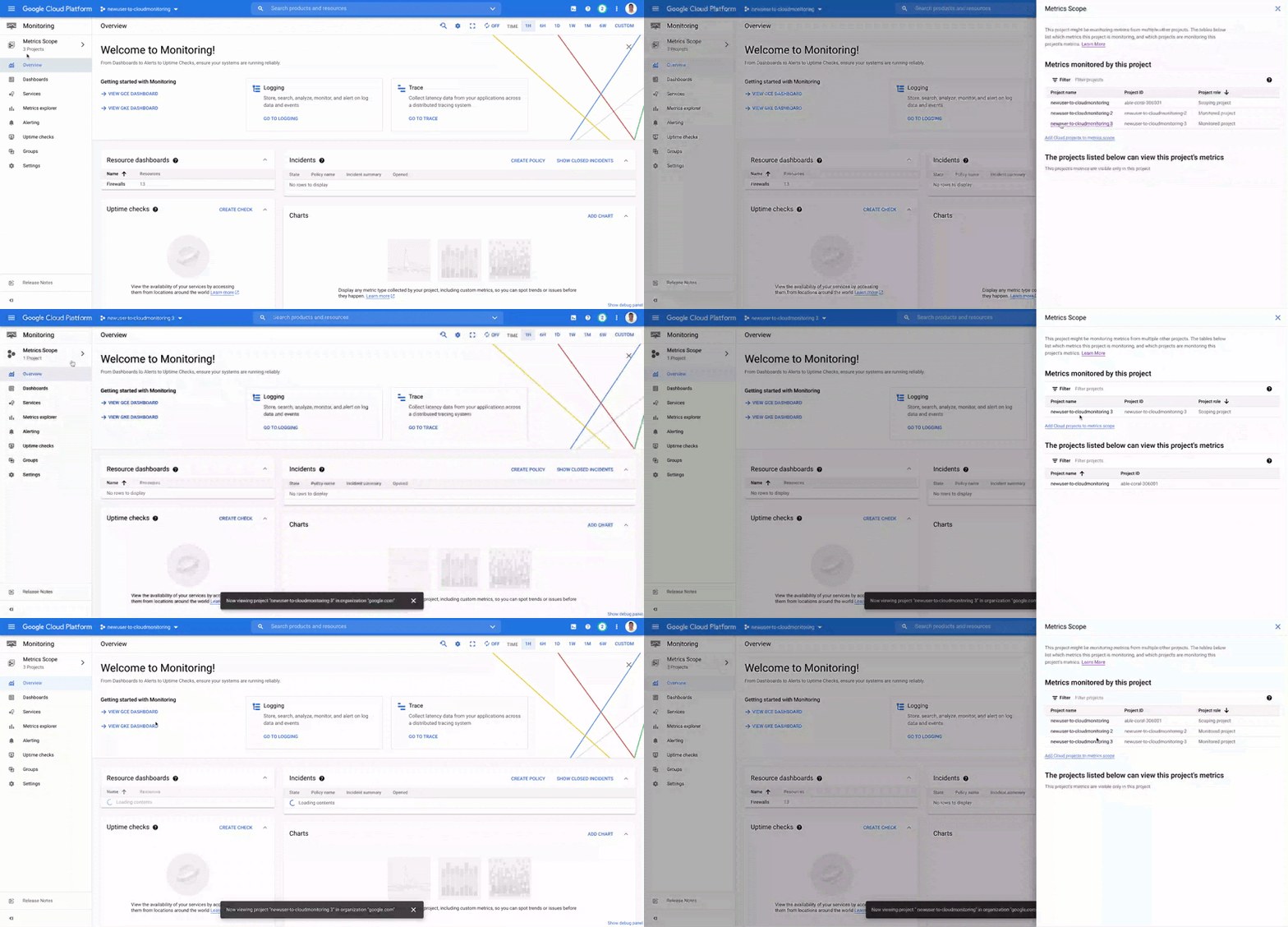
- In this example, Project-SRE is the name of a scoping project to monitor your fleet. You added two developer teams’ projects: Project-Dev-1 and Project-Dev-2, to Project-SRE’s Metrics Scope. If you select Project-SRE with the Cloud Console project picker and then go to the Monitoring page, you view the metrics for all three projects:

- If you select Project-Dev-1 with the Cloud Console project picker and then go to the Monitoring page, you view the Metrics Scope for Project-Dev-1 and you can only see the metrics for that project:
What else is new?
- Metrics Scopes can now monitor up to 375 projects (up from 100).
- New projects automatically start working in Cloud Monitoring without the previous 60-second Workspace creation process.
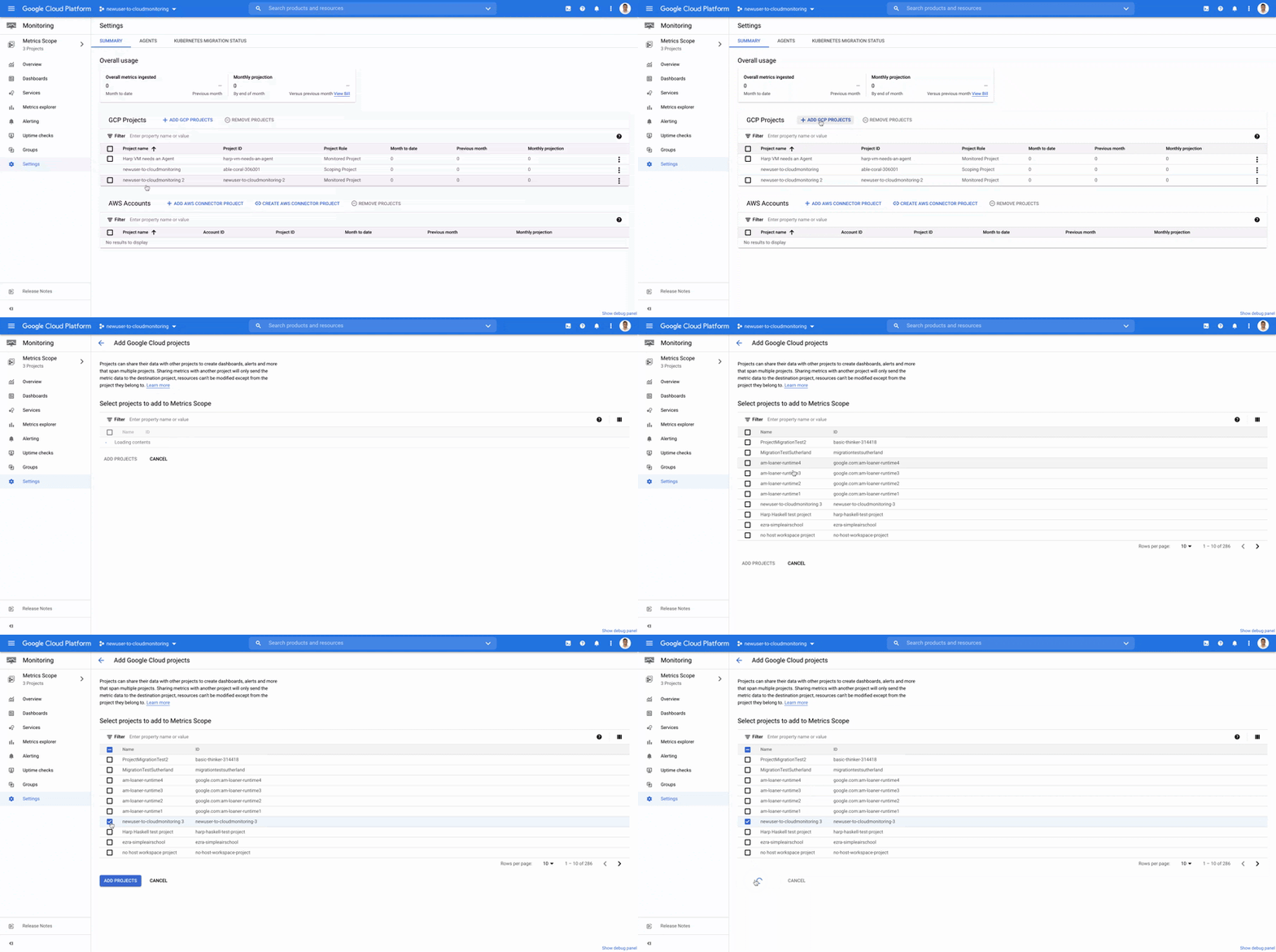
- If you want to monitor more than one project simply add it to your Metrics Scope:
Navigation
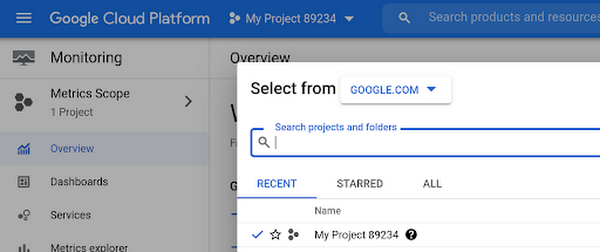
- Mentioned earlier, the Project Picker in the Cloud Console can be used to navigate between Metrics Scopes in Cloud Monitoring:
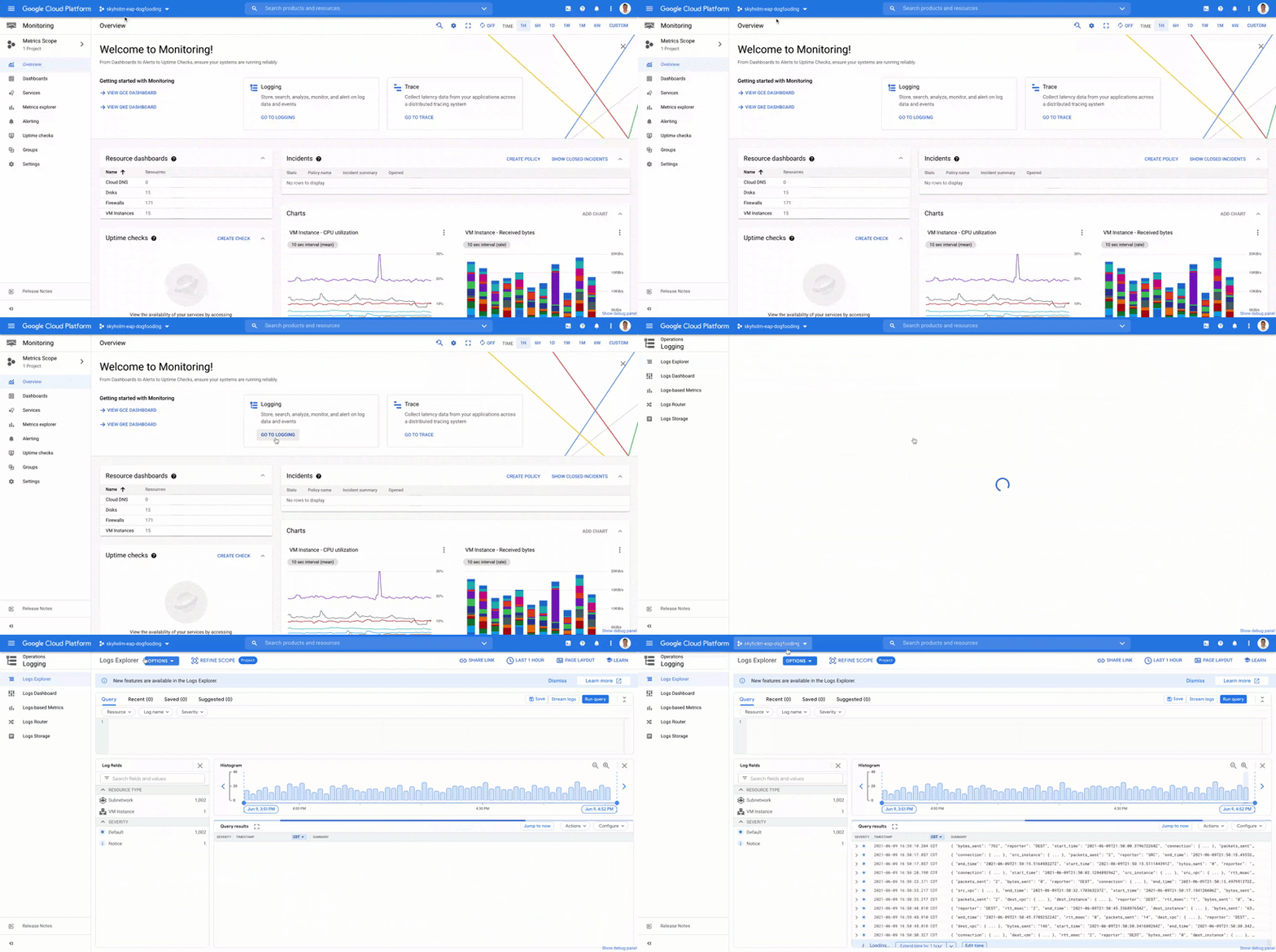
- This is now consistent with many other services across Google Cloud. Specifically, you can see how the project picker stays consistent when navigating from Cloud Monitoring to Cloud Logging:
- Additionally, to make your navigation between Metrics Scopes easy we’ve added the new Metrics Scope Tab and Panel in the UI:
Coming Soon
- The Metrics Scope API is coming within the next quarter! This API will enable you to programmatically manage your monitoring configurations and Metrics Scopes.
Current Workspaces users
If you are already using Workspaces in Cloud Monitoring you may have noticed that they converted to Metrics Scopes weeks ago. There is no additional action required and you can start taking advantage of the additional features of Metrics Scopes today.
Get Started
Companies that are digitally native or in the process of digital transformation have placed an increased operational role on developers and this often creates overlapping sets of responsibilities with Operations and SRE teams. Now multiple developer teams can focus on optimizing the performance of their applications while operators can take a fleet-wide view when maintaining and improving the performance of all of the infrastructure under their purview.For information on configuring a Metrics Scope to include metrics for multiple projects, see Viewing metrics for multiple projects.

3443
Of your peers have already downloaded this article
5:30 Minutes
The most insightful time you'll spend today!
While innovation remains a top priority across all industries, many companies are not achieving the results they want from their innovation efforts. As companies migrate their SAP enterprise resource planning (ERP) systems to the cloud, technology leaders see this as an opportunity to reimagine business processes and propel their innovation strategies.
This paper will explore the benefits that companies have reaped from their SAP cloud migration, such as using IT resources more effectively, gaining deeper insights from data, and improving innovation. It will also examine the approach organizations are taking to gain buy-in from other stakeholders in their operations, positioning the SAP migration for a successful outcome.
Accelerating AI Inference at Scale: Introducing Google Cloud TPU v5e

941
Of your peers have already read this article.
4:30 Minutes
The most insightful time you'll spend today!
Google Cloud’s AI-optimized infrastructure makes it possible for businesses to train, fine-tune, and run inference on state-of-the-art AI models faster, at greater scale, and at lower cost. We are excited to announce the preview of inference on Cloud TPUs. The new Cloud TPU v5e enables high-performance and cost-effective inference for a broad range AI workloads, including the latest state-of-the-art large language models (LLMs) and generative AI models.
As new models are released and AI becomes more sophisticated, businesses require more powerful and cost efficient compute options. Google is an AI-first company, so our AI-optimized infrastructure is built to deliver the global scale and performance demanded by Google products like YouTube, Gmail, Google Maps, Google Play, and Android that serve billions of users — as well as our cloud customers.
LLM and generative AI breakthroughs require vast amounts of computation to train and serve AI models. We’ve custom-designed, built, and deployed Cloud TPU v5e to cost-efficiently meet this growing computational demand.
Cloud TPU v5e is a great choice for accelerating your AI inference workloads:
- Cost Efficient: Up to 2.5x more performance per dollar and up to 1.7x lower latency for inference compared to TPU v4.
- Scalable: Eight TPU shapes support the full range of LLM and generative AI model sizes, up to 2 trillion parameters.
- Versatile: Robust AI framework and orchestration support.
In this blog, we’ll dive deeper into how you can leverage TPU v5e effectively for AI inference.
Up to 2.5x more performance per dollar and up to 1.7x lower latency for inference
Each TPU v5e chip provides up to 393 trillion int8 operations per second (TOPS), allowing complex models to make fast predictions. A TPU v5e pod consists of 256 chips networked over ultra-fast links. Each TPU v5e pod delivers up to 100 quadrillion int8 operations per second, or 100 PetaOps, of compute power.
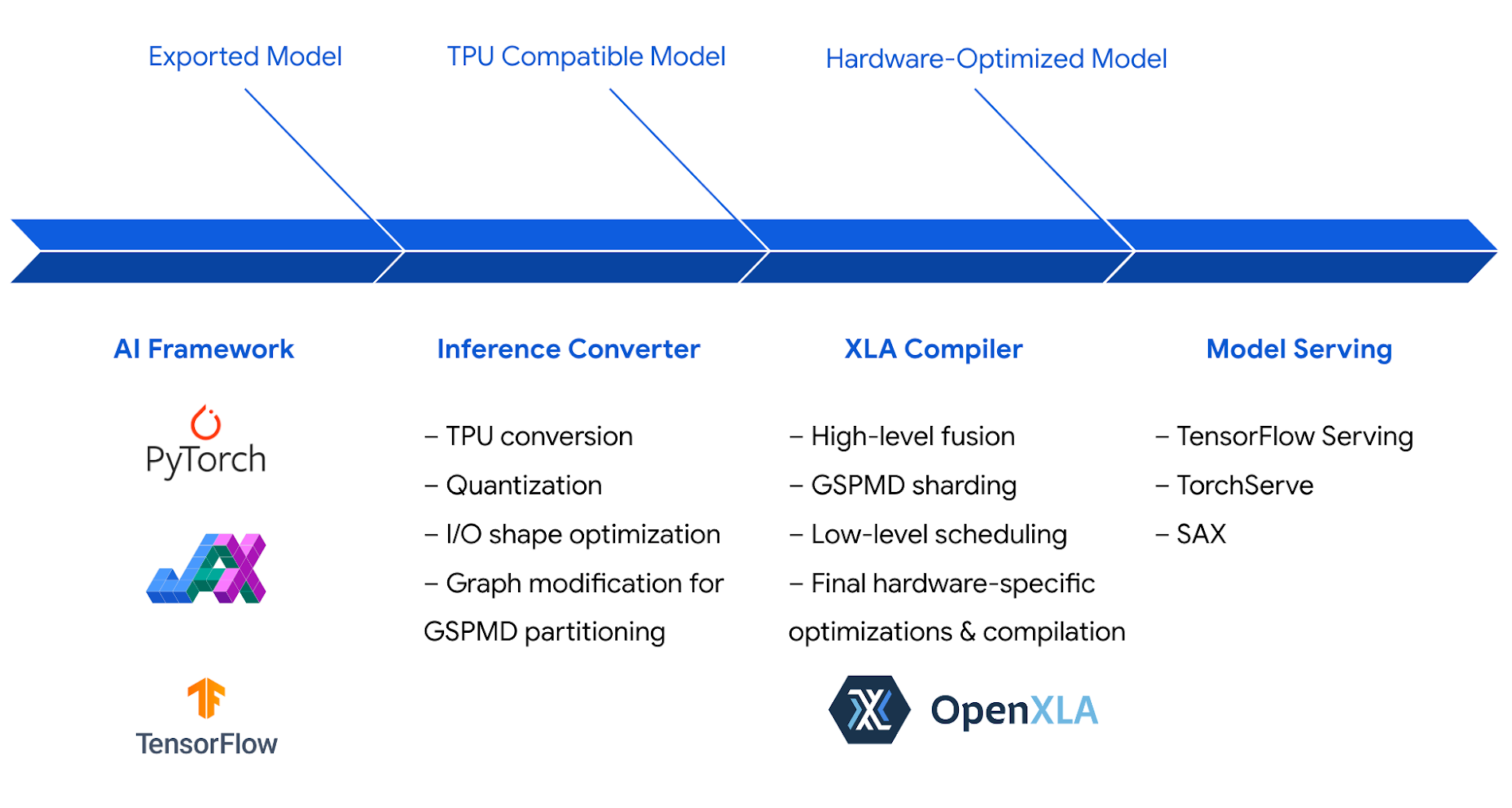
We optimized the Cloud TPU inference software stack to take full advantage of this powerful hardware. The inference stack leverages XLA, Google’s AI compiler, which generates highly-efficient code for TPUs to maximize performance and efficiency.
The combined hardware and software optimizations, including int8 quantization, enable Cloud TPU v5e to achieve up to 2.5x greater inference performance per dollar than Cloud TPU v4 on state-of-the-art LLM and generative AI models, including Llama 2, GPT-3, and Stable Diffusion 2.1:
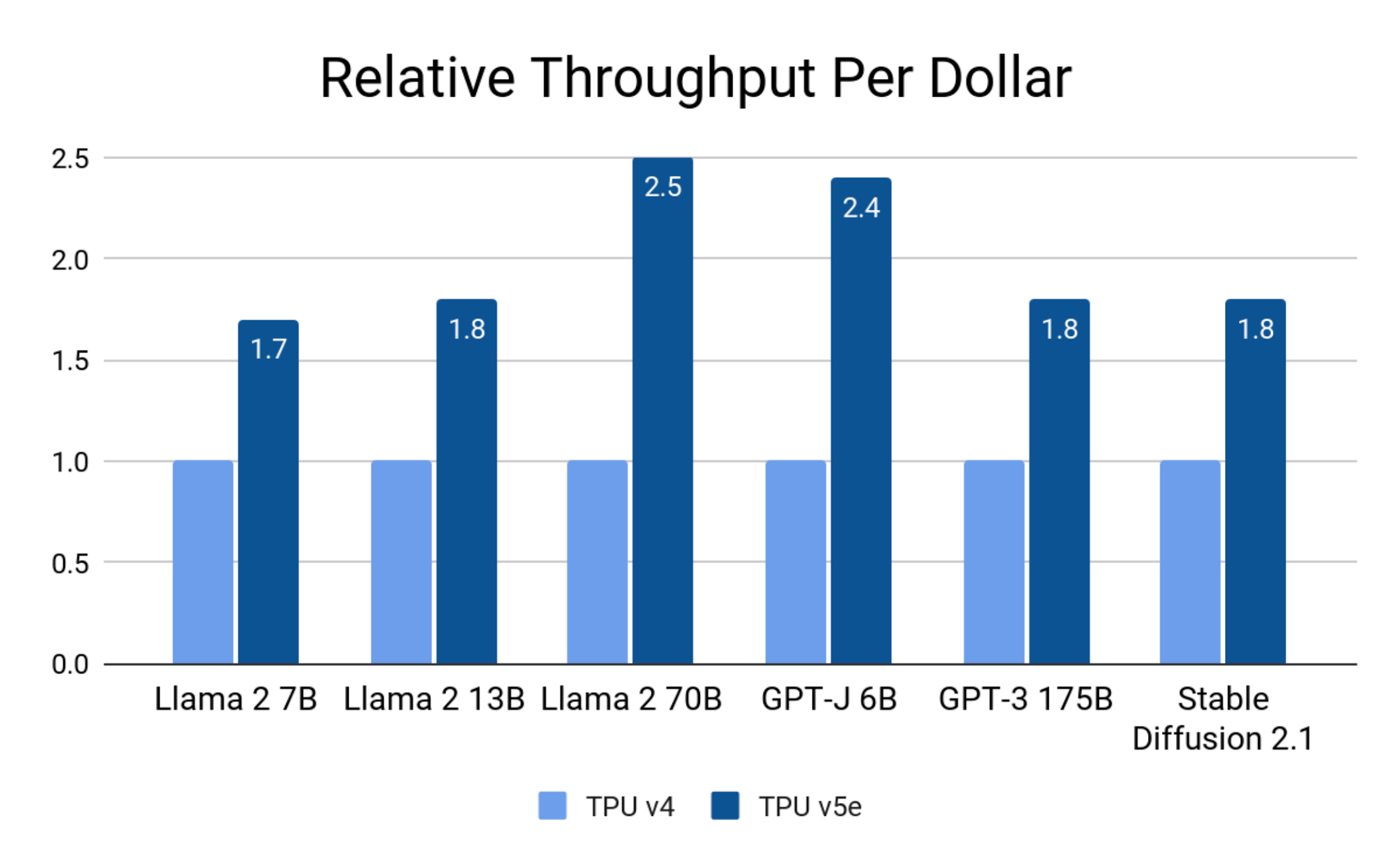
Google Internal Data. August 2023. Normalized to single-chip throughput. Precision: Llama 2 7B, 13B, 70B, GPT-J 6B: int8; GPT-J 175B, Stable Diffusion 2.1: bf16.
On latency, Cloud TPU v5e achieves up to 1.7x speedup compared to TPU v4:
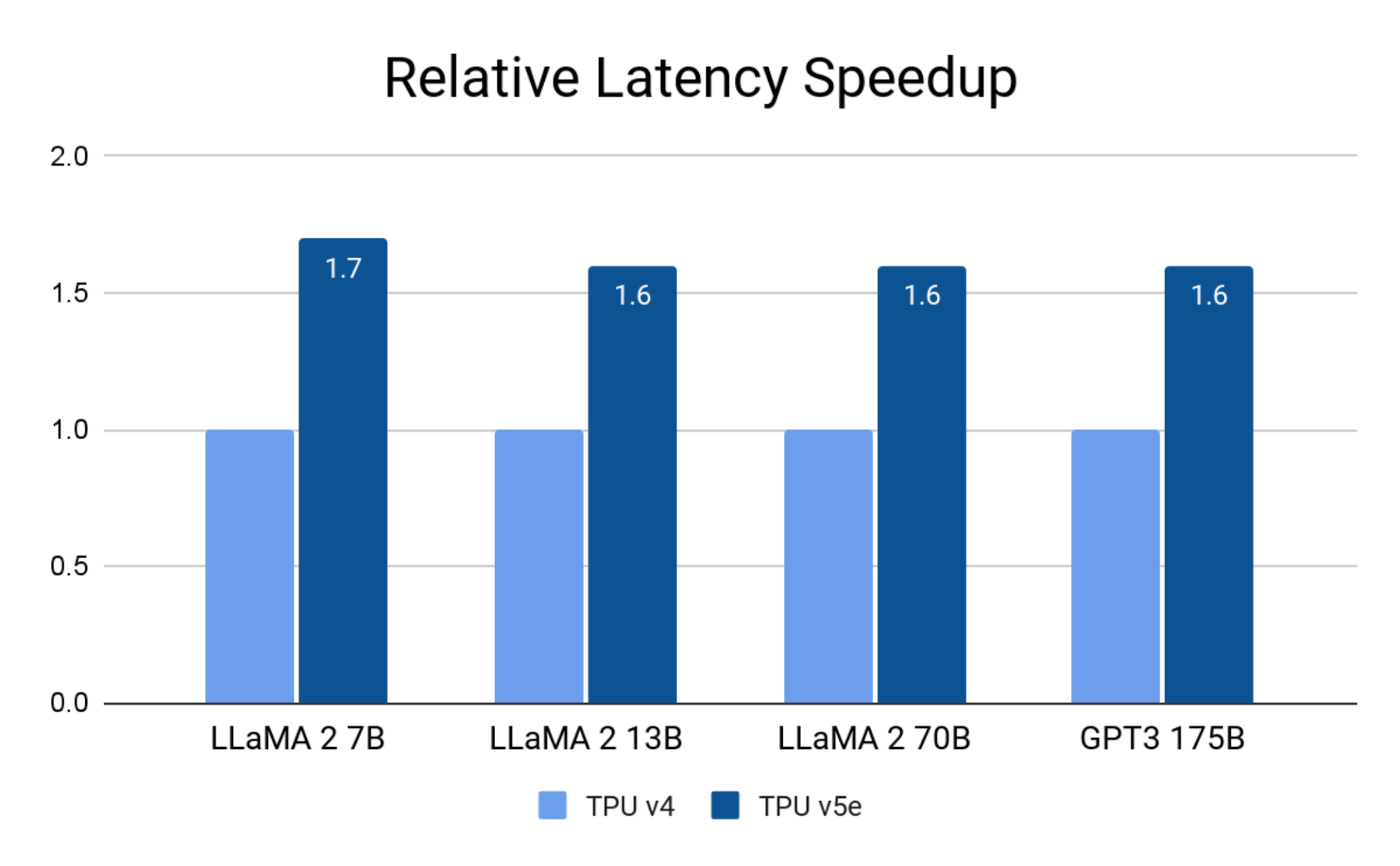
Google Internal Data. August 2023. Precision: Llama 2 7B, 13B and 70B: int8; GPT-3 175B: bf16.
Google Cloud customers have been running inference on Cloud TPU v5e, and some have seen even greater speedups on their particular workloads.
AssemblyAI offers dozens of AI models to their customers for speech recognition and understanding with over 25 million inference calls on a daily basis.
“Cloud TPU v5e consistently delivered up to 4X greater performance per dollar than comparable solutions in the market for running inference on our production model. The Google Cloud software stack is optimized for peak performance and efficiency, taking full advantage of the TPU v5e hardware that was purpose-built for accelerating the most advanced AI and ML models. This powerful and versatile combination of hardware and software dramatically accelerated our time to solution: instead of spending weeks hand-tuning custom kernels, within hours we optimized our model to meet and exceed our inference performance targets.” – Domenic Donato, VP of Technology, AssemblyAI
Scale to the full range of LLM and Generative AI model sizes
LLMs and generative AI models continue to grow in size and computational cost. The largest models require the combined compute and memory of hundreds of hardware accelerators. Cloud TPU v5e enables inference for a wide range of model sizes. A single v5e chip can run models with up to 13B parameters. From there, you can scale up to hundreds of chips and run models with up to 2 trillion parameters.
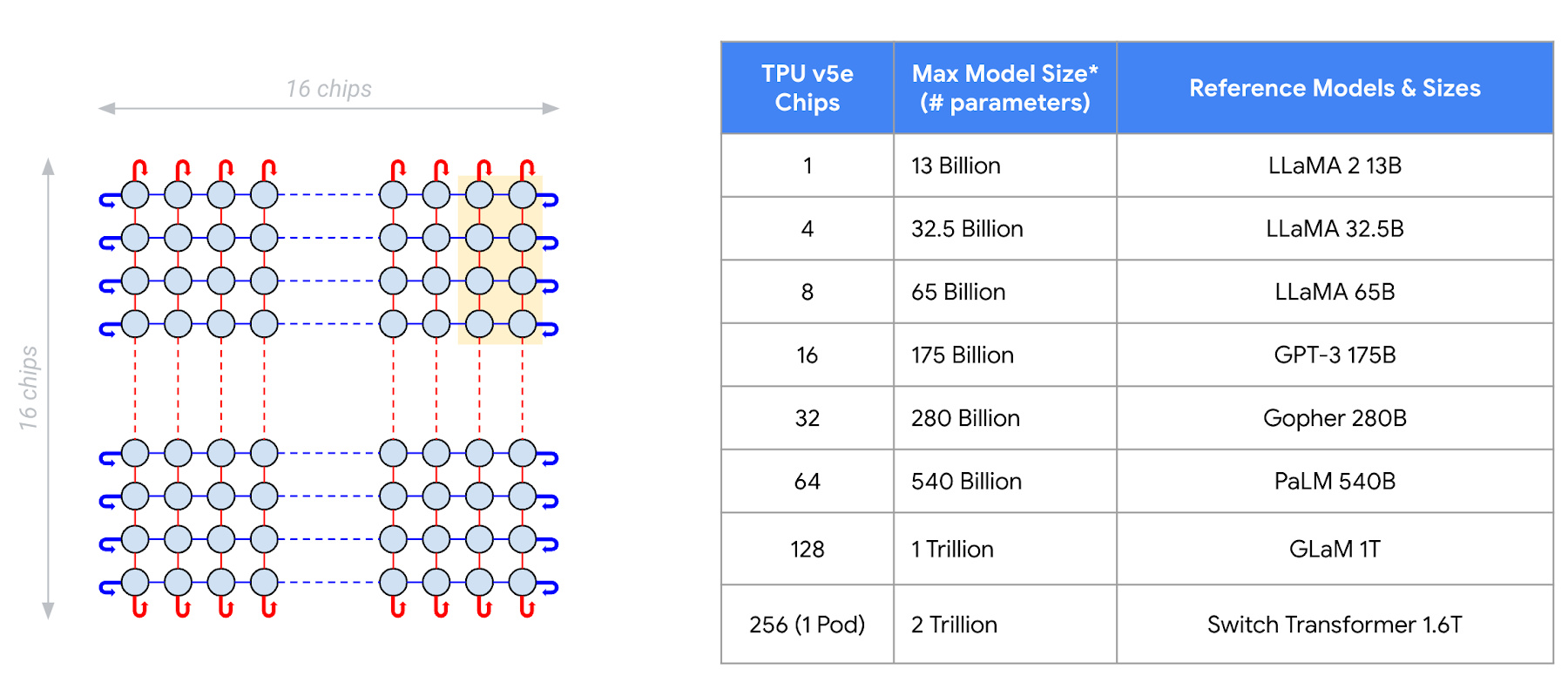
Google Internal Data. August 2023. Batch size = 1. Multi-head attention based decoder only language models: prefix length = 2048, decode steps = 256, beam size = 32 for sampling.
Gridspace leverages Google Cloud TPU infrastructure to power its full-stack conversational AI platform – building and integrating real-time conversational ASR, LLMs, semantic search, and neural TTS.
“We’re a huge fan of Google Cloud TPUs. Our benchmarks are demonstrating a 5X increase in the speed of AI models when training and running on Google Cloud TPU v5e. We are also seeing a 6x improvement in the scale of our inference metrics. We’ve scaled our AI models to billions of conversations per year across financial services, capital markets, and healthcare with Google Cloud’s AI infrastructure. Our Grace bots are powered by models trained using Cloud TPUs and served at scale on GKE with support for PCI, HITRUST, and SOC 2 compliance.” – Wonkyum Lee, Head of Machine Learning, Gridspace
Robust AI framework and orchestration support
Leading AI frameworks, including PyTorch, JAX, and TensorFlow, provide robust support for inference on Cloud TPU v5e. This means you can now train and serve models end-to-end on Cloud TPUs: what you train is what you serve.
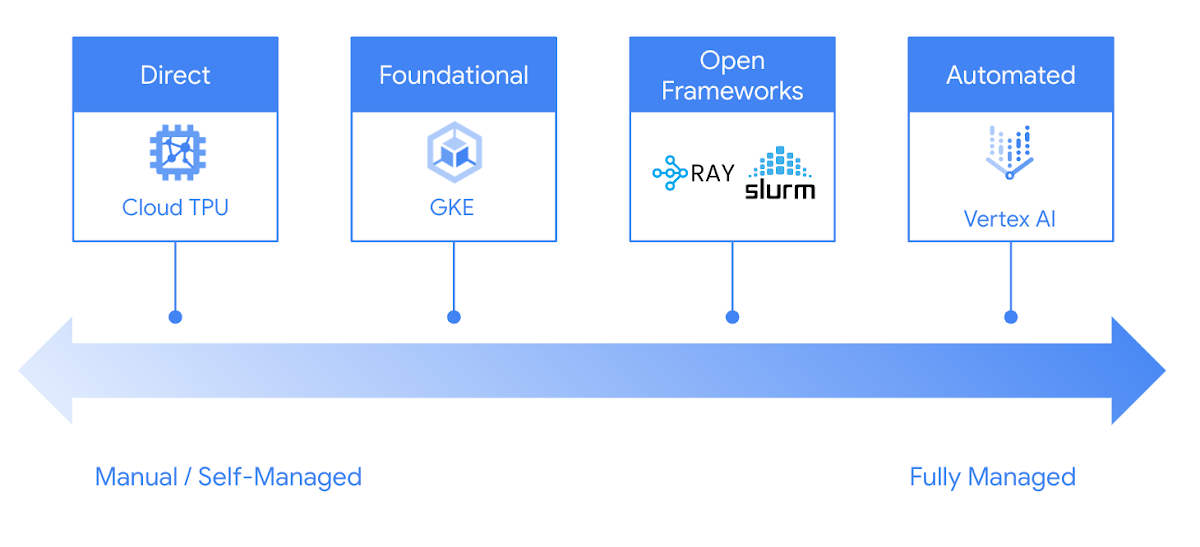
Google Cloud offers you many choices to run inference on Cloud TPUs easily and reliably. From GKE and Vertex AI, to popular open-source frameworks such as Ray and Slurm, you can leverage Google Cloud TPUs in your preferred way to fit your development process.
Try Cloud TPU v5e for inference today
Cloud TPU v5e provides a high-performance, cost-efficient, scalable, and reliable inference platform for LLMs and generative AI models. Leading AI companies are leveraging the power of Cloud TPU v5e to serve AI models at scale:
To get started with inference on Cloud TPU, reach out to your Google Cloud account manager or contact Google Cloud sales.
BURGER KING Germany: Serving Up Marketing Insights and Supply Chain Visibility Easily

13940
Of your peers have already read this article.
8:30 Minutes
The most insightful time you'll spend today!
Do hamburgers really come from Hamburg? This may still be a matter of debate, but the popularity of American-style burger joints not just in Hamburg but all over Germany, is clear. Germany’s top two fast food companies are both burger chains. One of them is BURGER KING®, a global brand that welcomes more than 11 million customers worldwide every day. The company arrived in Germany in 1976, when its first restaurant opened in Berlin. It now operates more than 100 restaurants across Germany, with franchisees operating more than 600 restaurants of their own.
“In the fast food industry, being able to move quickly is very important. That means delivering the right promotion to our app or launching a viral campaign within days. To do that across more than 700 restaurants, we need the support of the right technology.”
—Oliver Mielentz, IT Manager, BURGER KING® Deutschland GmbH
Previously a subsidiary of the U.S. business, BURGER KING® Germany became an independent company in 2015. As a result, it needed to develop its own IT infrastructure, and the changeover needed to happen fast. “We had to put in place systems that would work for the entire network of franchisees and enable us to easily roll out campaigns,” explains Oliver Mielentz, IT Manager at BURGER KING® Deutschland GmbH.
With the help of Google Cloud Premier partner Cloudwürdig, BURGER KING® Germany chose Google Cloud and G Suite as the right combination to suit its needs.
“In the fast food industry, being able to move quickly is very important,” says Oliver. “That means delivering the right promotion to our app or launching a viral campaign within days. To do that across more than 700 restaurants, we need the support of the right technology.”
Building a franchisee platform in just three months
When a business has multiple franchisees, it’s important to make sure everyone is on the same page, especially in the fast-paced fast food environment. “We have to collate data from all our franchisees and produce reports quickly in order to react to changes in customer behavior,” explains Oliver. “That means processing every transaction that takes place in our restaurants.” Following the restructure, BURGER KING® Germany also needed to build a secure invoicing system with data storage and optimize its communication channels.
“Using Tableau with BigQuery, we’re able to produce reports very quickly. Previously, it took much longer, as data had to be fetched manually. Our reaction time is now almost a business day faster.”
—Oliver Mielentz, IT Manager, BURGER KING® Deutschland GmbH
With support from Witter-IT, BURGER KING® Germany chose Cloudwürdig to build its BKD Connect internal platform on Google Cloud. Thanks to the ready-to-go tools on Google Cloud, it was able to put its invoicing system and data warehouse in place in just three months.
For the BURGER KING® Germany data warehouse, Cloudwürdig built an ETL pipeline that channels ticket data for every sale into BigQuery. “Data is gathered from the restaurants,” says Oliver, “and using Tableau with BigQuery, we’re able to produce reports very quickly. Previously, it took much longer, as data had to be fetched manually. Our reaction time is now almost a business day faster.”
As the ticket data for every transaction is stored in BigQuery, the marketing team can easily see exactly which products are selling well. That’s crucial for tweaking promotions as well as monitoring the supply chain to make sure enough produce is delivered to restaurants in response to changes in demand.
“Thanks to BigQuery, we have a speedy data pipeline that enables us to react on the same day to changes in the market and eliminate bottlenecks in production,” says Oliver.
Switching to G Suite to improve communication
To enable franchisees to sign in to its BKD Connect Platform, BURGER KING® Germany needed a secure authentication system. To solve that problem, it chose to provide franchisees with G Suite accounts. “It’s really easy to set up a new franchisee on the platform. I just create a new G Suite account and Drive folder for it, and it’s ready to go,” says Oliver. G Suite also helps the franchise network to run efficiently, as daily reports are automatically saved to Drive and shared to the appropriate regional network. “Thanks to that system, it’s much easier for any team at headquarters to access the information it needs,” Oliver explains.
BURGER KING® Germany also recently extended its use of G Suite across the whole company. “Following an evaluation of our previous email and productivity software, I made the decision to switch solely to G Suite,” says Oliver. BURGER KING® Germany employees now use Gmail, Calendar, and Drive for their day-to-day productivity needs. “We only just completed the migration, but already, everyone’s happy,” says Oliver. “It’s so easy to share a file using Drive or set up a meeting on Calendar.”
“We’re big fans of Hangouts Meet, and we have two rooms here at our Hanover headquarters equipped with Hangouts Meet hardware,” Oliver adds. “The speech quality is good, and it’s helpful to be able to see every participant, especially when you’re running a meeting with multiple franchisees.”
Optimizing infrastructure to power innovative campaigns
The BURGER KING® app, available for iOS and Android, helps the company to deliver a great customer experience. Through their MyBK accounts, guests can access coupons and special promotions. “We had a really interesting campaign for Easter: guests used the app to hunt for virtual Easter eggs,” explains Oliver. “We knew it was going to be big, and our previous back end wouldn’t have been able to handle the traffic.”
To enable the marketing campaign to go ahead, BURGER KING® Germany moved the back end of the app, along with its website, to Google Cloud. For developing and running its web and app back ends, it now uses App Engine and virtual machines on Compute Engine, as well as Memorystore and Cloud Functions. For monitoring and logging, it uses Stackdriver, and Cloud CDN and Cloud DNS to easily handle its traffic.
“We ran the campaign without any performance issues, even though we were receiving several million hits a day,” says Oliver. Since migrating the back end to Google Cloud, the marketing team also launched the popular “Escape the Clown” campaign. “That campaign blew our minds!” says Oliver. “It wouldn’t have been possible without Google Cloud, because it required a lot of back end capacity.”
To develop the app infrastructure it needs, BURGER KING® Germany relies on Cloudwürdig. “Working with Cloudwürdig is great because the team has the same agile mindset as us,” says Oliver. “When we have a new idea, we just set up a meeting, and in a couple of days the new infrastructure is in place. For Escape the Clown, it only took a few weeks to get everything ready to launch.”
Leveraging integrated tools to grow the business
Using Google Cloud together with G Suite enables BURGER KING® Germany to run its franchise network efficiently, while keeping its IT team lean. “Google Cloud and G Suite are the perfect fit for the way of working at BURGER KING® Germany,” says Oliver. “Many of the company’s operatives are often on the road, visiting restaurants and franchisees. With these tools, they can work flexibly and react quickly to the situation on the ground.”
“In order to grow the business, we need to use the data we receive every day to understand exactly what is happening in our restaurants. With the tools provided by Google Cloud, we can get more guests through the door and offer them a better experience.”
—Oliver Mielentz, IT Manager, BURGER KING® Deutschland GmbH
It also helps to keep infrastructure costs under control. “With Google Cloud, we only pay for what we use, which is really important for us,” Oliver explains. “It means we can scale up quickly if we see an opportunity to react to a trend in customer behavior and launch a new marketing campaign that resonates with the moment. When it’s finished, we can then scale down again, and that definitely saves us money.”
BURGER KING® is now working with Cloudwürdig to add more functionality to the BURGER KING® app using Google Kubernetes Engine. “We like to work with customers long-term to support their digital transformation. BURGER KING® Germany is a great example of how one project can develop into a great collaboration,” says Benny Woletz, Managing Director of Cloudwürdig.
BURGER KING® also plans to expand its presence in Germany and gain a greater market share by further tailoring both its marketing and the way it runs its restaurants to answer its guests’ needs. “In order to grow the business, we need to use the data we receive every day to understand exactly what is happening in our restaurants,” says Oliver. “With the tools provided by Google Cloud, we can get more guests through the door and offer them a better experience.”

4642
Of your peers have already downloaded this article
1:30 Minutes
The most insightful time you'll spend today!
As organizations continue to move workloads to public clouds, security professionals must protect the sensitive data and digital identities found in those workloads. Once wary of cloud adoption, many security professionals now believe that the native security capabilities of large public cloud platforms actually offer more affordable and superior security than what their teams could deliver themselves if the workloads remained on premises.
However, native security capabilities and features vary across public cloud providers. Three key factors can ensure a smooth transition to the cloud and influence public cloud provider selection: breadth and depth of native security features, unified configuration and management, and aggressive roadmaps.
Forrester researched, analyzed, and scored seven leading public cloud providers on 37 criteria and found that Google Cloud leads the pack.
Download this Forrester Research report to learn why Google Cloud comes out on top.
Learn to Access Process Metrics for Full-visibility into Software and Infrastructure behind Your Apps

3390
Of your peers have already read this article.
2:00 Minutes
The most insightful time you'll spend today!
When you are experiencing an issue with your application or service, having deep visibility into both the infrastructure and the software powering your apps and services is critical. Most monitoring services provide insights at the Virtual Machine (VM) level, but few go further. To get a full picture of the state of your application or service, you need to know what processes are running on your infrastructure. That visibility into the processes running on your VMs is provided out of the box by the new Ops Agent and made available by default in Cloud Monitoring. Today we will cover how to access process metrics and why you should start monitoring them.
Better visibility with process metrics
The data gathered by process metrics include CPU, memory, I/O, number of threads, and more, for any running processes and services on your VMs. When the Ops Agent or the Cloud Monitoring agent is installed, these metrics are captured at 60-second intervals and sent to Cloud Monitoring so you can visualize, analyze, track, and alert on them. A single VM may run tens or hundreds of processes, while you may have tens of thousands running across your fleet of VMs.
As a developer, you may only care about seeing inside a single VM to troubleshoot and identify memory leaks or the source of performance issues.
As an operator or IT Admin, you may be interested in aggregate resource consumption, building baseline views of compute, storage, and networking usage across your VM fleet. Then, when those baseline consumption levels break normal behaviors, you will know when to investigate your systems.
Built for scale and ease of use
Cloud Monitoring is built on the same advanced backend that powers metrics across Google. This proven scalability means your metrics ingestion will be supported despite the extremely high cardinality. Additionally, our agents do not require any config file changes to turn on process metric monitoring.
Lastly, our goal is to provide you the observability and telemetry data where, and when, you need it. So, like the rest of the operations suite, we deliver process metrics in the context of your infrastructure, directly in the VM admin console.
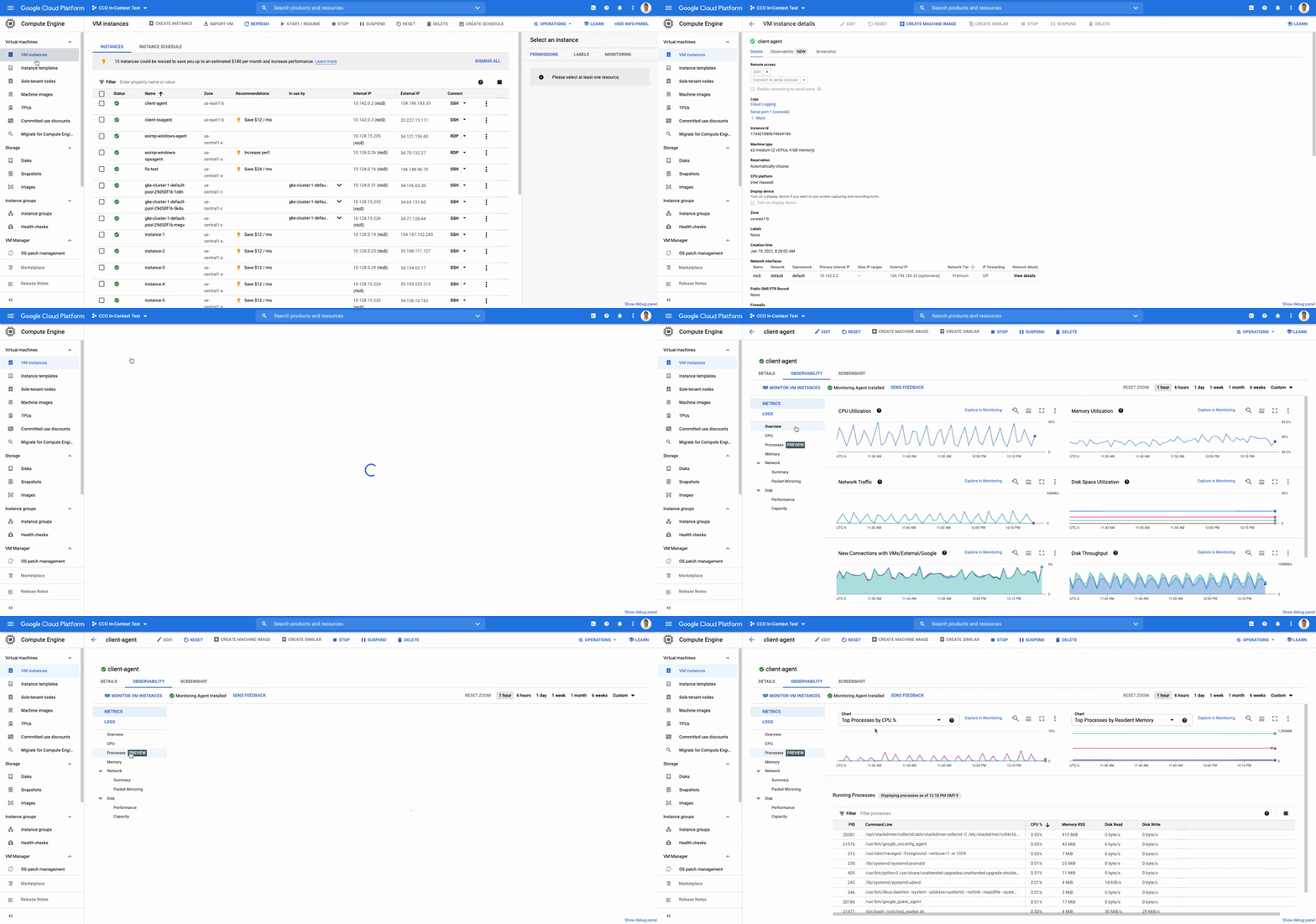
The navigation is simple. Once you have the Ops Agent or the Cloud Monitoring agent installed in your VMs:
- Go to the Compute Engine console page and click on VM Instances
- Select the VM that you want to investigate
- In the navigation menu on the top, click Observability
- Click on Metrics
- Lastly, click on Processes
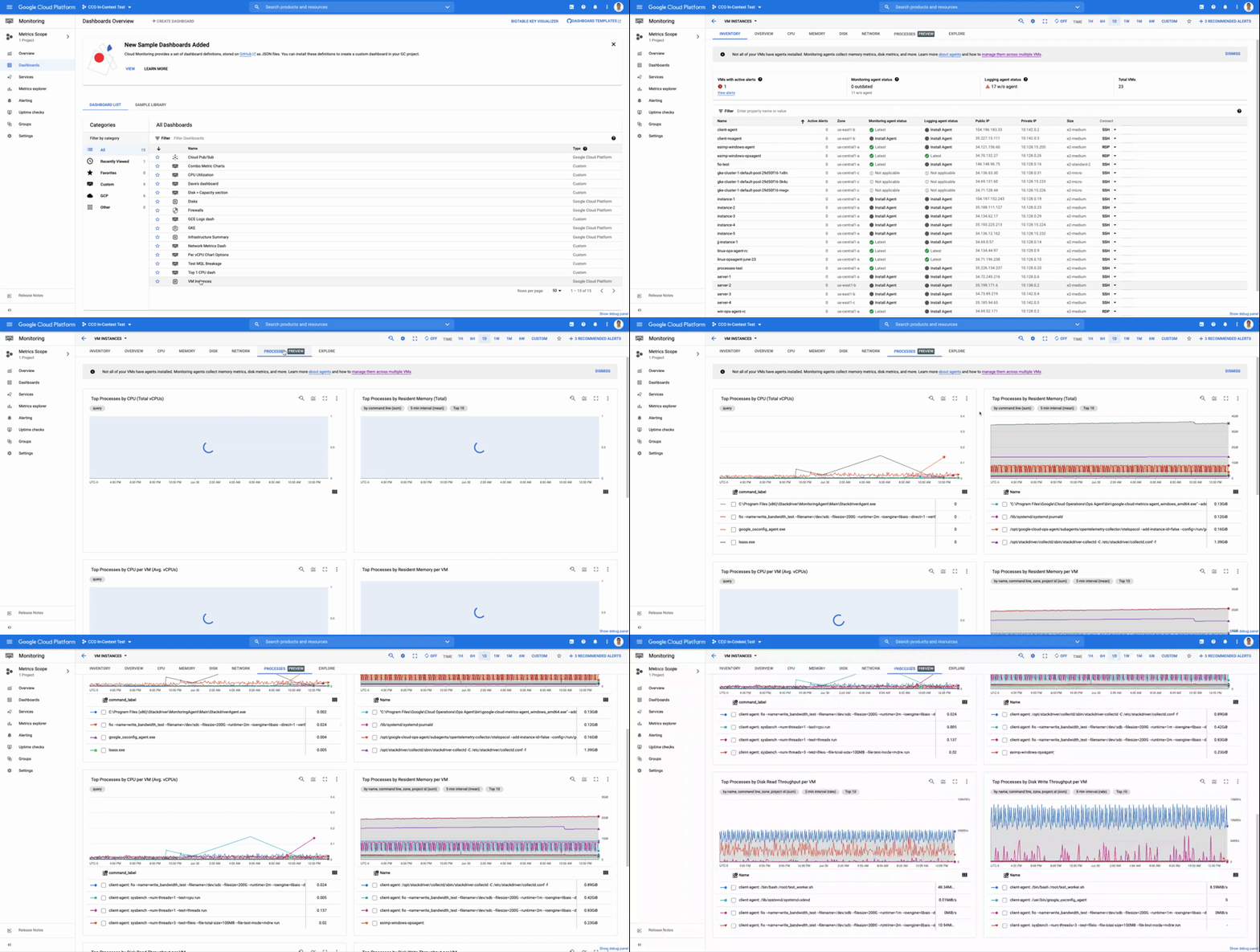
In the window on the right you will see a chart and a table with all of the processes in your VM. You can also filter by time frame and sort by name or value. You do not need to do anything, other than have the agent installed, for the process to be detected and displayed.
Fleet-wide metrics monitoring
Cloud Monitoring gives you a look across your fleet of VMs so you can identify the aggregated usage of resources by processes. This level of broad, yet granular, insight can drive your decisions around which software to run or how many VMs you need to optimally power your apps and services. Admins can perform a cost-savings analysis if they determine that certain processes are slowing down the work of a large number of VMs. The larger numbers of less powerful VMs can be replaced by fewer, more capable VMs.
To get this fleet-wide view:
- Navigate to Cloud Monitoring
- Click Dashboards in the left menu
- In the All Dashboards list, click on VM Instances
- Towards the top of the window, click on Processes
This provides many charts detailing the processes running across your fleet of VMs.
Get started today
To start identifying and monitoring your process metrics, you must first install the Ops Agent, or have installed the legacy Cloud Monitoring agent. Once that is complete, the process metrics data will automatically be ingested into Cloud Monitoring and the VM admin console.
If you have any questions, or to join the conversation with other developers, operators, DevOps, and SREs, visit the Cloud Operations page in the Google Cloud Community.
More Relevant Stories for Your Company

CCAI Insights: Answer Customers’ Queries & Understand Them Better with Conversation Data
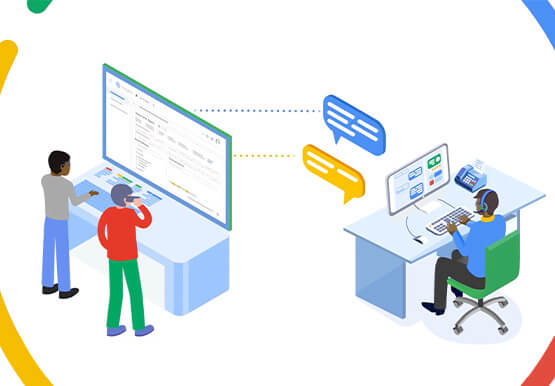
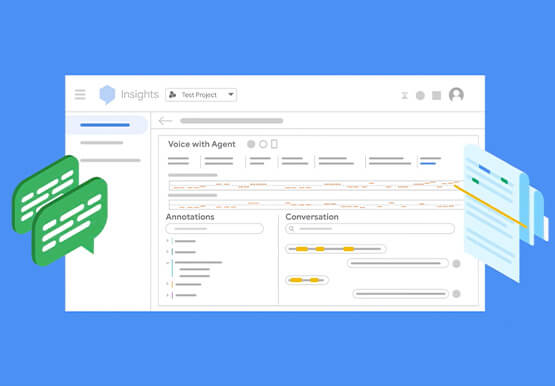
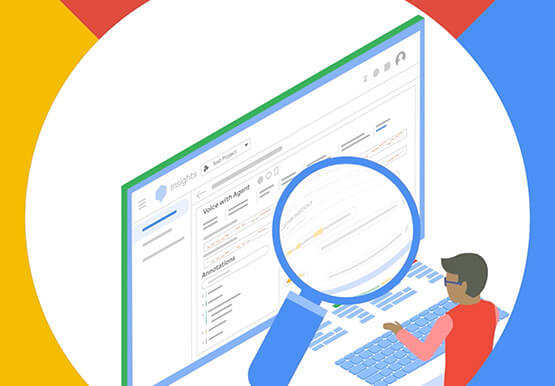
With CCAI Insights, businesses can drive contact center efficiency, solve customer problems and leverage data from customer interactions to understand them better! CCAI Insights, a core piece of the Google Cloud's Contact Center AI product suite is built to help contact center management dive into data to adjust business needs,

Why Now Moving to Cloud is Great for Media and Broadcasting Companies
The broadcasting industry has gone through many evolutions since its inception. From linear over-the-air (OTA) to digital & personalized, to standard to ultra high definition, these evolutions were driven by increased demand from viewers who want more choices. The next evolution is happening now, driven by the emergence in cloud

The Power of Two: Best Practices for Mergers & Acquisitions on Google Cloud
Congratulations! Your company just acquired or merged with another organization, beginning an important new chapter in its history. But like with many business deals, the devil is in the details — particularly when it comes to integrating the two companies’ cloud domains and organizations. In this blog post, we look

Rethinking retail with Google Cloud Retail Search
Cloud Retail Search, part of Discovery Solutions For Retail portfolio, helps retailers significantly improve the shopping experience on their digital platform with ‘Google-quality’ search. Cloud Retail Search offers advanced search capabilities such as better understanding user intent and self-learning ranking models that help retailers unlock the full potential of their
