





Fully-managed-zero-trust Security Solution, Traffic Director Integrated with CA Service

4964
Of your peers have already read this article.
1:30 Minutes
The most insightful time you'll spend today!
We created Traffic Director to bring to you a fully managed service mesh product that includes load balancing, traffic management and service discovery. And now, we’re happy to announce the availability of a fully-managed zero-trust security solution using Traffic Director with Google Kubernetes Engine (GKE) and Certificate Authority (CA) Service.
When platform administrators and security professionals think about modernizing their applications with a forward-looking security posture, they look for “zero-trust” security. This security posture is based on few fundamental blocks:
- A means of allocating and asserting service identity (for example, using X.509 certificates)
- Mutual authentication (mTLS) or server authentication (TLS)
- Encryption for all traffic flows (TLS encryption)
- Authorization checks and minimal privileges
- Infrastructure to make all of the above manageable and reliable
Traffic Director does this by integrating with CA Service, a highly available private CA which issues private certificates expressing service identities, and provides a managed mTLS certificate infrastructure with full certificate lifecycle management. Together, these solve both certificate issuance and CA rotation complexities.
With Traffic Director managing your service-to-service security, you can now enjoy end-to-end encryption, service-level authentication and granular authorization policies for your service mesh.

With this new capability, you can now:
- Implement mutual TLS (mTLS) and TLS between your services, including certificate lifecycle management. Communications within your mesh are authenticated and encrypted.
- Enable identity-based authorization, as well as authorization based on other parameters (such as the request method). These concepts underpin role-based access controls (RBAC) and enable you to take a “least privileges” stance where only authorized services can communicate with each other based on ALLOW/DENY rules.
mTLS is supported whether you’re using Envoy or proxyless gRPC for your service mesh. Authorization support for proxyless gRPC is coming later this year. Check out our documentation to learn more and get started with Envoy or proxyless gRPC.
How Firewall Insights can Simplify Corporate Firewall Rules

3115
Of your peers have already read this article.
3:30 Minutes
The most insightful time you'll spend today!
Corporate firewalls typically include a massive number of rules, which accumulate over time as new workloads are added. When rules stack up piecemeal like this, misconfigurations occur that, at best, create headaches for security administrators, and at worst, create vulnerabilities that lead to security breaches.
To address this, we have introduced the Firewall Insights module in our Network Intelligence Center, which provides a single console for managing Google Cloud network visibility, monitoring and troubleshooting.
What are Firewall insights?
Historically, there hasn’t been an easy way to deal with the accumulation of complicated firewall rules. That was until we created Firewall Insights, which provides metrics reports and insight reports. These two reports contain information about firewall usage and the impact of various firewall rules on your VPC network. Even better, these insights and metrics are integrated into your Google Cloud Console for the VPC firewall and are also available via APIs.
You can use metrics reports to verify that firewall rules are being used appropriately and as intended. This report can uncover leftover rules from the past that are not actively used, review that the firewall rules allow or deny what is intended, perform live debugging of connections dropped, and leverage Cloud Monitoring to discover malicious attempts to access your network.
You can use insight reports to identify firewall misconfigurations, detect security attacks, and optimize and tighten your security rules.
Let’s take a look at how these reports work.
Metrics Report, a deeper dive
Metrics insights analyzes your VPC firewalls usage by tracking metrics such as firewall hit counts and last used. Let’s check this out with an example:
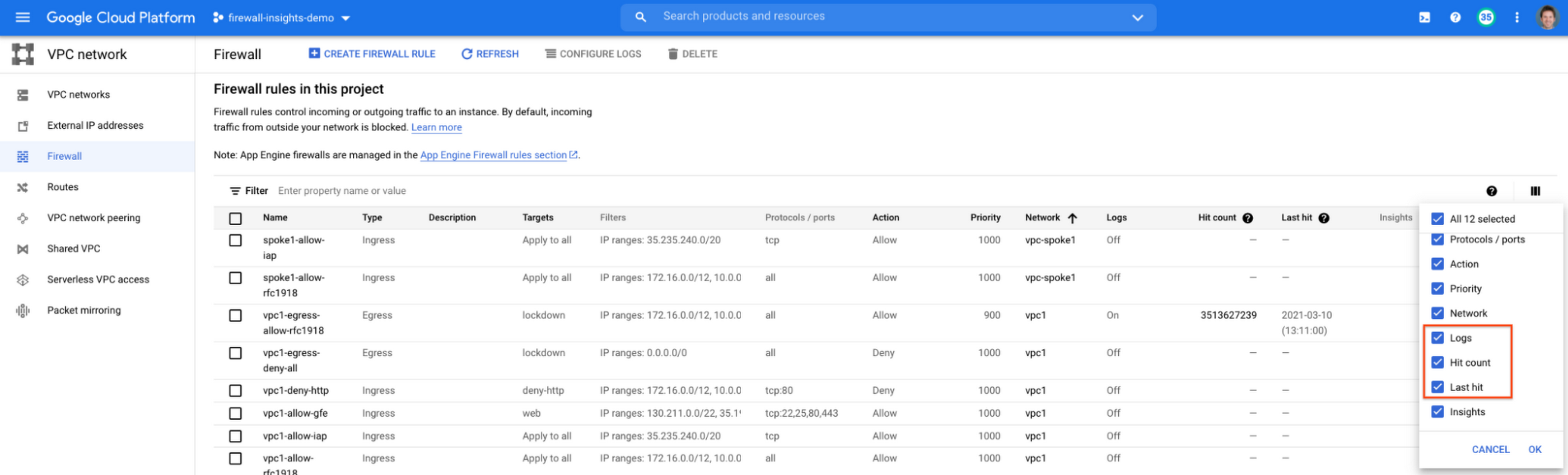
When you navigate to your VPC network and click on Firewall, ensure that you have selected Logs, Hit count and also Last hit in the column display options:
After this is enabled, now you should be able to see your VPC firewall rules with the hit count and last hit metrics. In the image below you can see that if logs are not enabled for rules, hit count and last hit metrics will not be collected. If logs are enabled, these details are collected, and shown in the VPC firewalls console.
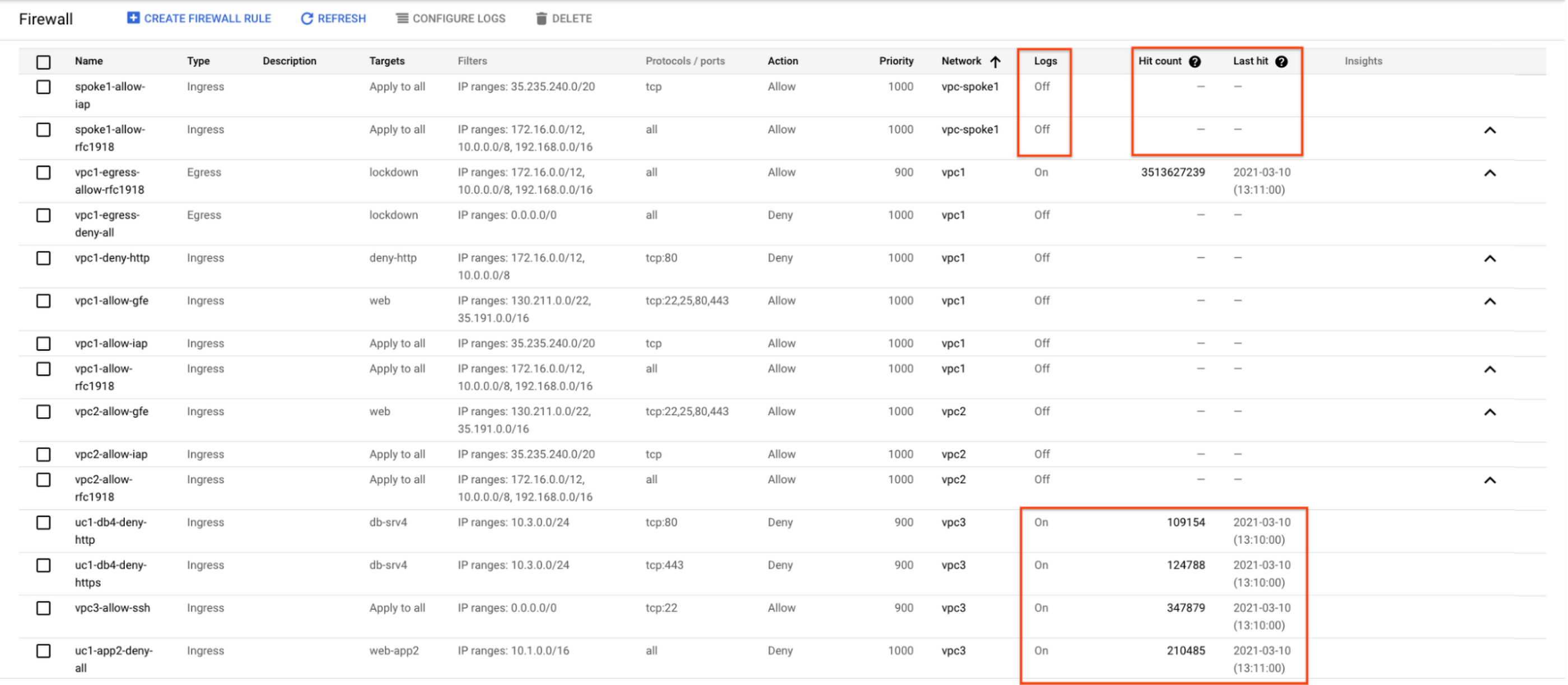
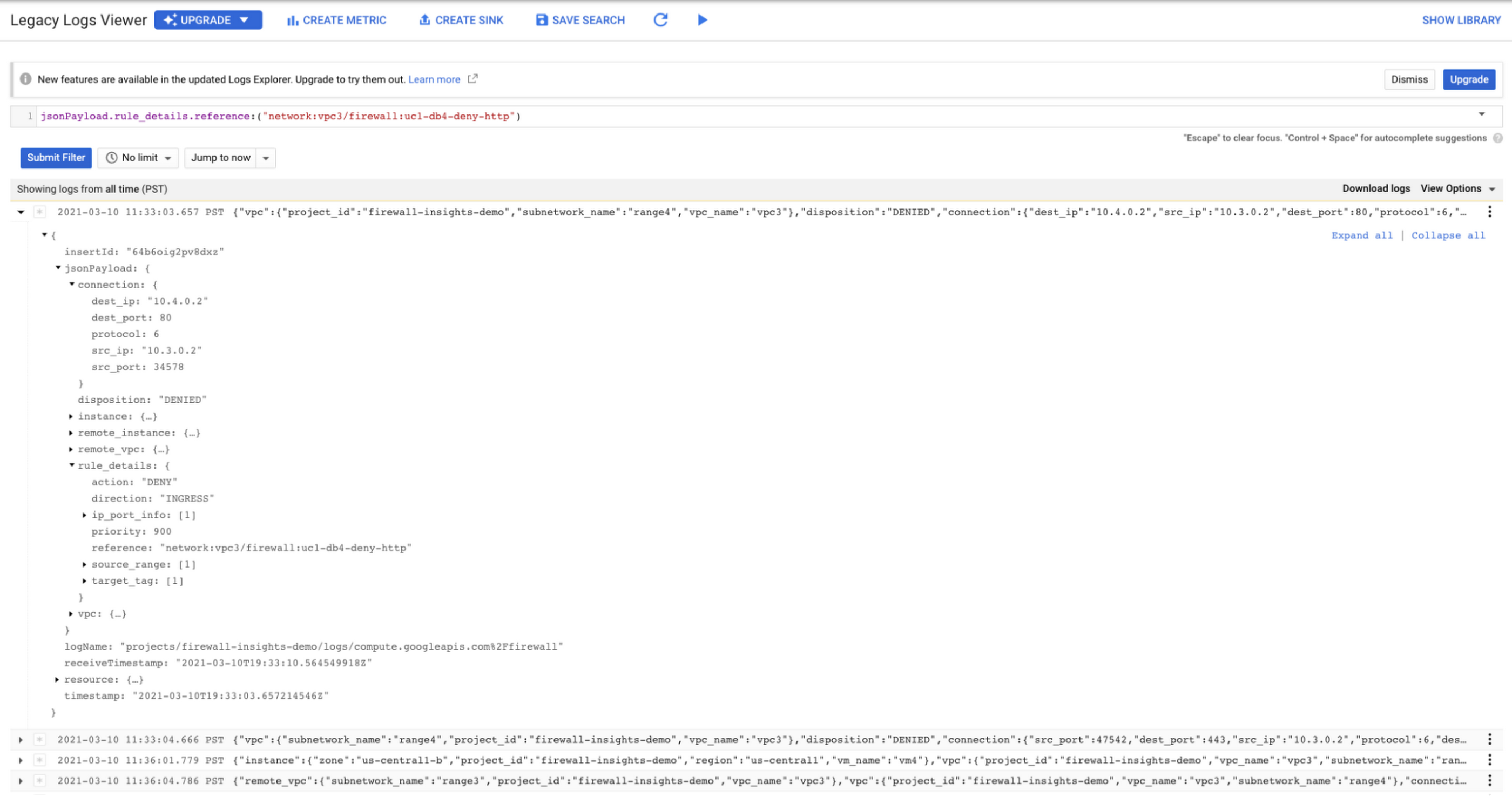
As you can see in Figure 1.2, each firewall rule which has logging enabled will show hit counts, so based on the example above, the rule “uc1-db4-deny-http” has been hit 109,154 times, the last time being 2021-03-10 (13:10:00). If you want to dive even deeper, you can click on the hit count and this will bring you to the logs viewer page where you can expand these logs and analyze all the details:
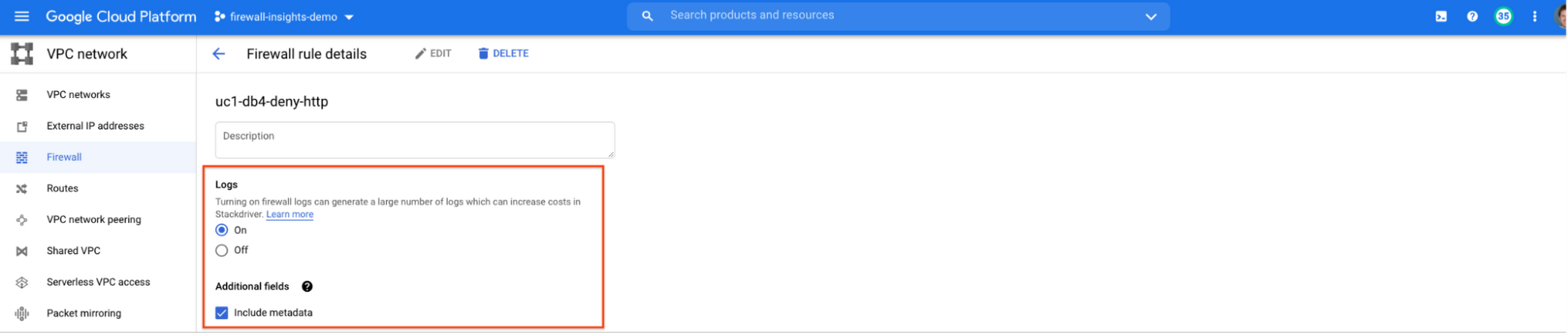
In order to enable logs for a particular firewall rule, you can edit it and turn logs on. By default, metadata is added in firewall logs. If you want to reduce the log size, you can do so by excluding these additional fields. Excluding these metadata fields will not impact the functionality of Firewall Insights.
From the “Firewall” page, you can also multi-select a group of firewall rules and turn on all logs at once.
Firewall rule usage metrics are accurate only for the period of time during which Firewall Rules Logging is enabled.
Insights Report, a deeper dive
Insights Report provides an intelligent analysis of the configuration of your firewalls. A report can contain one or more insights.
We will see examples now about the different insight reports which include:
- Shadowed firewall rules
- Allow rules with no hit in the last six weeks
- Deny rules with hits in the last 24 hours
By definition, a shadowed rule is a VPC firewall rule that is completely overshadowed by one or more firewall rules with higher or equal priority. We call that shadowing rules. Let’s see an example on how to find shadowed rules:Let’s say that you try to use ping between two VMs but it fails. Let’s take a look at the firewall rules applied to the VM:
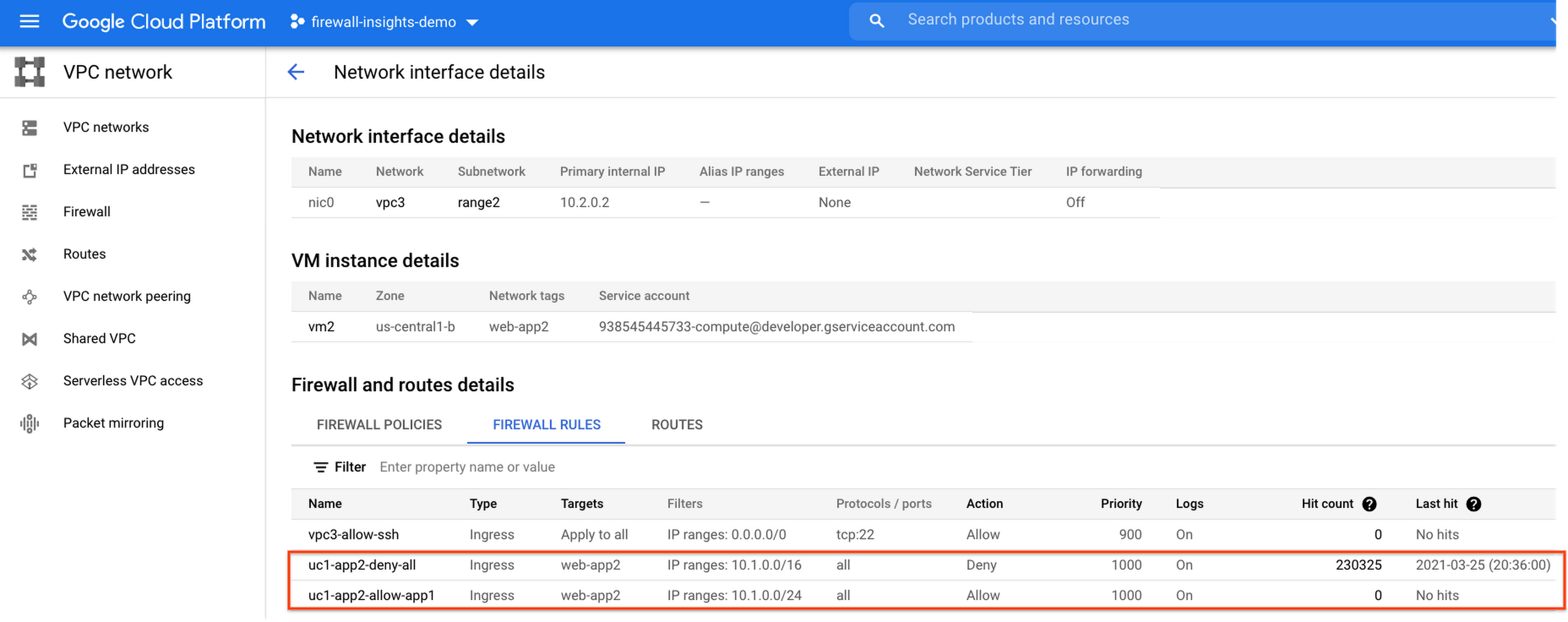
If we look closely, we can see that there are two rules with the same target tag, and those are almost identical except their source IP range. The IP range of the deny rule “uc1-app2-deny-all” includes the IP range of the rule allow “uc1-app2-allow-app1”. Therefore, we can see that “uc1-app2-allow-app1” is shadowed by “uc1-app2-deny-all”, and the ping between these VMs failed due to that.
To avoid such incidents in the future, Firewall Insights provides you with a convenient list of rules overshadowed by other firewall rules.
To see shadowed rules, you can click on the column selector, and add “Insights” to the firewall and route details:

Once this is applied, you will be able to see shadowed rules here:

Alternatively, you can navigate to Network Intelligence > Firewall Insights, where we will see the shadowed rule report:
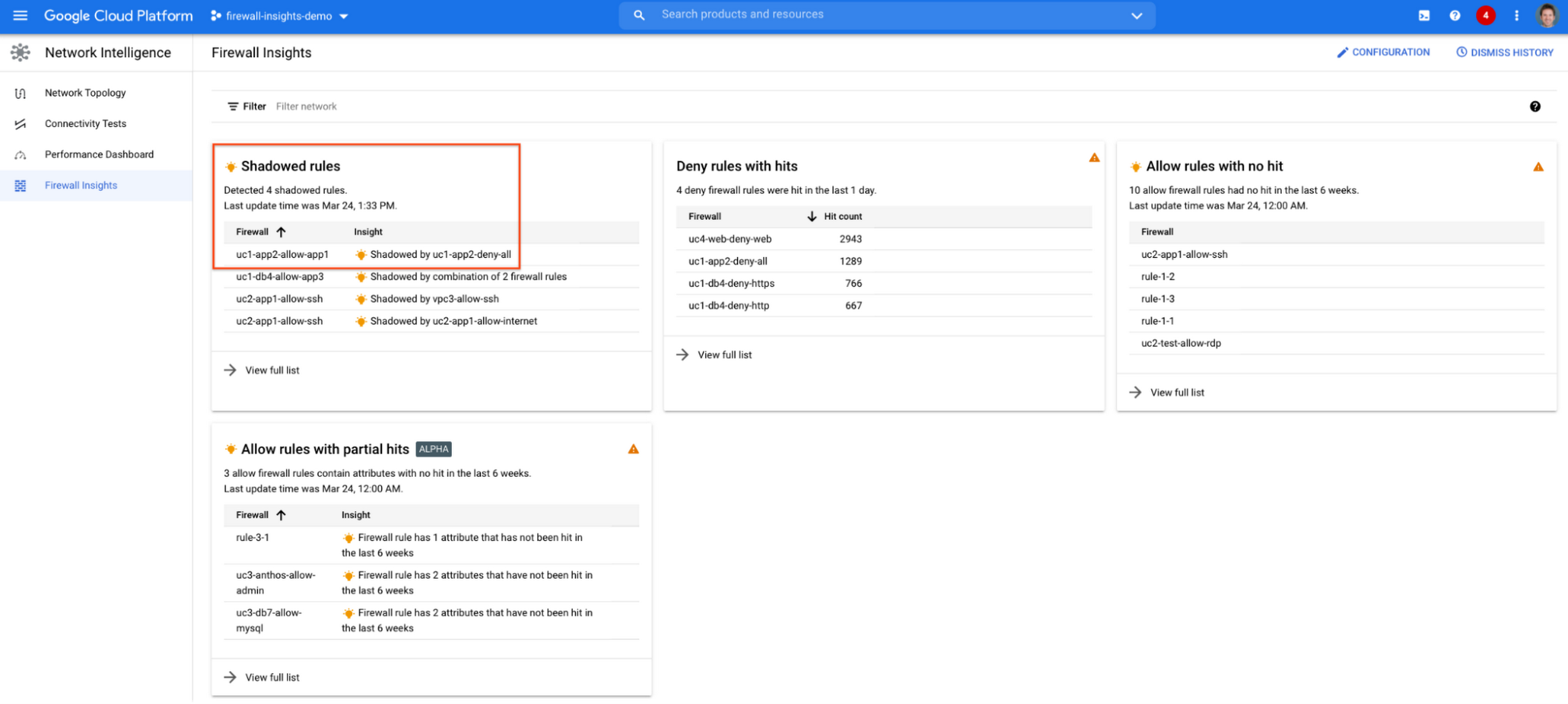
If we click on the insight we will get more details:

Going back to the firewall insights card (Figure 1.8), we can also identify that “uc1-db4-allow-app3” is shadowed by a combination of two rules and if we clicked on the insight this would provide all the details.
From the Firewall Insights dashboard, let’s move on to “allow rules with no hit”, where we can see firewall rules that have not logged any hits in the past six weeks. Such rules could be as a result of a misconfiguration, or leftover rules from past deployments. Tighten your security boundaries by identifying and removing such rules. If we go back to Network Intelligence > Firewall Insights, we can see allow rules with no hit:

We can drill down to view the full list of rules with no hit. We can see, for instance, one of the rules, the bottom one “uc2-app1-allow-internet”, might be a leftover rule to allow internet access from a past deployment, which means it has little likelihood of being hit in the future. So you may want to consider removing it from the rule set:

Click on the firewall rule to review all the details, and take a look at the prediction, which is made based on the hit pattern that we saw for similar rules in the same organization:

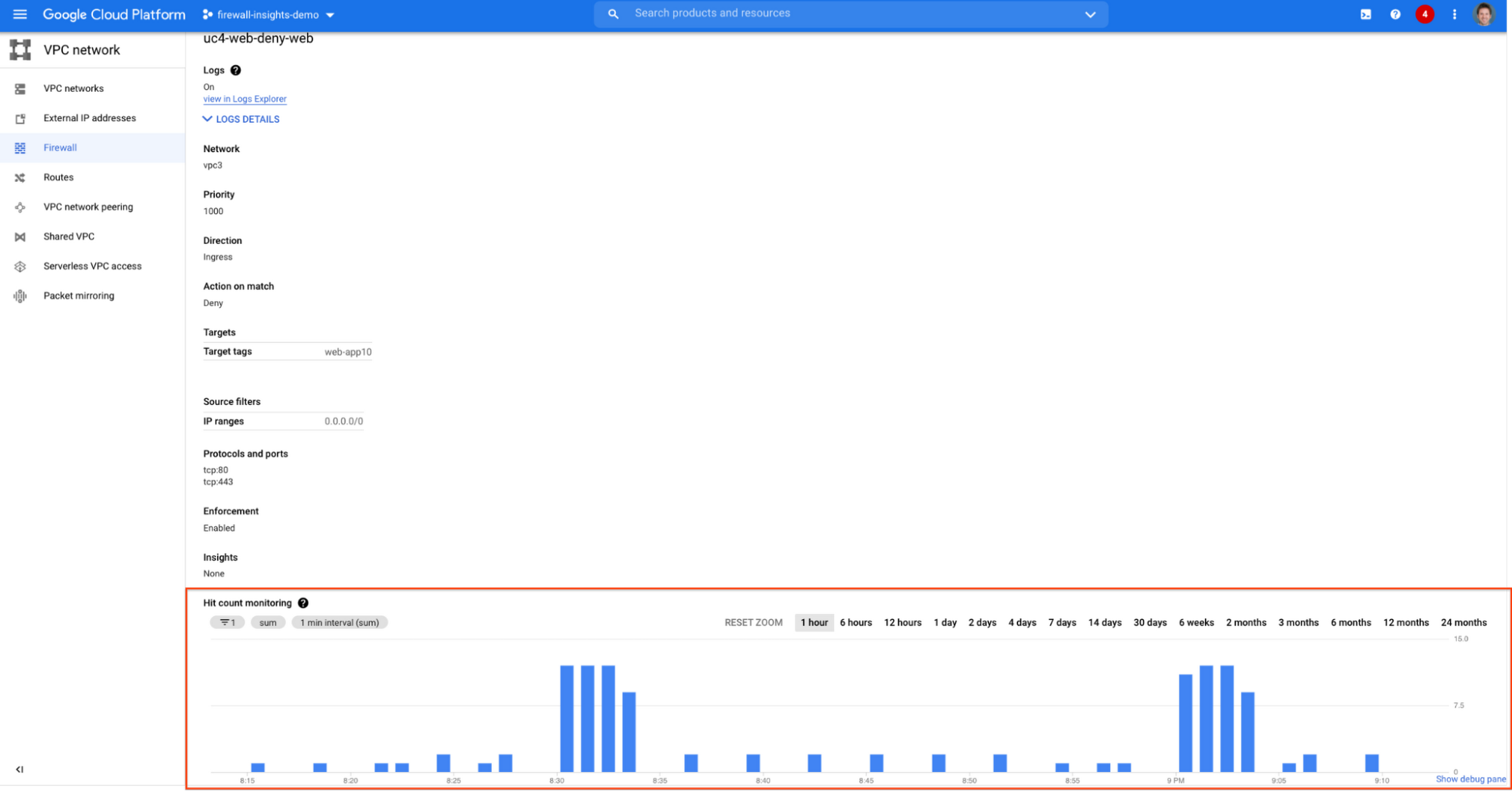
Let’s go back to the Firewall Insights dashboard and move on to the last category, “deny rules with hits in the last 24 hours”, which help you capture the traffic blocked by deny rules. These traffic types could indicate external attacks into your VPC network, or compromised VM instances attempting to send traffic out of your network. Let’s examine future hit prediction on a firewall rule. Navigate to Network Intelligence > Firewall Insights and take a look at the deny rules with hits card:

If your click on the “uc4-web-deny-web” rule, you can see the hit count monitoring, and if you click on the hit number we can dive deeper in the logs:

These tips should help you effectively leverage Firewall Insights to gain better control over a massive firewall rule set. Automate shadowed rule detection, quickly troubleshoot misconfigured rules, effortlessly pinpoint the overgranting rules hidden in the rule set, and identify the failed attempts to break into your network that were rejected by your firewall rules.
To learn more about Firewall Insights, please refer to our documentation. Additionally, to see how we’re advancing intelligent automation in network security, check our recent blog post.
How One Company Improved Security Significantly–Without Increasing Staff

6448
Of your peers have already read this article.
2:45 Minutes
The most insightful time you'll spend today!
Quanta Services is the leading specialty contractor with the largest and highly-skilled trained workforce in North America. It provides fully-integrated solutions for the electric power
pipeline industrial and telecommunications industries the company’s geographic footprint which includes North America Latin America and Australia.
It’s network of companies ensures world-class execution with local delivery and has over 40,000 employees.
“The exciting thing about Backstory is it allows us to land massive amounts of data from all of our different security tools and then Chronicle worries about how to correlate and aggregate this information for us. We can then focus on the highest priority threats.”
Richard Breaux, Manager Security Operations Quanta Services
Because Quanta Services’ customers provide energy and telecommunications to their customers, they have world-class cybersecurity requirements.
“We must ensure that Quanta leads the industry given the fact that our business is building the core infrastructure that powers people’s lives. It’s crucial that we meet their cybersecurity requirements,” says James Stinson, VP-IT, Quanta Services.
To support this goal Quanta implemented a number of security tools that generate terabytes of security telemetry. Over time, however, these systems generated an information overload for the company’s limited pool of qualified security resources.
“Our logging tools also couldn’t keep up with the rapidly growing information. With limited resources we need to focus our security analysts time on high quality work instead of digging through mountains of data,” says Stinson.
They achieve this by implementing Backstory and Chronicle, which is on Google Cloud.
“The exciting thing about Backstory is it allows us to land massive amounts of data from all of our different security tools and then Chronicle worries about how to correlate and aggregate this information for us. We can then focus on the highest priority threats,” says Richard Breaux, Manager Security Operations Quanta Services.
As a result, the company’s security team spends less time getting to the core information they need to address these incidents.
“What used to take us 15 minutes or more, we can now accomplish in seconds,” says Breaux.
Cloud KMS with Cloud Storage: Better Performance for High-intensity Workloads

3273
Of your peers have already read this article.
2:30 Minutes
The most insightful time you'll spend today!
Encryption is critical for securing sensitive data while it is stored and transits the cloud. Today, Cloud Storage encrypts data server-side with standard Google-managed encryption keys by default, and can also encrypt data with customer-managed encryption keys that are stored and managed by Cloud Key Management Service (Cloud KMS).
While customers have been able to secure their data on Cloud Storage with Cloud KMS keys for some time, we are always updating our encryption offerings to deliver better performance, lower costs and more capabilities that support critical business workloads. In this post, we’ll discuss some of our latest developments in this space—in particular, performance improvements for high-intensity workloads and support for customer-managed encryption keys (CMEK) for object composition.
Why use Cloud KMS with Cloud Storage?
Cloud KMS enables you to centrally manage your keys in a fast and scalable way that helps to meet your security and compliance needs. Cloud KMS generates customer-managed encryption keys (CMEK) which act as an additional layer of protection on top of Google’s default encryption keys. You can set these keys on a Cloud Storage bucket as a default key, and can easily manage key rotation, replacement or disabling right within Cloud KMS.
In addition to software-based CMEKs, Cloud Storage also supports hardware-based CMEKs hosted in hardware security modules that are FIPS 140-2 Level 3 validated as part of our Cloud HSM service. These enable you to protect your most sensitive workloads without needing to manage HSM cluster operations yourself.
Improving KMS performance for high-intensity workloads
While Cloud HSM is often used to protect the most sensitive data for a customer, especially for those in healthcare and financial services industries, the default quota limits for cryptographic operations on Cloud HSM keys may cause performance bottlenecks for customers aiming to run high-intensity workloads when using Cloud Storage, such as analytics workloads on Hadoop.
We are making improvements to the Cloud KMS request behaviour on Cloud Storage that more effectively batches requests to Cloud KMS to reduce request bandwidth and drive down KMS billing. Identical Cloud KMS requests from Cloud Storage will be batched together for newly written objects and across all supported encryption modes in Cloud KMS, including software-backed customer-managed encryption keys. As a result of these changes, when you are using Cloud KMS you may notice faster encrypt, read and write operations for new data, deduplicated Cloud KMS audit logs and lower overall Cloud KMS charges. Customers running high-intensity workloads should see a significant reduction in throughput to KMS, leading to a reduction in KMS cryptographic operation billing costs for all types of KMS keys, as well as enabling customers to scale the throughput of their HSM-encrypted workloads.
Newly written objects encrypted with Cloud KMS will leverage these changes, whether they are encrypted using software-backed or HSM-backed CMEKs, and no configuration change is needed. If you are looking to use Cloud KMS with Cloud Storage, check out the Cloud KMS page to learn more, especially for setting up a hardware-backed HSM.
Supporting Cloud KMS for object composition
Object composition in Cloud Storage is widely used today for different types of applications, from stitching video segments together for a replay to uploading large datasets for analytics workloads. As more and more customers are leveraging Cloud Storage for these applications, we are expanding object composition capabilities to be flexible across different encryption modes.
Object composition is now supported for customer-managed encryption keys in addition to Google-managed encryption keys and customer-supplied encryption keys. This allows you to manage your own encryption keys while performing object composition for business-critical needs such as compiling sensitive financial datasets.
To compose objects that are encrypted with customer-managed encryption keys, specify the resource name of the Cloud KMS key for encrypting the composed object as a query parameter in the compose request. For the JSON API, construct the following HTTP request, while specifying the Cloud KMS key resource name for the query parameter kmsKeyName.
POST https://storage.googleapis.com/storage/v1/b/bucket/o/destinationObject/compose
For the XML API, specify the Cloud KMS key resource name for the request header x-goog-encryption-kms-key-name. You can also specify a Cloud KMS key when using gsutil to perform object composition. Check out our documentation to try out object composition, or to start composing objects encrypted with customer-managed encryption keys.
Get started with better encryption
Being deliberate about encryption is critical for securing your sensitive data on Cloud Storage. Whether you are composing objects or running analytics workloads, leveraging the latest encryption offerings will deliver faster performance, better security and improved workload scalability. We’re always evolving our encryption products to meet your needs and help you achieve your business goals. To get started with encryption on Cloud Storage, check out our documentation to learn more.
Gmail’s BIMI Increases Confidence about Security and Delivers Immersive Email Experiences

5450
Of your peers have already read this article.
3:00 Minutes
The most insightful time you'll spend today!
Creating a secure-by-default experience based on robust defenses has always been a core design principle for Gmail. That’s why we’ve established a strong baseline of security in Gmail, with built-in protections to help automatically filter out potentially malicious messages. While these defenses help keep Gmail users safe, email functions as part of a large, complex, interconnected ecosystem that we continually invest in and work to protect. After first announcing Gmail’s Brand Indicators for Message Identification (BIMI) pilot last year, today we’re announcing that over the coming weeks we’re rolling out Gmail’s general support of BIMI, an industry standard that aims to drive adoption of strong sender authentication for the entire email ecosystem. BIMI provides email recipients and email security systems increased confidence in the source of emails, and enables senders to provide their audience with a more immersive experience.


“Bank of America has a wide range of security measures in place to support our customers, and we constantly evolve our program to deliver best in class protection. Part of this effort is our partnership with Google on BIMI, which provides an easy way to validate if correspondence is from us.” — Bank of America
BIMI enables organizations that authenticate their emails using Domain-based Message Authentication, Reporting, and Conformance (DMARC)—a standard for providing strong sender authentication that allows security systems to perform better filtering, separating legitimate messages from potentially spoofed ones—to validate ownership of their logos and securely transmit them to Google. BIMI is designed to be easy: for organizations with DMARC in place, validated logos display on authenticated emails from their domains and subdomains.
Here’s how it works: Organizations who authenticate their emails using Sender Policy Framework (SPF) or Domain Keys Identified Mail (DKIM) and deploy DMARC can provide their validated trademarked logos to Google via a Verified Mark Certificate (VMC). BIMI leverages Mark Verifying Authorities, like Certification Authorities, to verify logo ownership and provide proof of verification in a VMC. Once these authenticated emails pass our other anti-abuse checks, Gmail will start displaying the logo in the existing avatar slot.
“Gmail’s support of BIMI is a win for email authentication, brand trust, and consumers alike. BIMI gives organizations the opportunity to provide their customers with a more immersive email experience, strengthening email sender authentication across the entire email ecosystem.” — Seth Blank, Chair of the AuthIndicators Working Group
This is just the start for BIMI. The standard expects to expand support across logo types and validators. For logo validation, BIMI is starting by supporting the validation of trademarked logos, since they are a common target of impersonation. Today, Entrust and DigiCert support BIMI as Certification Authorities, and in the future the BIMI working group expects this list of supporting validation authorities to expand further. To learn more about BIMI and see the latest news, visit the working group’s website.
To take advantage of BIMI, ensure that your organization has adopted DMARC, and that you have validated your logo with a VMC. For Gmail users, no action is required. We’re proud to be one of the leading members in both establishing and supporting the BIMI standard and will continue to support efforts that contribute to security for the entire email ecosystem.
How Ocado Technology revolutionized the online grocery space by applying technology and automation

2852
Of your peers have already read this article.
2:30 Minutes
The most insightful time you'll spend today!
Grocery shopping has changed for good and Ocado Group has played a major role in this transformation. We started as an online supermarket, applying technology and automation to revolutionise the online grocery space. Today, after two decades of innovation, we are a global technology company providing state-of-the-art software, robotics, and AI solutions for online grocery. We created the Ocado Smart Platform, which powers the online operations of some of the world’s most forward-thinking grocery retailers, from Kroger in the U.S. to Coles in Australia.
With the global penetration of the Ocado Smart Platform and the increasing complexity of our operations, we’re paying close attention to our security estate. To proactively identify and tackle any security vulnerabilities, we decided to introduce Google Cloud’s Security Command Center (SCC) Premium as our centralized vulnerability and threat reporting service.
Gaining consolidated visibility into Ocado’s cloud assets
From the start, we were impressed with the speed of deployment and security findings surfaced with SCC. Where it would take several weeks in the past with other software vendors, we were able to quickly set up SCC in our environment and we could immediately start identifying our most vulnerable assets.
Today, we use SCC to detect misconfigurations and vulnerabilities across hundreds of projects throughout our organization and we use it to get an aggregated view of our security health findings. We filter the findings and then use Pub/Sub or Cloud Functions to send alerts directly to the tools each division is working with, such as Splunk or JIRA. This way, each of our teams can discover and respond to the security findings in their own environment, with SCC acting as the single source of truth for our security-related issues.
Driving autonomy by delegating security findings
Autonomy fuels innovation at Ocado Technology, which is why we want to make our teams as self-sufficient as possible. SCC helps to make our divisions more autonomous from the central organization. It delivers all the security insights technology teams need to make smart decisions on their own and at pace.
Here’s where SCC’s delegation features providing folder and project level access control come in. The platform’s fine-grained access control capabilities enable us to delegate SCC findings to specific teams, without having to give them a view of the entire Ocado Technology organization. Business units no longer need to contact us in the security team to track down vulnerabilities, they can do it themselves in a compliant and secure manner. It makes our work more efficient and autonomous, allowing everyone to focus on their own areas of expertise and environments.
Identifying and remediating multiple medium and high vulnerabilities
SCC’s findings are very rich and don’t end with the identification of the potential misconfigurations and vulnerabilities. It goes beyond this, recommending solutions to resolve any issues and providing clear guidelines on next steps. That’s why the feedback from our users across the organization has been so good.
SCC delivers on both quality and quantity. Since implementation, it has helped us identify and remove hundreds of medium and high vulnerabilities from our Google Cloud estate. The number of security related findings have also gone down each quarter, indicating real and tangible improvements in our security posture. SCC is so useful in maintaining our security posture as once we know where the issues are, tackling them is easy.
From 8-hour security scans to instant insights
One particular issue we’ve been able to handle well with SCC are vulnerabilities targeting the Apache logging system Log4j. SCC informed us about attempted compromises, active compromises, or the vulnerability exposure of our Dataproc images. During Log4j response, all these would have been otherwise very hard to track down, especially with limited resources. With SCC, we were able to leverage the security expertise of Google Cloud to identify the latest vulnerabilities, based on the most up-to-date security trends, and act on them quickly.
Obviously, speed is of the essence when it comes to threat mitigation and SCC has enabled us to fix issues faster, making us less exposed to outside threats. In the past, just scanning everything once could take up to eight hours. SCC sped things up from the start and findings have been nearly instantaneous since it rolled out real-time Security Health Analytics.
Strengthening compliance and demonstrating standards to stakeholders
SCC helps us to achieve better compliance standards, and demonstrate these standards to our stakeholders. We recently ran an internal audit exercise across the Ocado Technology organization, for example, where we identified the projects with the most numerous and severe security-related findings. Without the reports from SCC, this would have been extremely hard or even impossible.
We also use the Security Health Analytics information from SCC to visualize the data per project, creating a kind of heat map of security across the organization. This helps us assign our resources to the right projects and prioritize our efforts accordingly, informing our strategic decisions.
From top-down to a developer-led security
There’s been a paradigm shift in security operations, and things are moving from a top-down approach to a more developer-led and autonomous process. SCC helps drive that change at Ocado Technology. It enables us to place the responsibility for security-related issues closer to the resource owners. By making sure that the teams most impacted by a potential problem are the ones who get to fix it, we empower teams to resolve issues proactively and efficiently.
Looking forward, we can’t wait to see SCC evolve further. One of the features we’re most excited about is the ability to create custom findings (currently in preview) and additional integration capabilities that enable automation. We’re still not using everything SCC has to offer, but it is already a vital tool for our security team.
At Ocado Technology, we’re pioneering the future of online grocery shopping, and this future needs a strong security foundation. SCC helps us to strengthen and maintain that foundation, making profitable, scalable, and secure online grocery shopping possible for even more businesses around the world.
More Relevant Stories for Your Company

The Ultimate Guide to VPC Service Controls: Strengthening Your Security Posture
While cloud security skeptics might believe that data in the cloud is just one access configuration mistake away from a breach, the reality is that a well-designed set of defense in depth controls can help minimize the risk of configuration mistakes and other security issues. Our Virtual Private Cloud (VPC) Service Controls can play

DueDil Chooses Apigee to Leverage APIs for Customers’ Risk Monitoring with Better Insights
As their name reflects, DueDil provides due diligence services ranging from customer-specific risk evaluations and selections to customer onboarding and real-time risk monitoring for leading financial services, high-growth tech and insurance companies. Founded in 2009, the company helps more than 3,000 enterprise users from over 400 clients to not only understand with

Utilizing Google Cloud’s PII Security Features
BigQuery is a leading data warehouse solution in the market today, and is valued by customers who need to gather insights and advanced analytics on their data. Many common BigQuery use cases involve the storage and processing of Personal Identifiable Information (PII)—data that needs to be protected within Google Cloud

Your Cloud Defense Enhanced: Google Introduces End-to-End TDIR in Chronicle Security Operations
As cloud adoption continues to grow, so too does the number of cloud-born security threats. However, cloud environments can present significant opportunities to improve security with the right tools and processes in place. When it comes to effective threat detection, investigation and response (TDIR) in the cloud, modern solutions must ensure
