





3286
Of your peers have already watched this video.
5:30 Minutes
The most insightful time you'll spend today!
The 5-Min Demo: How to Develop, Train and Deploy Training Models on Kubernetes
Machine learning has taken businesses by storm. A growing number of organizations, both large and small, and spread across a swathe of industries, are figuring out how to quickly adopt ML.
But in the midst of that accelerated push, infrastructure and data science teams have to come to terms with high operational overheads especially considering all the time and effort it takes to develop a specific model and have it run in different places.
If you’re a data scientist or part of the data team, you’ve probably been here: You develop a model on your laptop, train it on the cloud, and then serve it in production, which could be on-prem or in a different cloud. The challenge is that in these various environments, hardware and software configurations could be totally different—and that leads to things breaking down.
That’s where Kubernetes comes in. It provides a way to easily develop training and deployment learning models in the very scalable and flexible way.
In
Document AI: A Platform for Businesses to Simplify Document Automation

2364
Of your peers have already read this article.
2:30 Minutes
The most insightful time you'll spend today!
As I type this blog in a Google Doc, I can’t help but think about how much we rely on digital documents to communicate, collaborate, and do business. Yet most of the data in documents remains un-analyzed. Even when documents are part of customer-facing workflows like processing a mortgage application or a contract, businesses frequently struggle with the data those documents contain. Often, even finding the right document in a haystack of thousands across the organization can be challenging. To resolve these difficulties, most organizations rely on manual, time-consuming, and resource-intensive processes—all of which are incredibly frustrating for employees at the forefront of document workflows.
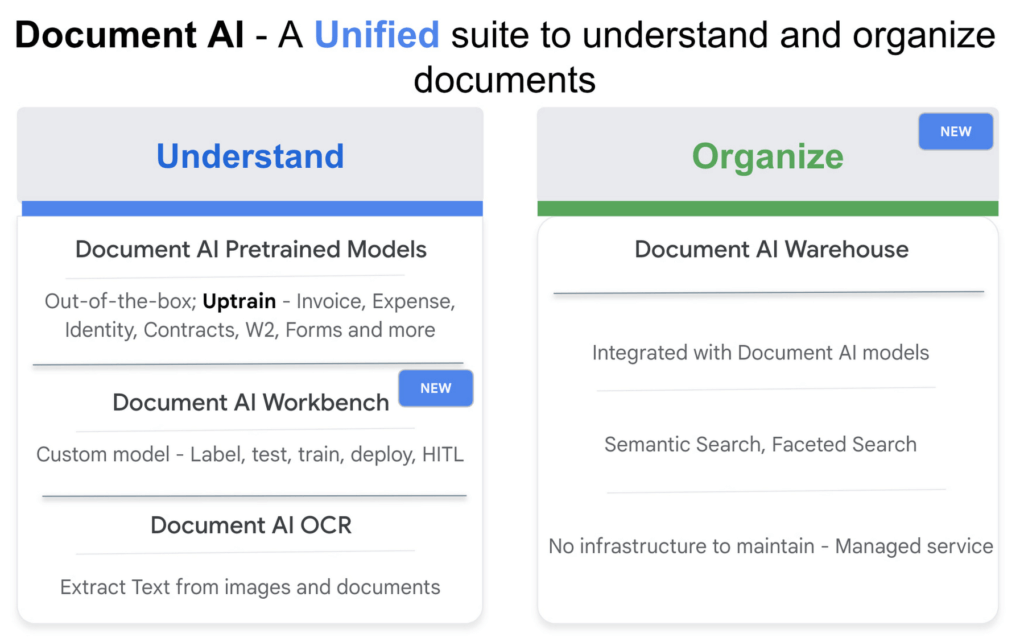
Because of challenges like these, in 2020, we launched Document AI, an AI agent that lets organizations apply machine learning (ML) to their hardest document automation problems. Since then, we have introduced specialized models to extract data for industry-specific use cases such as mortgage processing and procurement. With the launch of Document AI Workbench and Document AI Warehouse at Google Cloud Next ‘22, we’ve continued to take significant steps in our mission to help organizations simplify and automate document processing. Let’s double click on each of these announcements.
Custom document processing with Document AI Workbench
With Document AI Workbench, organizations can process documents by creating custom ML models that are specific to their business needs and extract unstructured data with a high degree of accuracy. Thanks to the user-friendly interface, even business users who do not have extensive ML skills can get started training or uptraining models.
Moreover, if an organization wants to transfer learning from pretrained models and enhance a model further to, say, include new fields, users can now do so by what we call “uptraining.” The uptraining feature is especially valuable for the most common yet complex use cases because it helps to save time and resources, so businesses don’t have to start from scratch. Uptraining for the invoice, purchase order (PO), contracts, W2, 1099-R, payslip, and 1040 pre-trained models unlocks new possibilities for improving accuracy, adding new language support, and schema customization.
We’re continuing to invest in these pretrained models. At Next’22, we announced an update to our invoice and expense pre-trained models with improvements to normalization and line item entities detection, as well as new ID proofing capabilities via a flexible API designed to spot fake, altered, or doctored ID documents. We’ve also added support for five new languages across invoice and expense models, in addition to the 12 previously-supported languages, and expanded availability in Canada and Australia regions, in addition to previously-supported US, EU, and Singapore regions.
According to Daan De Groodt, Managing Director, Deloitte Consulting LLP, Document AI Workbench “is poised to be a game changer, because we can now uptrain various text documents and forms utilizing powerful Google Machine Learning models to get the desired accuracy creating greater time and resource efficiencies for our clients.”
And customers are already seeing benefits. Libeo used Document AI to uptrain an invoice parser with 1,600 documents and increase its testing accuracy from 75.6% to 83.9%. “Thanks to uptraining, the Document AI results now beat the results of a competitor and will help Libeo save ~20% on the overall cost for model training over the long run,” said Libeo chief technology officer, Pierre-Antoine Glandier.
Google-powered document search with Document AI Warehouse
With Document AI Warehouse we are bringing the best of Google’s semantic search to documents. Document AI Warehouse lets enterprises search, store, govern and manage documents and their AI-extracted data and metadata in a single platform. With Document AI Warehouse’s simple and intuitive web accessible user interface, users can explore, view, bulk update and organize documents into folders. Document AI Warehouse offers robust enterprise control and governance so you can control who has access at the document and folder levels and assign users and groups permissions to view, edit, manage (share, delete) documents. You can migrate, sync, or federate documents from other repositories, such as Microsoft SharePoint, Amazon S3, and IBM FileNet. Or if that’s not an option we simply index the content and any extracted/tagged metadata).
We also will consolidate a number of next-generation product enhancements on Document AI OCR and Form Parser by the end of this year – including deeper insights into document quality & semantics, a unified document OCR experience, expanded language coverage for Form Parser, and advanced tooling for model lifecycle management. Google’s DeepMind team developed a new method that allows the creation of document parsing ML models for utility bills and purchase orders with 50%-70% less training data than what was previously needed for Document AI. We’re working on integrating this method into Document AI Workbench in the coming months.
Getting started
I’m very excited about what the future holds for Document AI as a platform for businesses to simplify document automation. Learn more about all these exciting developments in my session at Next’22 or try out one of our offerings today.
AI Solutions for Government Organizations: How to Get Started

4386
Of your peers have already read this article.
3:00 Minutes
The most insightful time you'll spend today!
Cloud-native features are helping public sector teams innovate faster than ever. Ideas discussed in a morning meeting can be a working proof of concept later that day. Managed services can remove administrative burden and reduce the steps needed to design and provision cloud infrastructure. Security can be built-in from the beginning with Identity and Access Management (IAM), Virtual Private Cloud Service Controls (VPC-SC), and Data Loss Prevention (DLP). Short-lived services and infrastructure-as-code allow rapid and cost-effective prototyping. These technologies can be used to architect a solution that follows the principle of least privilege and helps you secure your data.
So the question becomes: given the complex problems agencies face, where do you start? Google Public Sector now offers “Getting Started” and “Scaling” service offerings for CCAI, DocAI, and BigQuery to help you jumpstart your AI journey, based on where you are.
Complex problems, simpler AI-based solutions
Solving more challenging problems with cloud-native technology doesn’t have to be overwhelming. You can approach them the same way you might solve a puzzle: start with one piece that follows another until the larger picture takes shape. Though you can simplify the steps, solving these problems still requires powerful tools. Google Cloud’s AI/ML capabilities may be the answer for your team.
Google Public Sector is making it easier to get started with advanced technologies, beginning with artificial intelligence and machine learning (AI/ML) workloads for government organizations, and it’s something you can do now, one piece at a time.
Automating your FAQs with CCAI
Does your agency require a team to answer commonly asked questions? What if you could train an agent to answer questions immediately and operate 24/7? Contact Center AI (CCAI) can do this and more. Already using CCAI and need the agent to level up to address complex interactive dialogs? Getting Started with CCAI and Scaling with CCAI are new Google service offerings specifically designed to help public sector organizations tackle situations like these.
Automate data entry with DocAI
How many hours does your team spend manually reviewing or entering data from standardized forms? What if you could automatically pull data right from the page? Google Document AI (DocAI) specializes in exactly this—even if the form has handwritten text. Getting Started with DocAI and Scaling with DocAI are new service offerings that help you remove this burden from your team. DocAI automates data entry and makes that data available to other teams while prioritizing both security and ease of use.
Making data and insights accessible with BigQuery
Then there’s all your existing data. You may have years of it stored in many places, and you may not have a way to make use of it when you need it. BigQuery is Google’s enterprise data warehouse. It was designed for data analytics—looking back at historical data to make conclusions about it. But BigQuery’s analytics don’t stop there. It can also look forward in time to make predictions, often using the same datasets. Getting Started with BigQuery and Scaling with BigQuery are new service offerings that help you take your first steps toward AI/ML capabilities by starting with a single table or pipeline that can help make sense of all your data.
The best help is the kind that meets you where you are and gets you where you want to be. Google Public Sector’s new service offerings do just that: help you work through complex problems by meeting you wherever your starting line is, whether you’re ready to start or ready to scale. Let us know if you would like us to contact you about the services mentioned in this article. Let’s solve your highest impact problems together, one puzzle piece at a time.
6410
Of your peers have already watched this video.
2:00 Minutes
The most insightful time you'll spend today!
CCAI Insights: Answer Customers’ Queries & Understand Them Better with Conversation Data
With CCAI Insights, businesses can drive contact center efficiency, solve customer problems and leverage data from customer interactions to understand them better!
CCAI Insights, a core piece of the Google Cloud’s Contact Center AI product suite is built to help contact center management dive into data to adjust business needs, preempt problems with timely analysis of customer conversations and keep agents prepared. Additionally, businesses can automatically feed data into Insights from other areas of CCAI like Dialogflow CX or another product sources. Watch the video to find out more benefits and capabilities of CCAI Insights in elevating CX.
Google Cloud Helped Digitec Galaxus Personalize Over 2 Million Newsletters in a Week

8300
Of your peers have already read this article.
3:00 Minutes
The most insightful time you'll spend today!
Digitec Galaxus AG is the biggest online retailer in Switzerland, operating two online stores: Digitec, Switzerland’s online market leader for consumer electronics and media products, and Galaxus, the largest Swiss online shop with a steadily growing range of consistently low-priced products for almost all daily needs.
Known for its efficient, personalized shopping experiences, it’s clear that Digitec Galaxus understands what it takes to deliver a platform that is interesting and relevant to customers every time they shop.
The problem: Personalizing decisions for every situation
Digitec Galaxus already had established an engine to help them personalize experiences for shoppers when they reached out to Google Cloud. They had multiple recommendation systems in place and were also extensive early adopters of Recommendations AI, which already enabled them to offer personalized content in places like their homepages, product detail pages, and their newsletter.
But those same systems sometimes made it difficult to understand how best to combine and optimize to create the most personalized experiences for their shoppers. Their requirements were threefold:
- Personalization: They have over 12 recommenders they can display on the app, however they would like to contextualize this and choose different recommenders (which in turn select the items) for different users. Furthermore they would like to exploit existing trends as well as experiment with new ones.
- Latency: They would like to ensure that the solution is architected so that the ranked list of recommenders can be retrieved with sub 50 ms latency.
- End-to-end easy to maintain & generalizable/modular architecture: Digitec wanted the solution to be architected using an easy to maintain, open source stack, complete with all MLops capabilities required to train and use contextual bandits models. It was also important to them that it is built in a modular fashion such that it can be adapted easily to other use cases which have in mind such as recommendations on the homepage, Smartags and more .
To improve, they asked us to help them implement a machine learning (ML) contextual bandit based recommender system on Google Cloud taking all the above factors into consideration to take their personalization to the next level.
Contextual bandits algorithms are a simplified form of reinforcement learning and help aid real-world decision making by factoring in additional information about the visitor (context) to help learn what is most engaging for each individual. They also excel at exploiting trends which work well, as well as exploring new untested trends which can yield potentially even better results. For instance, imagine that you are personalizing a homepage image where you could show a comfy living room couch or pet supplies.
Without a contextual bandit algorithm, one of these images would be shown to someone at random without considering information you may have observed about them during previous visits. Contextual bandits enable businesses to consider outside context, such as previously visited pages or other purchases, and then observe the final outcome (a click on the image) to help determine what works best.
Creating a personalization system with contextual bandits
While Digitec Galaxus heavily personalizes their website homepages, they are very very sensitive and also require more cross-team collaboration to update and make changes.
Together with the Digitec Galaxus team, we decided to narrow the scope and focus on building a contextual bandit personalization system for the newsletter first. The digitec Galaxus team has complete control over newsletter decisions and testing various ML experiments on a newsletter would have less chance of adverse revenue impact than a website homepage.
The main goal was to architect a system that could be easily ported over to the homepage and other services offered by Digitec with minimal adaptations. It would also need to satisfy the functional and non-functional requirements of the homepage as well as other internal use cases.
Below is a diagram of how the newsletter’s personalization recommendation system works:

- The system is given some context features about the newsletter subscriber such as their purchase history and demographics. Features are sometimes referred to as variables or attributes, and can vary widely depending on what data is being analyzed.
- The contextual bandit model trains recommendations using those context features and 12 available recommenders (potential actions).
- The model then calculates which action is most likely to enhance the chance of reward (a user clicking in the newsletter) and also minimize the problem (an unsubscribe).
Calculating whether a click was a newsletter or an unsubscribe enabled the system to optimize for increasing clicks and avoid showing non-relevant content to the user (click-bait). This enabled Digitec Galaxus to exploit popular trends while also exploring potentially better-performing trends.
How Google Cloud helps
The newsletter context-driven personalization system was built on Google Cloud architecture using the ML recommendation training and prediction solutions available within our ecosystem.
Below is a diagram of the high-level architecture used:
The architecture covers three phases of generating context-driven ML predictions, including:
ML Development: Designing and building the ML models and pipeline
Vertex Notebooks are used as data science environments for experimentation and prototyping. Notebooks are also used to implement model training, scoring components, and pipelines. The source code is version controlled in Github. A continuous integration (CI) pipeline is set up to automatically run unit tests, build pipeline components, and store the container images to Cloud Container Registry.
ML Training: Large-scale training and storing of ML models
The training pipeline is executed on Vertex Pipelines. In essence, the pipeline trains the model using new training data extracted from BigQuery and produces a trained, validated contextual bandit model stored in the model registry. In our system, the model registry is a curated Cloud Storage.
The training pipeline uses Dataflow for large scale data extraction, validation, processing, and model evaluation, and Vertex Training for large-scale distributed training of the model. AI Platform Pipelines also stores artifacts, the output of training models, produced by the various pipeline steps to Cloud Storage. Information about these artifacts are then stored in an ML metadata database in Cloud SQL. To learn more about how to build a Continuous Training Pipeline, read the documentation guide.
ML Serving: Deploying new algorithms and experiments in production
The training pipeline uses batch prediction to generate many predictions at once using AI Platform Pipelines, allowing Digitec Galaxus to score large data sets. Once the predictions are produced, they are stored in Cloud Datastore for consumption. The pipeline uses the most recent contextual bandit model in the model registry to evaluate the inference dataset in BigQuery and give a ranked list of the best newsletters for each user, and persist it in Datastore. A Cloud Function is provided as a REST/HTTP endpoint to retrieve the precomputed predictions from Datastore.
All components of the code and architecture are modular and easy to use, which means they can be adapted and tweaked to several other use cases within the company as well.
Better newsletter predictions for millions
The newsletter prediction system was first deployed in production in February, and Digitec Galaxus has been using it to personalize over 2 million newsletters a week for subscribers. The results have been impressive, 50% higher than our baseline. However, the collaboration is still ongoing to improve the results even more.
“Working at this level in direct exchange with Google’s machine learning experts is a unique opportunity for us. The use of contextual bandits in the targeting of our recommendations enables us to pursue completely new approaches in personalization by also personalizing the delivery of the respective recommender to the user. We have already achieved good results in our newsletter in initial experiments and are now working on extending the approach to the entire newsletter by including more contextual data about the bandits arms. Furthermore, as a next step, we intend to apply the system to our online store as well, in order to provide our users with an even more personalized experience. To build this scalable solution, we are using Google’s open source tools such as TFX and TF Agents, as well as Google Cloud Services such as Compute Engine, Cloud Machine Learning Engine, Kubernetes Engine and Cloud Dataflow.”—Christian Sager, Product Owner, Personalization ( Digitec Galaxus)
Since the existing architecture and system is also dynamic, it will automatically adapt to new behaviours, trends, and users. As a result, Digitec Galaxus plans to re-use the same components and extend the existing system to help them improve the personalization of their homepage and other current use cases they have within the company. Beyond clicks and user engagement, the system’s flexibility also allows for future optimization of other criteria. It’s a very exciting time and we can’t wait to see what they build next!
3301
Of your peers have already watched this video.
16:30 Minutes
The most insightful time you'll spend today!
Engage and Translate: Text and Audio Chat in 100+ Languages
As users worldwide connect to the internet and work remotely, it’s more important than ever to make interactive applications chat in many languages.
But when users speak 100s of languages, this quickly can get challenging. Where to start? If you are new to translation, Sarah Weldon, the Product Manager for Cloud Translation, and Dale Markowitz, an Applied AI Engineer and Developer Advocate touch on a couple of simple starters, then provide examples of how you could advance your translations once you have gone further along the learning curve.
They also share how the Translation API can quickly globalize an app, with no multilingual expertise required. Increasing language coverage can drastically increase engagement, even for internal applications. For example, when Mercy Corps integrated Translation API in their internal hub, traffic volume increased 70%. Learn about integrating the Google Cloud Translation API Advanced with a chatbot client, using the machine translation glossary feature to control a set of terms for more relevant translation.
More Relevant Stories for Your Company




Google’s AutoML Vision Helps AES Fight Climate Change
Global warming is one of the big challenges of our times; if not the biggest challenge of our times, says Andres Gluski, President and CEO, AES, a Fortune 500 company that generates and distributes renewable energy in 15 countries to help end climate change. AES relies on Google's AutoML Vision

Discover Latest Resources on Google Cloud’s Datasets Solution
Editor’s note: With Google Cloud’s datasets solution, you can access an ever-expanding resource of the newest datasets to support and empower your analyses and ML models, as well as frequently updated best practices on how to get the most out of any of our datasets. We will be regularly updating this

Enhanced AI-based Photo Editing: Let’s Enhance Fuels The Next Wave of Innovation with Google Cloud and NVIDIA
There’s an explosion in the number of digital images generated and used for both personal and business needs. On e-commerce platforms and online marketplaces for example, product images and visuals heavily influence the consumer’s perception, decision making and ultimately conversion rates. In addition, there’s been a rapid shift towards user-generated

New Visual Interface for Google Cloud’s Speech-to-Text API Makes API Easy to Use !
At Google Cloud, we’re committed to making artificial intelligence (AI) accessible to everyone and easier to harness for new use cases. That’s why we’re excited to announce the general availability of our intuitive, new visual user interface for Google Cloud’s Speech-to-Text (STT) API, right in Google Cloud Console, which makes the API
