





How Firewall Insights can Simplify Corporate Firewall Rules

3118
Of your peers have already read this article.
3:30 Minutes
The most insightful time you'll spend today!
Corporate firewalls typically include a massive number of rules, which accumulate over time as new workloads are added. When rules stack up piecemeal like this, misconfigurations occur that, at best, create headaches for security administrators, and at worst, create vulnerabilities that lead to security breaches.
To address this, we have introduced the Firewall Insights module in our Network Intelligence Center, which provides a single console for managing Google Cloud network visibility, monitoring and troubleshooting.
What are Firewall insights?
Historically, there hasn’t been an easy way to deal with the accumulation of complicated firewall rules. That was until we created Firewall Insights, which provides metrics reports and insight reports. These two reports contain information about firewall usage and the impact of various firewall rules on your VPC network. Even better, these insights and metrics are integrated into your Google Cloud Console for the VPC firewall and are also available via APIs.
You can use metrics reports to verify that firewall rules are being used appropriately and as intended. This report can uncover leftover rules from the past that are not actively used, review that the firewall rules allow or deny what is intended, perform live debugging of connections dropped, and leverage Cloud Monitoring to discover malicious attempts to access your network.
You can use insight reports to identify firewall misconfigurations, detect security attacks, and optimize and tighten your security rules.
Let’s take a look at how these reports work.
Metrics Report, a deeper dive
Metrics insights analyzes your VPC firewalls usage by tracking metrics such as firewall hit counts and last used. Let’s check this out with an example:
When you navigate to your VPC network and click on Firewall, ensure that you have selected Logs, Hit count and also Last hit in the column display options:
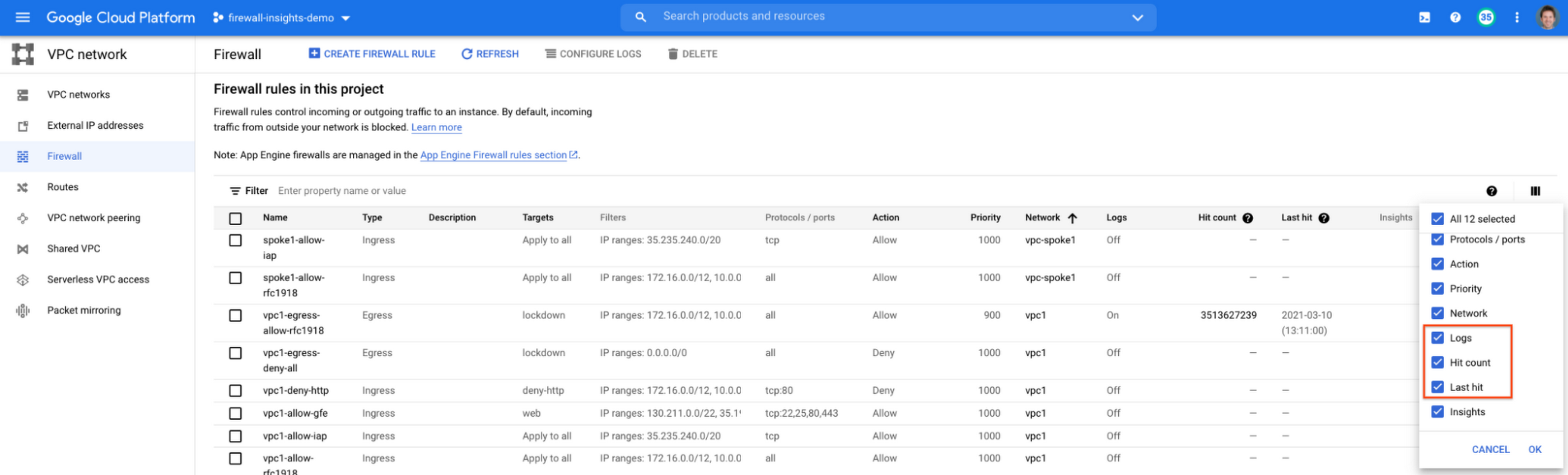
After this is enabled, now you should be able to see your VPC firewall rules with the hit count and last hit metrics. In the image below you can see that if logs are not enabled for rules, hit count and last hit metrics will not be collected. If logs are enabled, these details are collected, and shown in the VPC firewalls console.
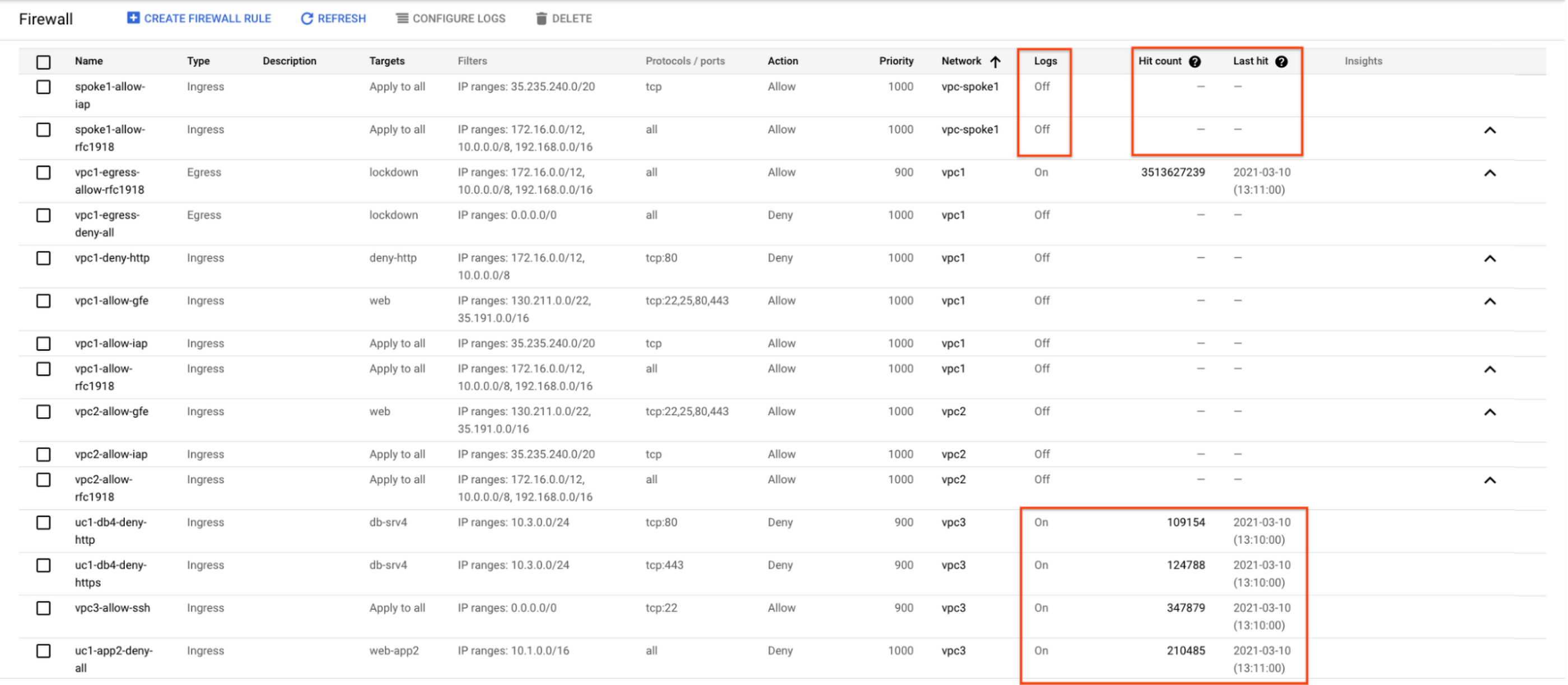
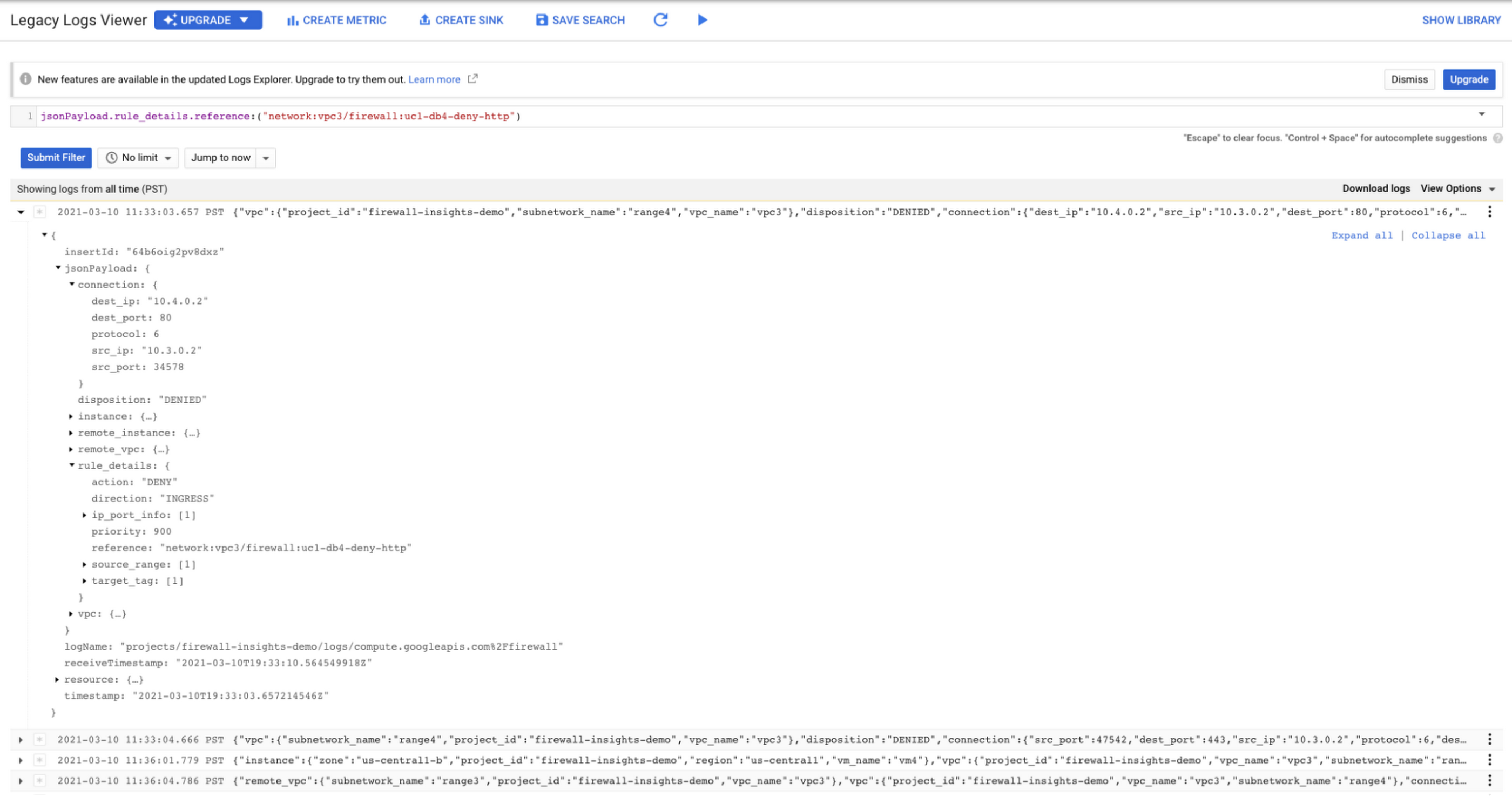
As you can see in Figure 1.2, each firewall rule which has logging enabled will show hit counts, so based on the example above, the rule “uc1-db4-deny-http” has been hit 109,154 times, the last time being 2021-03-10 (13:10:00). If you want to dive even deeper, you can click on the hit count and this will bring you to the logs viewer page where you can expand these logs and analyze all the details:
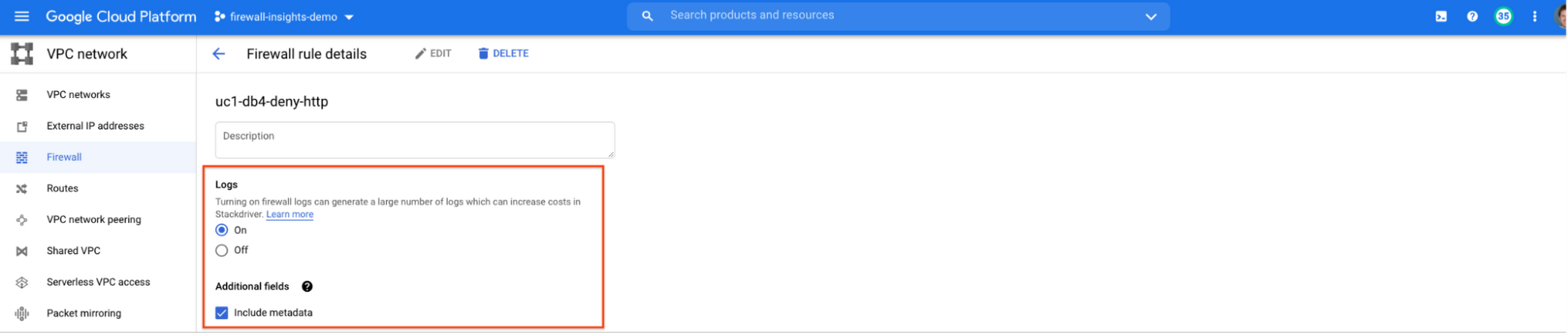
In order to enable logs for a particular firewall rule, you can edit it and turn logs on. By default, metadata is added in firewall logs. If you want to reduce the log size, you can do so by excluding these additional fields. Excluding these metadata fields will not impact the functionality of Firewall Insights.
From the “Firewall” page, you can also multi-select a group of firewall rules and turn on all logs at once.
Firewall rule usage metrics are accurate only for the period of time during which Firewall Rules Logging is enabled.
Insights Report, a deeper dive
Insights Report provides an intelligent analysis of the configuration of your firewalls. A report can contain one or more insights.
We will see examples now about the different insight reports which include:
- Shadowed firewall rules
- Allow rules with no hit in the last six weeks
- Deny rules with hits in the last 24 hours
By definition, a shadowed rule is a VPC firewall rule that is completely overshadowed by one or more firewall rules with higher or equal priority. We call that shadowing rules. Let’s see an example on how to find shadowed rules:Let’s say that you try to use ping between two VMs but it fails. Let’s take a look at the firewall rules applied to the VM:
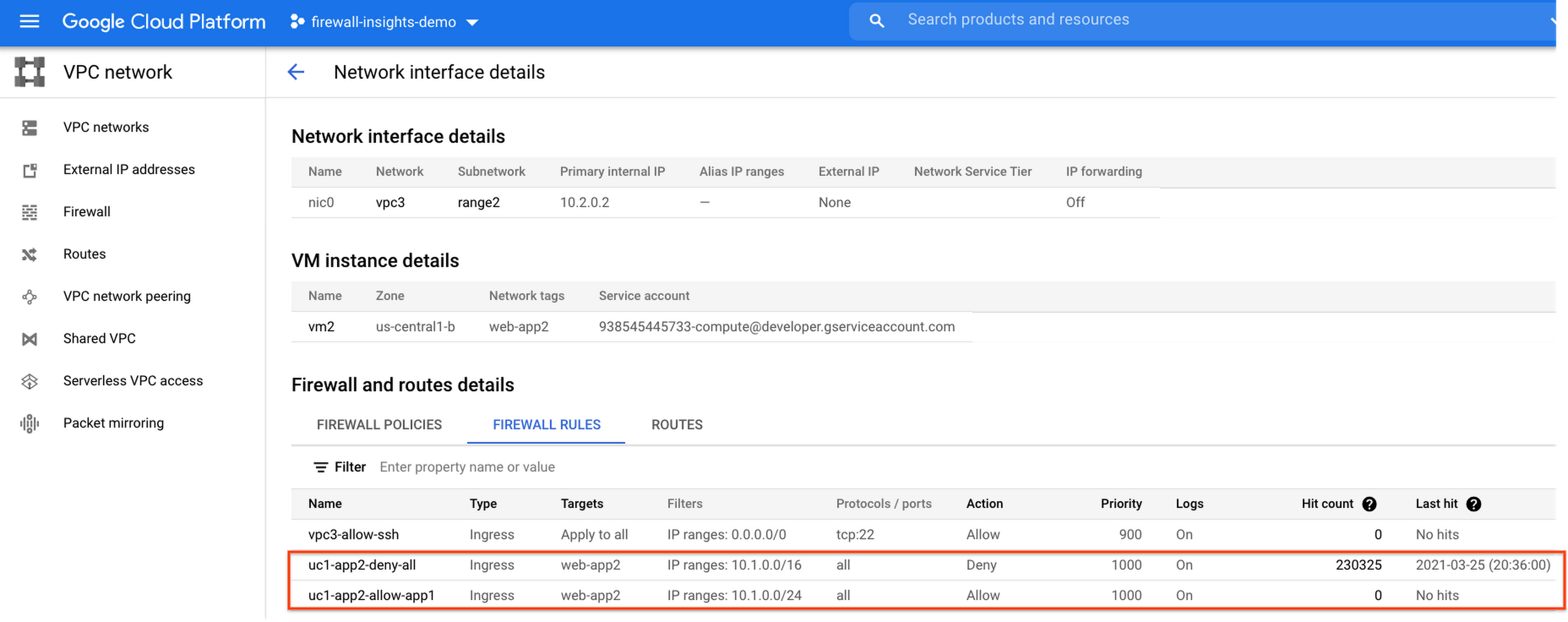
If we look closely, we can see that there are two rules with the same target tag, and those are almost identical except their source IP range. The IP range of the deny rule “uc1-app2-deny-all” includes the IP range of the rule allow “uc1-app2-allow-app1”. Therefore, we can see that “uc1-app2-allow-app1” is shadowed by “uc1-app2-deny-all”, and the ping between these VMs failed due to that.
To avoid such incidents in the future, Firewall Insights provides you with a convenient list of rules overshadowed by other firewall rules.
To see shadowed rules, you can click on the column selector, and add “Insights” to the firewall and route details:

Once this is applied, you will be able to see shadowed rules here:

Alternatively, you can navigate to Network Intelligence > Firewall Insights, where we will see the shadowed rule report:
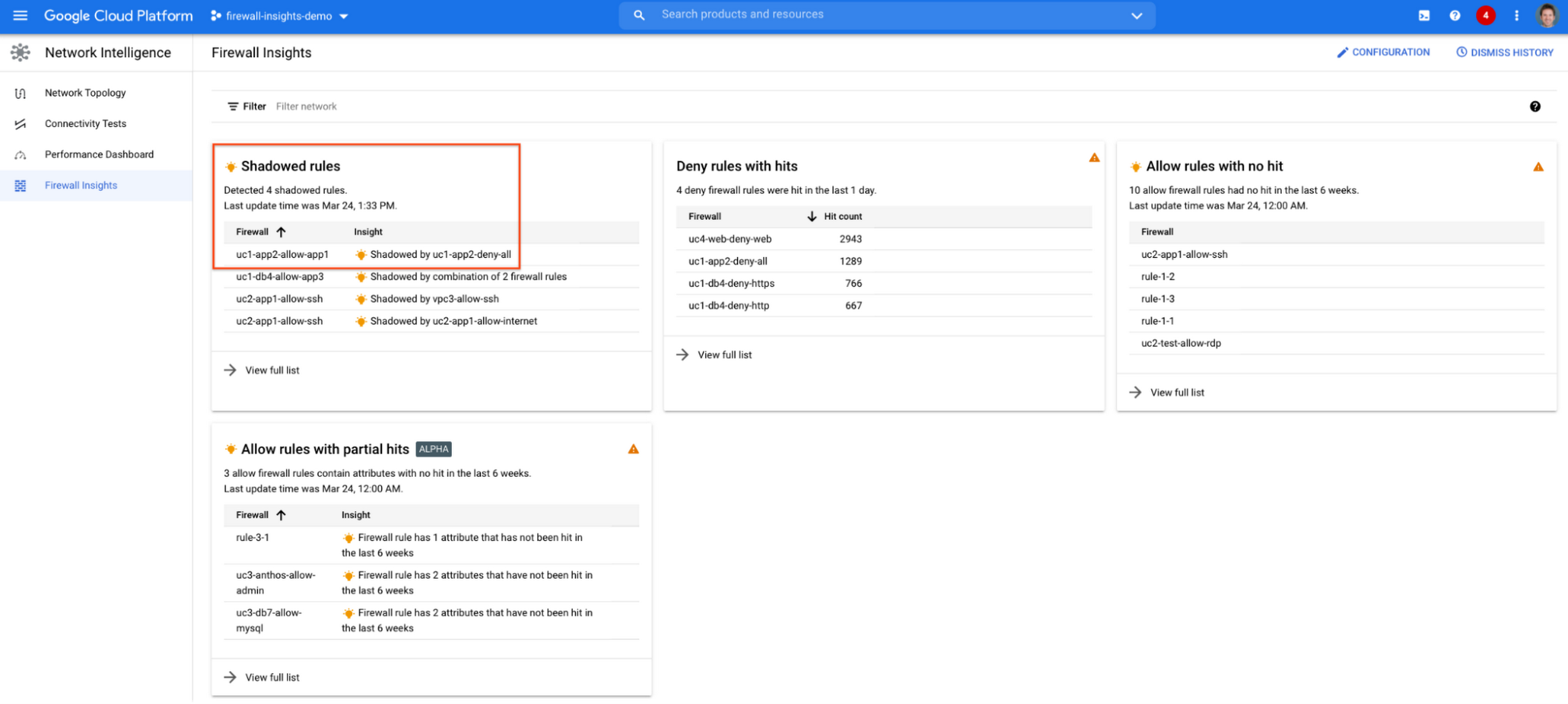
If we click on the insight we will get more details:

Going back to the firewall insights card (Figure 1.8), we can also identify that “uc1-db4-allow-app3” is shadowed by a combination of two rules and if we clicked on the insight this would provide all the details.
From the Firewall Insights dashboard, let’s move on to “allow rules with no hit”, where we can see firewall rules that have not logged any hits in the past six weeks. Such rules could be as a result of a misconfiguration, or leftover rules from past deployments. Tighten your security boundaries by identifying and removing such rules. If we go back to Network Intelligence > Firewall Insights, we can see allow rules with no hit:

We can drill down to view the full list of rules with no hit. We can see, for instance, one of the rules, the bottom one “uc2-app1-allow-internet”, might be a leftover rule to allow internet access from a past deployment, which means it has little likelihood of being hit in the future. So you may want to consider removing it from the rule set:

Click on the firewall rule to review all the details, and take a look at the prediction, which is made based on the hit pattern that we saw for similar rules in the same organization:

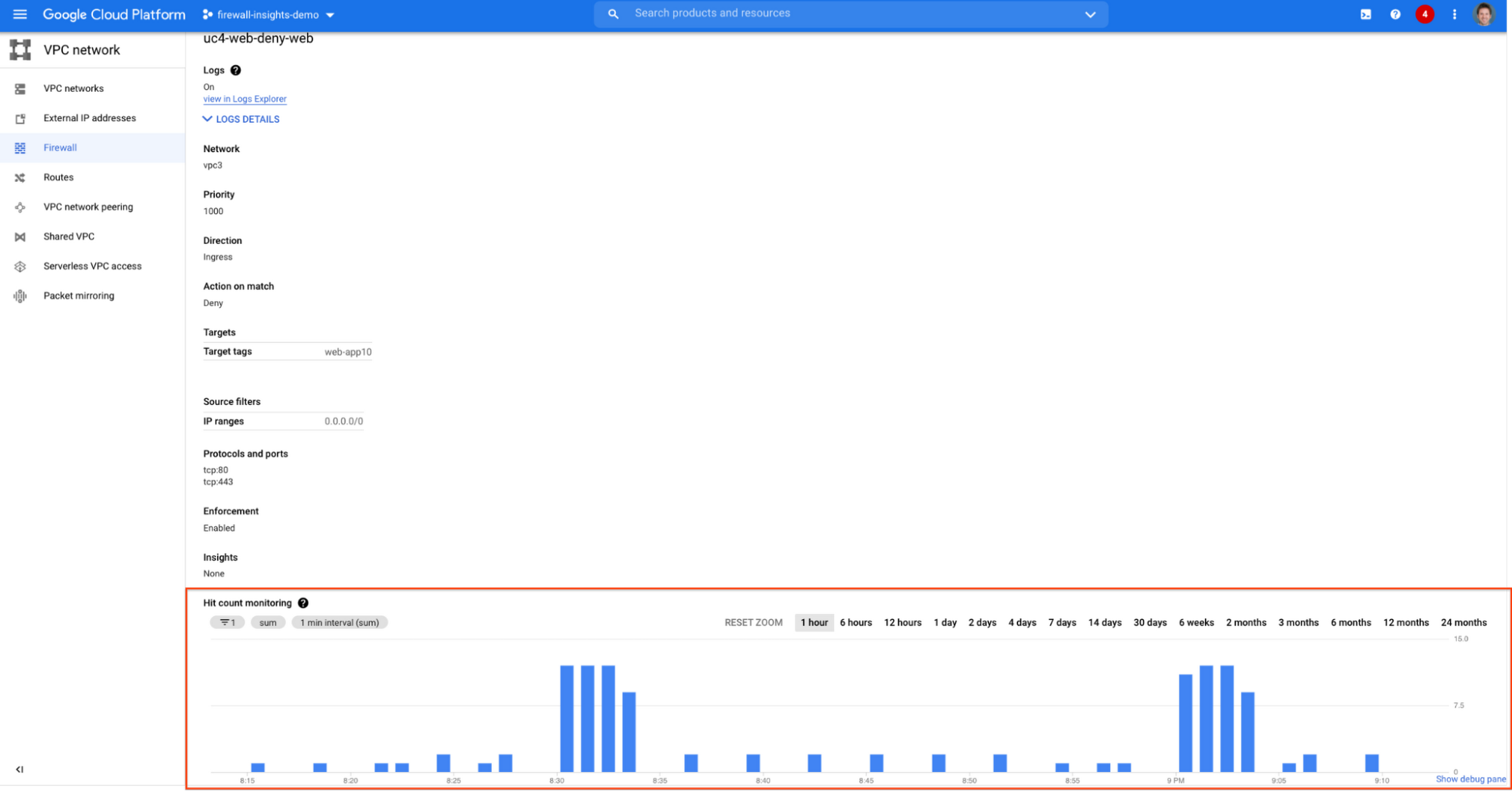
Let’s go back to the Firewall Insights dashboard and move on to the last category, “deny rules with hits in the last 24 hours”, which help you capture the traffic blocked by deny rules. These traffic types could indicate external attacks into your VPC network, or compromised VM instances attempting to send traffic out of your network. Let’s examine future hit prediction on a firewall rule. Navigate to Network Intelligence > Firewall Insights and take a look at the deny rules with hits card:

If your click on the “uc4-web-deny-web” rule, you can see the hit count monitoring, and if you click on the hit number we can dive deeper in the logs:

These tips should help you effectively leverage Firewall Insights to gain better control over a massive firewall rule set. Automate shadowed rule detection, quickly troubleshoot misconfigured rules, effortlessly pinpoint the overgranting rules hidden in the rule set, and identify the failed attempts to break into your network that were rejected by your firewall rules.
To learn more about Firewall Insights, please refer to our documentation. Additionally, to see how we’re advancing intelligent automation in network security, check our recent blog post.
If You Don’t Have These Features in Your Cloud, You’re Missing the Mark on Security

3299
Of your peers have already read this article.
6:00 Minutes
The most insightful time you'll spend today!
At Google Cloud, we work tirelessly to give our customers increased levels of control and visibility over their data. We’ve come out with new capabilities for data encryption, network security, security analytics, and user protection designed to deliver on that promise.
External Key Manager: Store and manage encryption keys outside of Google Cloud
We give enterprises a broad range of encryption options so you can appropriately balance risk, control, security, and operational complexity when protecting your cloud workloads.
Google Cloud encrypts customer data at-rest by default and offers customers multiple options to control and manage their encryption keys. Today, we’re pleased to announce the next level of control with our new External Key Manager. Coming soon to beta, External Key Manager works with Cloud KMS and lets you encrypt data in BigQuery and Compute Engine with encryption keys stored and managed in a third-party key management system deployed outside Google’s infrastructure. External Key Manager allows you to maintain separation between your data at-rest and your encryption keys while still leveraging the power of cloud for compute and analytics.
To make this new service easy to implement, we are working with five industry-leading key management vendors: Equinix, Fortanix, Ionic, Thales and Unbound.
Key Access Justifications: Decide when and why your data can be decrypted
We believe that trust in the cloud is created through transparency. Google Cloud led the industry in providing meaningful transparency into provider access to customer data, and now we’re extending that transparency to use of encryption keys. Key Access Justifications is a new feature that will work with External Key Manager. It provides a detailed justification each time one of your keys is requested to decrypt data, along with a mechanism for you to explicitly approve or deny providing the key using an automated policy that you set.
Using External Key Manager and Key Access Justifications together, you can deny Google the ability to decrypt your data for any reason. As a result, you are the ultimate arbiter of access to your data–a level of control not available from any other cloud provider. Key Access Justifications is coming soon to alpha for BigQuery, and Compute Engine/Persistent Disk and covers the transition from data-at-rest to data-in-use. Customers interested in becoming early adopters can sign up here.
These new encryption innovations complement other recently released encryption options:
- Customer-managed encryption keys for Cloud SQL, now generally available (GA)
- Customer managed encryption keys for GKE persistent disks, a beta feature for Google Kubernetes Engine (GKE)
- Application layer secrets encryption in GKE, a GA feature which enables envelope encryption for your Kubernetes secrets
- Key import for Cloud HSM, a GA feature which lets users generate and use their own keys with Google Cloud’s managed HSM service
- Cloud HSM availability in all Google Cloud regions and multi-regions (with the exception of global multi-region)
All these updates offer you more control over how your data is protected.
Defend against internet threats
When you stand up applications on Google Cloud, you benefit from DDoS and web attack protection at Google scale. Google Cloud Armor works with our global Cloud Load Balancing infrastructure and provides always-on attack detection and mitigation so you can run your business without interruption.
Today, we’re pleased to announce the beta of Cloud Armor’s new web application firewall (WAF) capabilities to help protect applications against targeted and distributed internet threats. You can now configure Cloud Armor policies with geo-based access controls, pre-configured WAF application protection rules to mitigate OWASP Top 10 risks, and a custom rules language to create custom Layer-7 filtering policies.
Cloud Armor also now integrates with Cloud Security Command Center (Cloud SCC), notifying customers of suspicious application traffic patterns directly in the Cloud SCC dashboard.
Collect and inspect network traffic at scale
As networks grow in complexity, monitoring traffic helps you manage performance and security. In public cloud environments however, capturing network traffic reliably at scale for monitoring has been a challenge.
Our new Packet Mirroring service, now in beta, allows you to collect and inspect network traffic for Compute Engine and GKE; it’s available for all machine types in all of our regions. With this service, you can use third-party tools to more proactively detect threats, better respond to intrusions with signature-based attack detection, and better identify zero-day attacks with anomaly detection. For more, watch this video.
We’ve built an ecosystem of partners so you can use Packet Mirroring with third-party tools of your choice, including products from Awake Security, Check Point, Cisco, Corelight, cPacket Networks, ExtraHop Networks, Flowmon, Ixia by Keysight, Netscout, and Palo Alto Networks.
Protect G Suite and Cloud Identity users
Google’s Advanced Protection Program is our strongest protection for users at risk of targeted attacks. In the enterprise, this includes IT administrators and executives. Today, the Advanced Protection Program is starting to roll out to G Suite and Cloud Identity customers. With the Advanced Protection Program for the enterprise, we’ll enforce a specific set of policies for enrolled users including security key enforcement, blocking access to untrusted apps and enhanced scanning for email threats. Learn more.
We’re also introducing app access control, helping you reduce the risk of data loss by limiting access to G Suite APIs to third-party apps you trust. You can also more easily manage and restrict which Google APIs are available for use by third-party and customer-owned apps, and see which apps are verified by Google. Learn more.
Benefit from unique Google threat intelligence in Cloud Security Command Center
We continue to build products that help our customers benefit from the techniques we’ve developed to defend Google. Whether you are using Cloud Security Command Center to improve your security posture on GCP, or Chronicle Backstory to monitor your data on premise or in other clouds, we’re packaging threat detection and prevention capabilities that are available only from Google, and giving them to you.
Event Threat Detection, now in beta, helps you detect threats targeting your cloud resources using logs, so you can send incidents to your SIEM (Security Information and Event Management system) for further investigation. Event Threat Detection relies on Google threat intelligence to help you spot and stop threats before they result in business damage or loss.
Security Health Analytics helps you prevent incidents by identifying potential misconfigurations and compliance violations in your GCP resources and suggesting appropriate corrective action.
As we continue to innovate and simplify security management on GCP, Event Threat Detection and Security Health Analytics will be bundled in a Premium Edition of Cloud Security Command Center with other new capabilities that help you meet industry compliance requirements, catch web application vulnerabilities, detect compromised VMs, and discover other threats. The Premium Edition will give you a comprehensive, easy-to-deploy set of tools to protect your cloud resources. To learn more about how to use Cloud Security Command Center, check out our recent video series.
Chronicle: security analytics wherever your apps are deployed
Chronicle’s Backstory product was designed by former Google security professionals to enable anyone to use the types of techniques we use to detect threats and investigate security incidents. It brings world-class strengths in data analytics to your security data, privately and easily.
Many organizations leverage a mix of on-prem environments and multiple clouds to run their applications, making it difficult to collect and store security telemetry from various systems and tie individual events together for analysis. Backstory, our flagship offering for hybrid security analytics, offers you this level of intelligence. With just a few clicks, in minutes, you can aggregate and analyze your security telemetry wherever your apps may run, and where they might run in the future.
Enhanced Risk Management: Google Cloud & CyberGRX’s Innovative Collaboration

1129
Of your peers have already read this article.
3:30 Minutes
The most insightful time you'll spend today!
Risk managers know there is one assessment type that’s foundational for every risk management program: the vendor risk assessment. Understanding the risk posture of your vendors and third parties, including your cloud providers, is an important part of an effective risk management program. While collecting and analyzing information can often be time-consuming for risk managers, Google Cloud collaborates with third-party risk management (TPRM) providers to make the process easier.
These TPRM organizations provide independent due diligence services and platforms to help automate vendor risk management based on their inspection of security, privacy, business continuity, and operational resiliency controls, aligned with industry standards and regulation compliance. The ultimate goal is to help our customers scale and accelerate their assessments of Google Cloud.
We enable trusted TPRM providers, like CyberGRX, to examine the CyberGRX controls (such as privacy, operational, and management) and operations. Based on their observations, CyberGRX provides a validated cyber risk assessment of Google Cloud’s security posture. Like assessments performed by individual customers, the CyberGRX assessment of Google Cloud details our adherence to industry standards and the security protocols built into our infrastructure.
Using a standardized approach like this, CyberGRX can quickly provide access to a security assessment of Google Cloud. CyberGRX’s validation process focuses on measuring the accuracy of a third party, such as Google Cloud’s assessment answers. CyberGRX analysts and partners evaluate evidence provided by Google Cloud to confirm we have implemented certain critical controls as indicated by their assessment. The assessment of Google Cloud is available to organizations via the CyberGRX website.
How Google Cloud stacks up
CyberGRX’s assessment covers more than 200 controls, and integrates Google Cloud’s responses with analytics, threat intelligence, and risk models. Additionally, CyberGRX’s Framework Mapper provides further functionality by mapping the cyber risk assessment of Google Cloud to more than 20 commonly used industry frameworks and standards. This enables our customers to view the cyber risk assessment of Google Cloud against customers’ specific, local compliance regime requirements including the MITRE ATT&CK framework.
CyberGRX’s Framework Mapper has broad standards and requirements coverage, including:
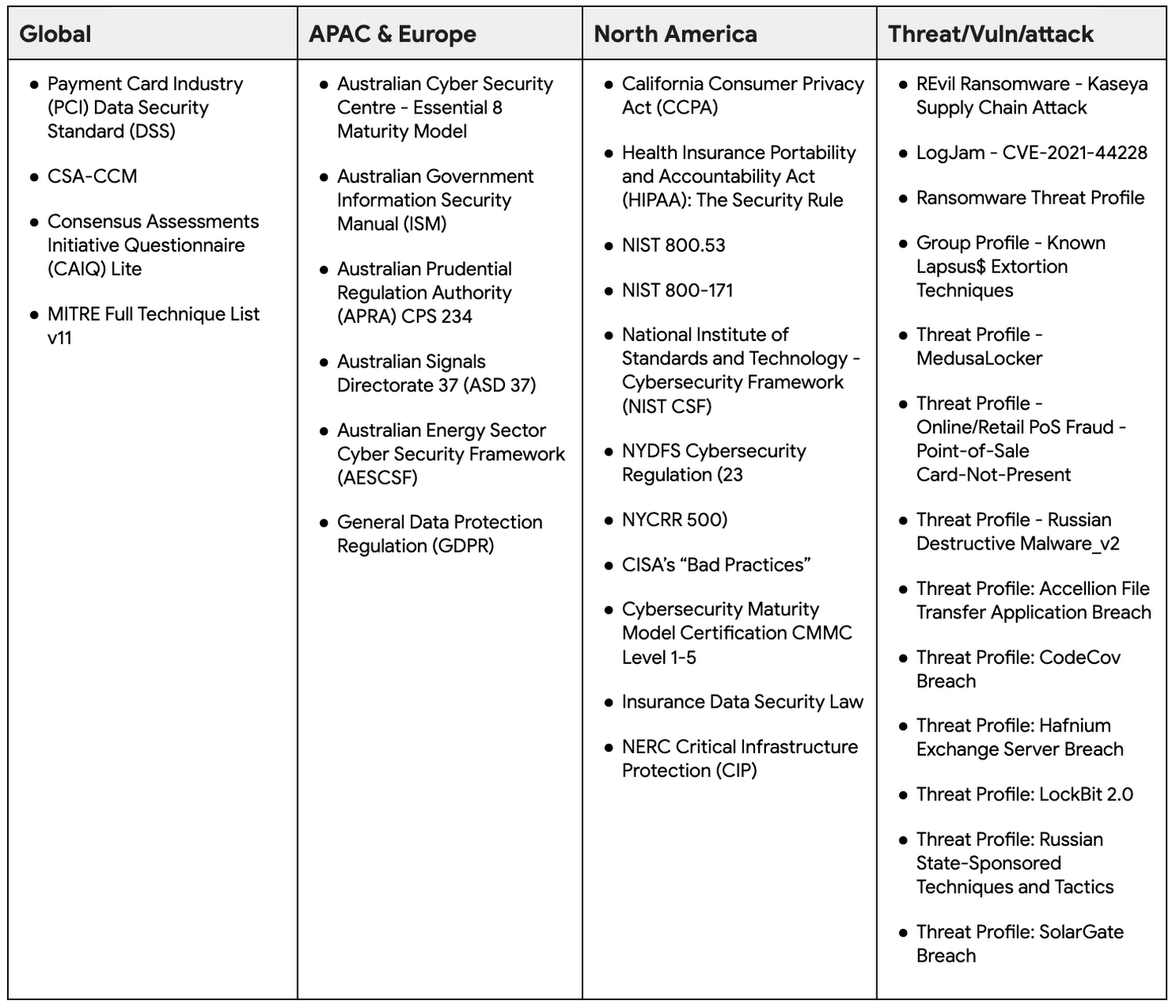
The CyberGRX mapping technology enables customers to see a mapping that is based on their specific needs, aggregated into a single assessment. This saves customers time and effort by eliminating the need for customers to create and repeatedly perform customized assessments of Google Cloud. Customers can now map the cyber risk assessment of Google Cloud to the frameworks they’re accustomed to using.
Integrating the MITRE ATT&CK™ framework
MITRE ATT&CK is a strongly-supported knowledge base that helps model security adversarial behavior, tactics, and techniques which currently includes 13 tactics and 192 techniques.
In June 2022, Google Cloud announced our support and investment in a research partnership with MITRE Engenuity Center for Threat-Informed Defense, which included facilitating the mapping of the MITRE ATT&CK framework to Google Cloud security capabilities.
CyberGRX also recognizes the value of the MITRE ATT&CK framework and maps their foundational assessment to the MITRE ATT&CK framework. This allows organizations to review their security controls and gain visibility into gaps in their defenses. Security leaders can rapidly and easily identify critical problems for remediation.
There are multiple benefits to using the MITRE ATT&CK framework when accessing Google Cloud’s risk assessment through CyberGRX, including:
- Uncovering previously unreported gaps by leveraging MITRE techniques to create kill chains or use cases.
- Integrating results into internal risk and threat management programs that already align with MITRE ATT&CK.
- Increasing credibility and defensibility to CyberGRX risk findings to support third-party decisions and relationships due to connection to MITRE-based analytics.
Take advantage of the Google Cloud and CyberGRX collaboration
CyberGRX’s independent security assessment of Google Cloud is available to Google Cloud customers, and is an easy way for organizations to scale and accelerate their cloud assessments. CyberGRX provides a comprehensive and objective view of Google Cloud’s security posture based on a number of local compliance regime requirements and the MITRE ATT&CK framework. CyberGRX’s centralized assessment supports our customers’ annual vendor risk management processes and reduces the review time.
What Users and System Designers Must Learn from Google’s Best Practices for Password Management

5274
Of your peers have already read this article.
3:00 Minutes
The most insightful time you'll spend today!
Updated for 2021: This post includes updated best practices including the latest from Google’s Best Practices for Password Management whitepapers for both users and system designers.
Account management, authentication and password management can be tricky. Often, account management is a dark corner that isn’t a top priority for developers or product managers. The resulting experience often falls short of what some of your users would expect for data security and user experience.
Fortunately, Google Cloud brings several tools to help you make good decisions around the creation, secure handling and authentication of user accounts (in this context, anyone who identifies themselves to your system—customers or internal users). Whether you’re responsible for a website hosted in Google Kubernetes Engine, an API on Apigee, an app using Firebase, or other service with authenticated users, this post lays out the best practices to follow to ensure you have a safe, scalable, usable account authentication system.
1. Hash those passwords
My most important rule for account management is to safely store sensitive user information, including their password. You must treat this data as sacred and handle it appropriately.
Do not store plaintext passwords under any circumstances. Your service should instead store a cryptographically strong hash of the password that cannot be reversed—created with Argon2id, or Scrypt. The hash should be salted with a value unique to that specific login credential. Do not use deprecated hashing technologies such as MD5, SHA1 and under no circumstances should you use reversible encryption or try to invent your own hashing algorithm. Use a pepper that is not stored in the database to further protect the data in case of a breach. Consider the advantages of iteratively re-hashing the password multiple times.
Design your system assuming it will be compromised eventually. Ask yourself “If my database were exfiltrated today, would my users’ safety and security be in peril on my service or other services they use?” As well as “What can we do to mitigate the potential for damage in the event of a leak?”
Another point: If you could possibly produce a user’s password in plaintext at any time outside of immediately after them providing it to you, there’s a problem with your implementation.
If your system requires detection of near-duplicate passwords, such as changing “Password” to “pAssword1”, save the hashes of common variants you wish to ban with all letters normalized and converted to lowercase. This can be done when a password is created or upon successful login for pre-existing accounts. When the user creates a new password, generate the same type of variants and compare the hashes to those from the previous passwords. Use the same level of hashing security as with the actual password.
2. Allow for third-party identity providers if possible
Third-party identity providers enable you to rely on a trusted external service to authenticate a user’s identity. Google, Facebook, and Twitter are commonly used providers.
You can implement external identity providers alongside your existing internal authentication system using a platform such as Identity Platform. There are a number of benefits that come with Identity Platform, including simpler administration, a smaller attack surface, and a multi-platform SDK. We’ll touch on more benefits throughout this list.
3. Separate the concept of user identity and user account
Your users are not an email address. They’re not a phone number. They’re not even a unique username. Any of these authentication factors should be mutable without changing the content or personally identifiable information (PII) in the account. Your users are the multi-dimensional culmination of their unique, personalized data and experience within your service, not the sum of their credentials. A well-designed user management system has low coupling and high cohesion between different parts of a user’s profile.
Keeping the concepts of user account and credentials separate will greatly simplify the process of implementing third-party identity providers, allowing users to change their username, and linking multiple identities to a single user account. In practical terms, it may be helpful to have an abstract internal global identifier for every user and associate their profile and one or more sets of authentication datavia that ID as opposed to piling it all in a single record.
4. Allow multiple identities to link to a single user account
A user who authenticates to your service using their username and password one week might choose Google Sign-In the next without understanding that this could create a duplicate account. Similarly, a user may have very good reason to link multiple email addresses to your service. If you’ve properly separated user identity and authentication, it will be a simple process to link several authentication methods to a single user.
Your backend will need to account for the possibility that a user gets part or all the way through the signup process before they realize they’re using a new third-party identity not linked to their existing account in your system. This is most simply achieved by asking the user to provide a common identifying detail, such as email address, phone, or username. If that data matches an existing user in your system, require them to also authenticate with a known identity provider and link the new ID to their existing account.
5. Don’t block long or complex passwords
NIST publishes guidelines on password complexity and strength. Since you are (or will be very soon) using a strong cryptographic hash for password storage, a lot of problems are solved for you. Hashes will always produce a fixed-length output no matter the input length, so your users should be able to use passwords as long as they like. If you must cap password length, do so based on the limits of your infrastructure; often this is a matter of memory usage (memory used per login operation * potential concurrent logins per machine), or more likely—the maximum POST size allowable by your servers. We’re talking numbers from hundreds of KB to over 1MB. Seriously. Your application should already be hardened to prevent abuse from large inputs. This doesn’t create new opportunities for abuse if you employ controls to prevent credential stuffing and hash the input as soon as possible to free up memory.
Your hashed passwords will likely already consist of a small set of ASCII characters. If not, you can easily convert a binary hash to Base64. With that in mind, you should allow your users to use literally any characters they wish in their password. If someone wants a password made of Klingon, Emoji, and ASCII art with whitespace on both ends, you should have no technical reason to deny them. Just make sure to perform Unicode normalization to ensure cross-platform compatibility. See our system designers whitepaper (PDF) for more information on Unicode and supported characters in passwords.
Any user attempting to use an extreme password is probably following password best practices (PDF) including using a password manager, which allows the entry of complex passwords even on limited mobile device keyboards. If a user can input the string in the first place (i.e., the HTML specification for password input disallows line feed and carriage return), the password should be acceptable.
6. Don’t impose unreasonable rules for usernames
It’s not unreasonable for a site or service to require usernames longer than two or three characters, block hidden characters, and prevent whitespace at the beginning and end of a username. However, some sites go overboard with requirements such as a minimum length of eight characters or by blocking any characters outside of 7-bit ASCII letters and numbers.
A site with tight restrictions on usernames may offer some shortcuts to developers, but it does so at the expense of users and extreme cases will deter some users.
There are some cases where the best approach is to assign usernames. If that’s the case for your service, ensure the assigned username is user-friendly insofar as they need to recall and communicate it. Alphanumeric generated IDs should avoid visually ambiguous symbols such as “Il1O0.” You’re also advised to perform a dictionary scan on any randomly generated string to ensure there are no unintended messages embedded in the username. These same guidelines apply to auto-generated passwords.
7. Validate the user’s identity
If you ask a user for contact information, you should validate that contact as soon as possible. Send a validation code or link to the email address or phone number. Otherwise, users may make a typo in their contact info and then spend considerable time using your service only to find there is no account matching their info the next time they attempt login. These accounts are often orphaned and unrecoverable without manual intervention. Worse still, the contact info may belong to someone else, handing full control of the account to a third party.
8. Allow users to change their username
It’s surprisingly common in legacy systems or any platform that provides email accounts not to allow users to change their username. There are very good reasons not to automatically release usernames for reuse, but long-term users of your system will eventually come up with significant reasons to use a different username and they likely won’t want to create a new account.
You can honor your users’ desire to change their usernames by allowing aliases and letting your users choose the primary alias. You can apply any business rules you need on top of this functionality. Some orgs might limit the number of username changes per year or prevent a user from displaying or being contacted via anything but their primary username. Email address providers are advised to never re-issue email addresses, but they could alias an old email address to a new one. A progressive email address provider might even allow users to bring their own domain name and have any address they wish.
If you are working with a legacy architecture, this best practice can be very difficult to meet. Even companies like Google have technical hurdles that make this more difficult than it would seem. When designing new systems, make every effort to separate the concept of user identity and user account and allow multiple identities to link to a single user account and this will be a much smaller problem. Whether you are working on existing or greenfield code, choose the right rules for your organization with an emphasis on allowing your users to grow and change over time.
9. Let your users delete their accounts
A surprising number of services have no self-service means for a user to delete their account and associated PII. Depending on the nature of your service, this may or may not include public content they created such as posts and uploads. There are a number of good reasons for a user to close an account permanently and delete all their PII . These concerns need to be balanced against your user experience, security, and compliance needs. Many if not most systems operate under some sort of regulatory control (such as PCI or GDPR), which provides specific guidelines on data retention for at least some user data. A common solution to avoid compliance concerns and limit data breach potential is to let users schedule their account for automatic future deletion.
In some circumstances, you may be legally required to comply with a user’s request to delete their PII in a timely manner. You also greatly increase your exposure in the event of a data breach where the data from “closed” accounts is leaked.
10. Make a conscious decision on session length
An often overlooked aspect of security and authentication is session length. Google puts a lot of effort into ensuring users are who they say they are and will double-check based on certain events or behaviors. Users can take steps to increase their security even further.
Your service may have good reason to keep a session open indefinitely for non-critical analytics purposes, but there should be thresholds after which you ask for password, 2nd factor, or other user verification.
Consider how long a user should be able to be inactive before re-authenticating. Verify user identity in all active sessions if someone performs a password reset. Prompt for authentication or 2nd factor if a user changes core aspects of their profile or when they’re performing a sensitive action. Re-authenticate if the user’s location changes significantly in a short period of time. Consider whether it makes sense to disallow logging in from more than one device or location at a time.
When your service does expire a user session or requires re-authentication, prompt the user in real time or provide a mechanism to preserve any activity they have not saved since they were last authenticated. It’s very frustrating for a user to take a long time to fill out a form, only to find all their input has been lost and they must log in again.
11. Use 2-Step Verification
Consider the practical impact on a user of having their account stolen when choosing 2-Step Verification (also known as two-factor authentication, MFA, or 2FA) methods. Time-based one-time passwords (TOTP), email verification codes, or “magic links” are consumer-friendly and relatively secure. SMS 2FA auth has been deprecated by NIST due to multiple weaknesses, but it may be the most secure option your users will accept for what they consider a trivial service.
Offer the most secure 2FA auth you reasonably can. Hardware 2FA such as the Titan Security Key are ideal if feasible for your application. Even if a TOTP library is unavailable for your application, email verification or 2FA provided by third-party identity providers is a simple means to boost your security without great expense or effort. Just remember that your user accounts are only as secure as the weakest 2FA or account recovery method.
12. Make user IDs case-insensitive
Your users don’t care and may not even remember the exact case of their username. Usernames should be fully case-insensitive. It’s trivial to store usernames and email addresses in all lowercase and transform any input to lowercase before comparing. Make sure to specify a locale or employ Unicode normalization on any transformations.
Smartphones represent an ever-increasing percentage of user devices. Most of them offer autocorrect and automatic capitalization of plain-text fields. Preventing this behavior at the UI level might not be desirable or completely effective, and your service should be robust enough to handle an email address or username that was unintentionally auto-capitalized.
13. Build a secure auth system
If you’re using a service like Identity Platform, a lot of security concerns are handled for you automatically. However, your service will always need to be engineered properly to prevent abuse. Core considerations include implementing a password reset instead of password retrieval, detailed account activity logging, rate-limiting login attempts to prevent credential stuffing, locking out accounts after too many unsuccessful login attempts, and requiring two-factor authentication for unrecognized devices or accounts that have been idle for extended periods. There are many more aspects to a secure authentication system, so please see the further reading section below for links to more information.
Further reading
There are a number of excellent resources available to guide you through the process of developing, updating, or migrating your account and authentication management system. I recommend the following as a starting place:
- Our Modern Password Security for System Designers whitepaper (PDF)
- The related Modern password security for users whitepaper (PDF)
- NIST 800-063B covers Authentication and Lifecycle Management
- OWASP continually updates their Password Storage Cheat Sheet
- OWASP goes into even more detail with the Authentication Cheat Sheet
- Google Cloud Identity Platform is a multi-protocol customer identity and access management solution, with robust authentication features
- Google’s Firebase Authentication site has a rich library of guides, reference materials and sample code
Announcing New, Faster Search and Investigative Experience in Chronicle Security Operations

2930
Of your peers have already read this article.
1:30 Minutes
The most insightful time you'll spend today!
In cybersecurity, speed matters. Whether a security analyst is trying to understand the details of an alert that was triggered by an indicator of compromise (IoC), or find additional context for a suspicious asset, speed is often the critical factor that will help thwart a cyberattack before threat actors are able to inflict damage.
With speed in mind, we are pleased to announce the general availability of our new investigative experience in Chronicle Security Operations. We are continuing to deliver on our mission to bring the power of Google to security operations and are raising the bar for search and the investigative experience in the SOC.
With this release, SecOps teams will be able to harness Chronicle’s lightning-fast search across any form of structured data. Additionally, the new investigation experience can provide greater flexibility to pivot and drill-down when conducting complex, open-ended threat investigations and surface insights quickly and easily.
Our Unified Data Model (UDM) schema, with its built-in flexibility that can effectively handle a wide variety of security related events, is at the heart of Chronicle’s powerful search. We have scaled this capability by optimizing query responses across structured data. Additionally, analysts can investigate large datasets and build complex queries with a new and intuitive user experience. With user personalization enhancements, analysts can quickly access saved searches and top queries in their environment to improve routine SOC workflows.
With the new investigative experience, security teams can:
- Drive faster threat understanding with an interactive event results timeline that helps eliminate unnecessary long wait times by streaming results as they are processed to quickly begin threat analysis
- Use enhanced context and operationalize relevant data for threat analysis with one-click filter-to-query conversion
- Personalize the analyst experience with saved search and search history functions for quicker analyst knowledge recall
- Power threat investigation and hunting with a new, improved, highly performant UDM search
Let’s look at an example of how to use the reimagined investigative experience and our new broader, faster search.
In our use-case, a security analyst is investigating a curated detection alert for potentially suspicious behavior on a Windows environment. Additionally, there is a low prevalence domain from host “win-dc-01” with ip “10.166.0.3”. To investigate further, let’s open the UDM Search page and construct a query containing the host and IP information along with destination information of the domain the host was contacting (edge.microsoft.com). Over 70,000 events stream into the investigation interface providing the analyst an immediate picture of data surrounding their alert.
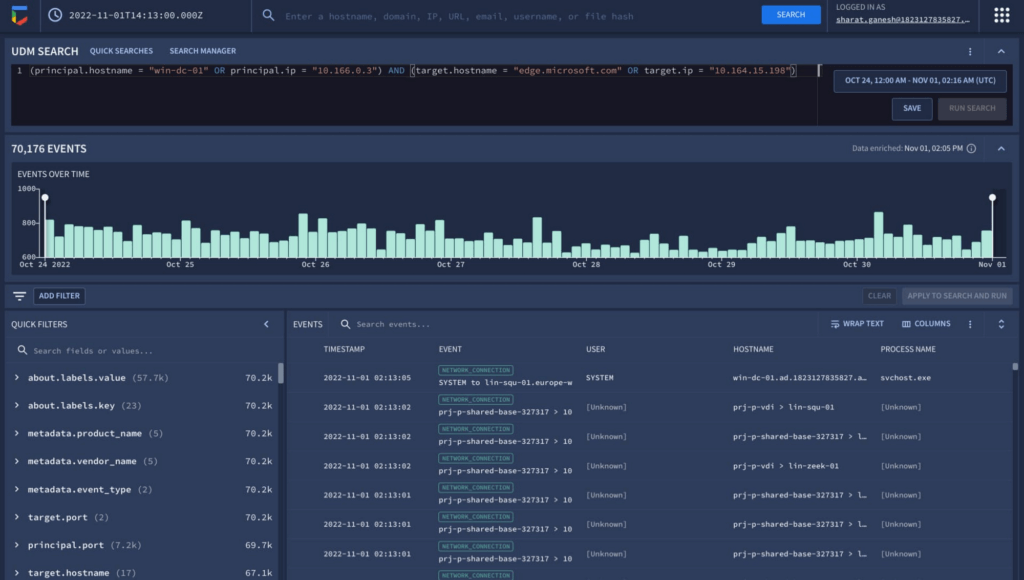
The new interactive events timeline can provide a clear picture of event trends over time with key statistical data which can be easily filtered. Additionally, with the new quick filters, the analyst is able to easily filter out hosts that are known-good to get pertinent information about the domain.
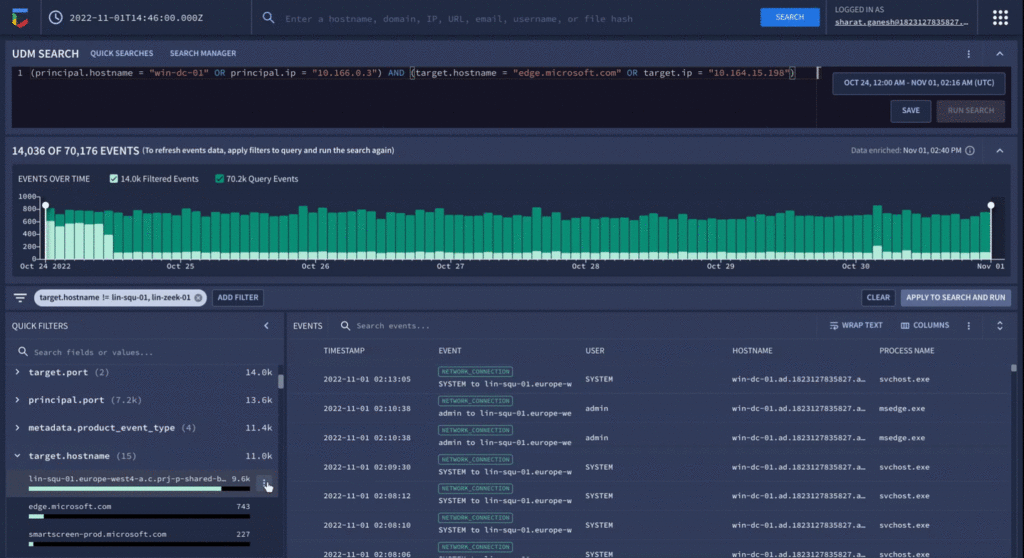
Analyzing value aggregations present in the filter panel, automatically generated by Chronicle, enables analysts to domain values of highest interest, and quickly determine that approximately 800 events were present in the last week that related to edge.microsoft.com URL. Since Microsoft Edge is disallowed in the organization, there should not be any outbound traffic to this type of destination.
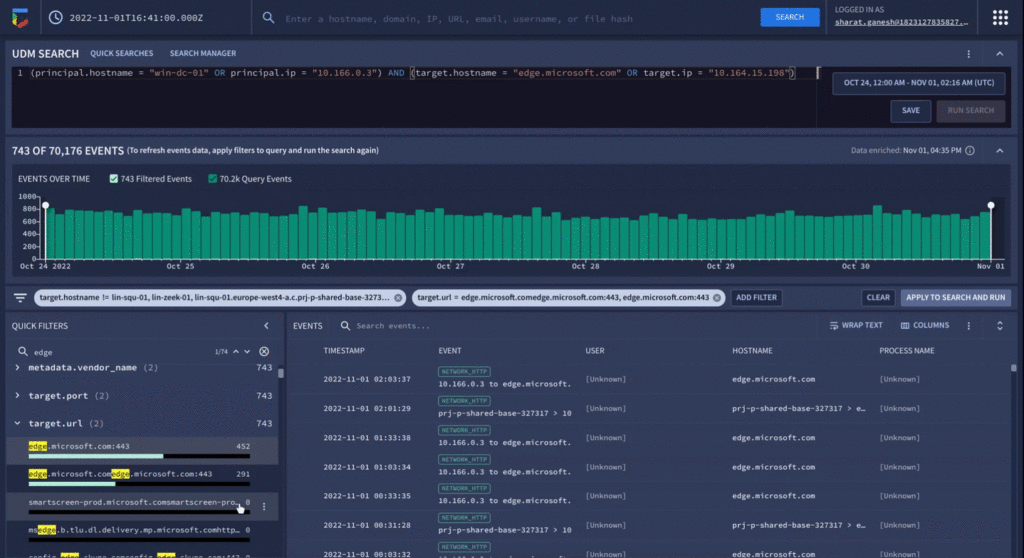
As a final step before orchestrating a response in Chronicle SOAR’s case management, the analyst can save their search to quickly recall the steps they took in the future for related investigations.
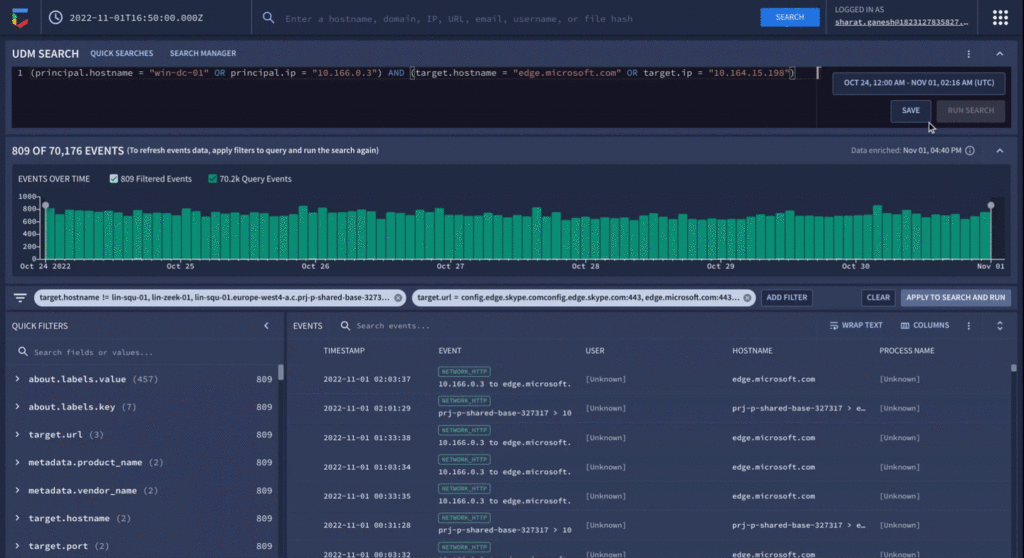
We have already seen our customers use these new capabilities in preview to build new use cases, accelerate existing threat hunting workflows, and drive faster threat response. We will continue our mission to bring Google speed, scale, and intelligence to the investigative experience, expediting “time to aha” for security analysts, and driving better, faster responses.
Ready to put Chronicle to work in your Security Operations Center? Contact Google Cloud sales or your customer success CSM team. You can also learn more about all these new capabilities in Google Chronicle in our product documentation.
Google Products Helps HMH’s Healthcare Staff Work from Anywhere Efficiently and Securely!

10213
Of your peers have already read this article.
3:00 Minutes
The most insightful time you'll spend today!
Hackensack Meridian Health (HMH) executive Mark Eimer explains how an ambitiously-timed rollout of a comprehensive suite of Google products helped the entire organization—from doctors to IT staff—achieve better security, cultivate a more equitable work environment, and ultimately, improve patient outcomes.
How does a recently merged, 17-hospital healthcare system fast-track a platform migration and hardware rollout securely and in a way that improves work for everyone, regardless of location or role? These are the questions that kept me up at night in early 2020, when the pandemic demanded a “big bang”—something our legacy laptops and operating systems couldn’t handle.
We began our work with Google in 2020 with the adoption of Chrome as our default browser. As we migrated platforms, keeping patient data safe was of the utmost importance to us, along with providing every staff member with the tools they needed to work virtually. Our staff often experienced issues accessing our web-based applications using Internet Explorer or Edge Browser, a problem that went away when we switched to Chrome. Chrome’s versatile compatibility also made it easier for my team to migrate all of our web-based operations, and Chrome’s security and manageability were key components to making this switch a huge win for the organization.
The success of this migration led us to extend our Google partnership to patient care applications—where Google’s expertise in AI and ML helps scale the use of diagnostics tools and improve other aspects of the patient journey.

Achieving security at every step
Like so many other healthcare organizations, we’ve been concerned about ransomware attacks. This is part of why we moved to Google Workspace and distributed over 3,000 Chrome OS devices in kiosk mode in March of 2020, when many of us went remote due to the pandemic. We were very concerned about team members accessing corporate applications through home devices that were running EOL operating systems (WIN7), as well as a general lack of antivirus and encryption measures.
We were protected by the fact that Google’s software and hardware both had built-in security features that we needed to stave off sophisticated attackers. For example, Chrome OS automatically updates to the latest security update and encrypts data living outside the cloud on the hardware. These features protected us from security-related disruptions, letting us securely move a huge library of file shares and emails across thousands of accounts to Google Chrome OS in just four months.
A year later, in March 2021, we migrated the enterprise over to Google Workspace and saw an immediate reduction in spam by 30% from the inherent built-in AI/ML. This meant staff were less likely to receive (and click through) phishing attempts. My team could connect, create, and collaborate easily and securely—even as more of us were working from home and needed to access sensitive data remotely.
Leveling the playing field
As an organization, we were surprised by how many team members didn’t have personal computers at home. We quickly decided that if we needed team members to work from home, the health network would have to supply hardware. Chromebooks’ lower price tag compared to PCs—on top of their built-in security controls—allowed us to purchase, deploy, and support that initial distribution of 3,000 Chromebooks to team members in less than three weeks, providing devices to every eligible remote employee instead of just a select few. This was vital to reaching our equitable technology goal as part of our diversity and inclusion initiative: everybody has the same tools to do good work.
When all employees have what they need to do their jobs well, we get better patient outcomes. Before we began this cloud adoption journey, patient and staff experiences were different within the hospitals and outside of them.
Now it’s the same wherever our staff is, and we’ve seen efficiency and accessibility benefits extend to the patient side. For example, we built a web-based contact center that supports 80 locations that use Workspace and Chrome OS devices. Since customer service, admin, and providers are all on the same system, it has become a one-stop shop for patients.
Furthermore, through the Grow with Google program, we were able to provide another benefit to employees that drove our equity goals. Google trained 50 non-IT staff members—from environmental services, food and nutrition, and other non-tech areas who were interested in making a career change to IT—on the Google products we were using. They may not have thought about switching to a career in IT before the Grow with Google program came to our organization, but through this partnership, they now have that opportunity.
A strategic, long-term partner
With any large-scale rollout, the work doesn’t end once laptops are in employee hands. Google has shown their commitment to long-term collaboration as they continuously optimize their products for the unique needs of healthcare providers and go the extra mile in tailoring tools to our staff’s workflows.
For example, on the Chrome OS side, the Google team has helped our registration desks and document centers with device integration for hardware like credit card readers and e-signature pads. They’ve also helped us meet security and privacy requirements mandated by state and federal governments around HIPAA, Medicaid, and Medicare reimbursements. Over this next year, we’ll look at a feature roadmap with Google Cloud to deliver further enhancements, iterating on the product itself to meet our needs for the present and the future.

Delivering the future of healthcare
The benefits we’ve seen around security and usability—and the ability to provide all staff with equal access to Google’s technology—are why we’re expanding our partnership with Google to both the administrative and clinical sides of HMH. In addition to further Google rollouts with corporate, next year we’re distributing Chromebooks to all 350 of our ambulatory clinics.
We’re also working with the Google professional services team to create a custom AI model that analyzes 3D mammogram images. This AI model will enable two providers to read mammograms—which adheres to international best practices but is currently rare in the US—without requiring additional time. Conducting double readings of mammograms will yield better health outcomes for our patients, such as a lower patient recall rate and an increased accuracy in detecting breast cancer.
We’re currently building the model using a variety of Google Cloud products, including Cloud Healthcare API. Once complete, this model is expected to be trained, deployed, and maintained in Google’s Vertex AI, allowing our providers to be more productive as they make clinical decisions with AI support. As the model is proven over time, we plan to make the predictive services accessible to other healthcare organizations.
With Google, we’re able to achieve a unified architecture for storing data as well as training and deploying AI models, which enable our staff to work more efficiently and securely from anywhere. While I may not be able to predict the future as accurately as AI can, I foresee our continued partnership with Google as a key part of HMH’s improved provider and patient outcomes.
More Relevant Stories for Your Company

4 Cloud Security Trends to Watch Out for in 2022
When it comes to cloud security, 2022 will be the year that the past catches up with the future. Trends that businesses have been ignoring for too long will force organizations large and small to confront and control their security debt. That’s according to Google Cloud’s own cybersecurity experts, who

Announcement: Merger of Google’s Data Processing Terms into CDPA
At Google, we are constantly looking to improve our products, services, and contracts so that we can better serve our customers. To this end, we are pleased to announce that we have updated and merged our data processing terms for Google Cloud, Google Workspace (including Workspace for Education), and Cloud

Three Reasons Why Enterprises Must Think Next-gen Serverless
As we reflect on the past year, Heraclitus' phrase “The only constant in life is change” has never rang more true. With the pandemic, companies had to shift operations, launch new products and adapt to extreme demand patterns, sometimes within a matter of weeks. To respond to customer needs faster

Best Kept Security Secrets: How Assured Workloads Accelerates Security
Digital transformation is now a strategic imperative for organizations across every industry. For governments and regulated businesses, moving services to the cloud poses a unique set of challenges. As a vital enabler of transformation, the cloud can unlock innovation and help keep pace with the accelerating pace of digital business.
